
Home › Research › Windows Easy Transfer: History, Versions, Replacements (2026)
Research data
Windows Easy Transfer: History, Versions and What Replaced It
Windows Easy Transfer, XP to Windows 11: five versions, none moved programs; then 9.8 years with no local tool, and a PC-to-PC tool that lasted 487 days.
Key Windows Easy Transfer facts
- Five Windows versions, from XP to 8.1, had a built-in tool for moving to a new PC; none moved installed programs (2013).
- Windows went 9.8 years without a built-in way to move files directly between PCs; the tool that ended the gap in 2025 lasted 487 days.
- A new Mac could take the old one's applications over a plain FireWire cable in 2005, two years before Windows Easy Transfer shipped.
- Moving 1 GB over the Easy Transfer Cable took 3.9 minutes as one file and 11.4 as small files (2007).
- An Easy Transfer Cable for Windows Vista cost $39.99 in 2007; its maker still charged $39.99 for one in 2013.
- PCmover Express costs $34.95 in 2026 and still moves no programs; Microsoft's site gave it away free for 366 days in 2015 and 2016.
- Free OneDrive storage fell to 5 GB in July 2016 and is still 5 GB in 2026, a fifth of the 2008 peak.
- The '500 MB' limit an encyclopedia gives Microsoft's free PCmover offer of 2015-16 belongs to a Laplink product of 2020 (2025).
Sources: Microsoft (2025, 2016); Apple; The Register; Belkin International; Laplink Software; BetaNews; Wikipedia, article 'Windows Easy Transfer'
Windows Easy Transfer is gone, but the question it answered has not: how do you move everything from an old Windows PC to a new one? This page sets out what Microsoft offered, version by version, in Microsoft's own words and dates: what each tool moved and what it left behind, what the cables and the partner offers cost, how long a transfer took, how Microsoft explained, or did not explain, each change, and how OneDrive and Windows Backup took Easy Transfer's place. Where Microsoft deleted a page, the archived copy is cited; where a popular claim is wrong, the record that settles it is here.
What is Windows Easy Transfer?
Five Windows versions, from XP to 8.1, had a built-in tool for moving to a new PC; none moved installed programs (derived from Microsoft, 2013).

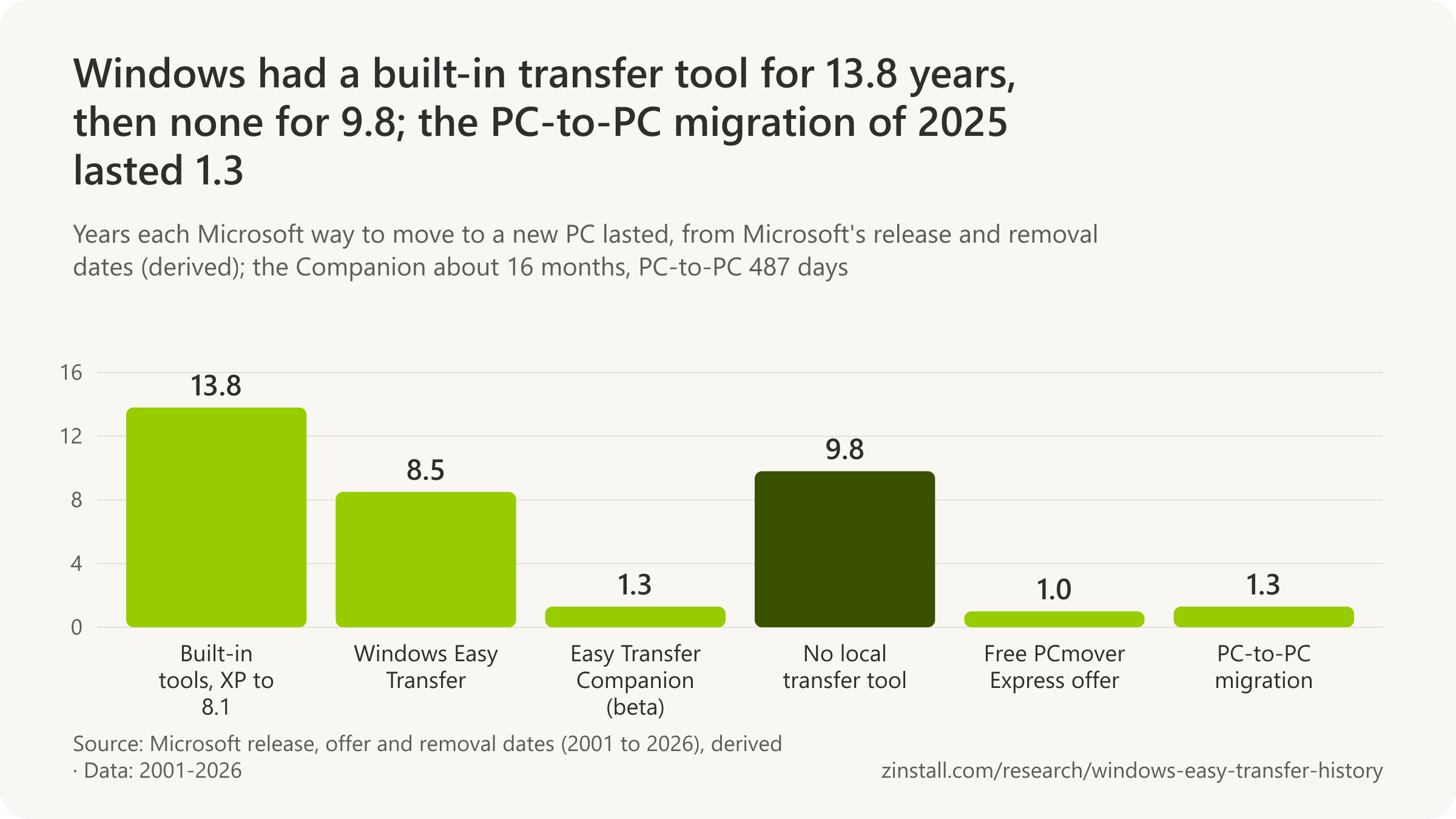
- Windows went 9.8 years without a built-in way to move files directly between PCs; the tool that ended the gap in 2025 lasted 487 days.
- Windows Easy Transfer was part of Windows for about 8.5 years, from Vista's launch in January 2007 to Windows 10 in July 2015.
- Counting XP's Files and Settings Transfer Wizard, Windows had a built-in transfer tool for 13.8 years, from October 2001 to July 2015.
- More than 20 million people ran the Windows 7 Upgrade Advisor in six months, the nearest thing to an Easy Transfer usage figure.
| Tool or event | Date |
|---|---|
| Windows XP, with the Files and Settings Transfer Wizard | 25 October 2001 |
| Windows Vista, with Windows Easy Transfer | 30 January 2007 |
| Easy Transfer Companion beta, which moved programs | 13 February 2007 |
| Companion withdrawn, without a notice | mid-June 2008 |
| Windows 7, with a redesigned Easy Transfer | 22 October 2009 |
| Windows 8, which kept it | 26 October 2012 |
| Windows 10, with no transfer tool | 29 July 2015 |
| Windows Backup's first public release (on Windows 10) | 22 August 2023 |
| PC-to-PC migration announced | 23 May 2025 |
| PC-to-PC migration removed | 22 September 2026 |
Sources: Microsoft (2001-2026); ZDNet
Related guides: Windows Easy Transfer on Windows 11 · Everything to a new Windows 11 PC
More statistics (5)
Windows Easy Transfer was Microsoft's built-in tool for moving a person's files, settings, e-mail and user accounts from an old Windows PC to a new one. It shipped in Windows Vista, Windows 7 and Windows 8, in a cut-down, import-only form in Windows 8.1, and grew out of Windows XP's Files and Settings Transfer Wizard. Windows 10 shipped without it, and none of Microsoft's built-in tools ever moved installed programs.
Five versions, and how long each tool lasted
- Windows had a built-in tool for moving to a new PC for about 13.8 years, from Windows XP's Files and Settings Transfer Wizard on 25 October 2001 to Windows 10's release without Easy Transfer on 29 July 2015 (derived from Microsoft's dates, 2001 and 2015).
- Five Windows versions shipped a built-in PC-to-PC transfer tool: Windows XP (Files and Settings Transfer Wizard), Vista, 7 and 8 (Windows Easy Transfer) and 8.1 (Easy Transfer, import only); none of them moved installed programs (derived from Microsoft, 2001 to 2013).
- Windows Easy Transfer was part of Windows for about 8.5 years, from Windows Vista's consumer launch on 30 January 2007 to Windows 10's release without it on 29 July 2015 (derived from Microsoft's dates, 2007 and 2015).
- Windows went 9.8 years without a built-in local PC-to-PC transfer tool, from Windows 10's release without Easy Transfer on 29 July 2015 to Microsoft's PC-to-PC migration announcement on 23 May 2025 (derived from Microsoft, 2025).
How many people used it
- More than 20 million customers ran the Windows 7 Upgrade Advisor in its first six months, and many also ran Windows Easy Transfer in that period, Microsoft's Building Windows 8 blog said in 2011, the closest Microsoft came to an Easy Transfer usage figure (Microsoft, 2011).
Sources: Microsoft (2001-2025)
Which versions of Windows have Easy Transfer?
Windows 8.1, out on 17 October 2013, kept Easy Transfer only to import data from another PC, no longer to send it (Microsoft, 2013).

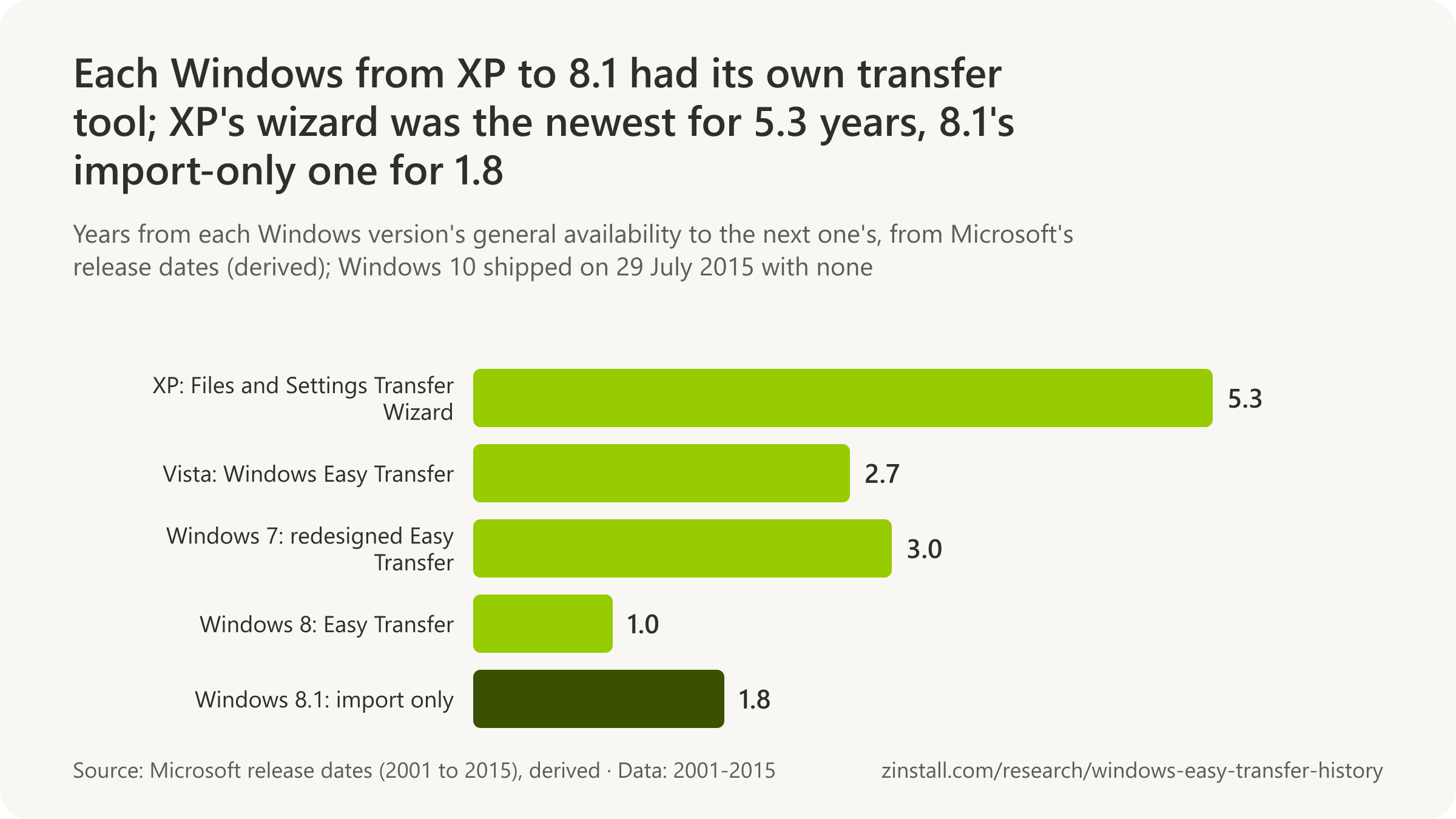
- Windows XP's wizard took files and settings from six older versions, Windows 95 to Windows 2000, as well as from XP itself.
- Vista's Easy Transfer offered four ways to move: a USB cable, a network, a USB or external drive, and CD or DVD.
- Windows 7's Easy Transfer could not move files from 64-bit to 32-bit Windows; from 64-bit XP they had to be copied by hand.
- On Windows RT, Easy Transfer moved files, e-mail and favorites only by USB or external drive, and no settings at all.
- Windows 7's version was redesigned because users found earlier ones 'hard to figure out' or stalled before the job was done.
| Version and question | Answer |
|---|---|
| Windows XP (2001): how it moved data | Floppies or removable media, direct cable, home network |
| Windows XP: which PCs it took data from | Windows 95 to XP (32-bit) |
| Windows Vista (2007): which PCs it took data from | Windows 2000 SP4, XP SP2, Vista |
| Windows Vista: what it could not use | No floppies; no DVDs from 2000 or XP |
| Windows 7 (2009): how it moved data | Cable, network, external drive |
| Windows 7: which PCs it took data from | XP, Vista or 7 to Windows 7 |
| Windows 8 (2012): what and how | Accounts, files, settings; cable, network or drive |
| Windows 8: limits | No 64 to 32-bit; other language: data only |
| Windows 8.1 (2013): sources and method, per a forum answer | 8.1: from 8, RT or 7, by drive only |
Sources: Microsoft (2001-2025); Microsoft Community
Related guides: From XP to Windows 11 or 10 · From Vista to Windows 11 or 10 · From Windows 7 to Windows 11
More statistics (46)
Every Windows from XP to Windows 8.1 had a tool for moving to a new PC, and each one changed what it could take, from which older versions and over which cable, network or disk. Microsoft published the rules in its help pages and Knowledge Base articles, many of which survive only as archived copies; this section gives them version by version, in Microsoft's words.
Windows XP: the Files and Settings Transfer Wizard
- The Files and Settings Transfer Wizard was new in Windows XP: Microsoft introduced it in June 2001 as the tool that gathers files and settings on the old computer and moves them to the new one (Microsoft, 2001).
- To move settings onto a clean Windows XP installation on the same PC, Microsoft told users in 2001 to save the wizard's collection to a folder with at least 150 MB free (Microsoft, 2001).
- For a direct connection, Windows XP's Files and Settings Transfer Wizard needed a serial PC-to-PC file transfer cable, with the ports set by an Autodetect button on both computers (Microsoft, 2001).
- Microsoft called a home network drive the fastest way to run Windows XP's Files and Settings Transfer Wizard and floppy disks the slowest, with one or two disks for settings alone and five to ten for files and settings (Microsoft, 2001).
- Windows XP's Files and Settings Transfer Wizard could be started on an older Windows from the XP CD, under Perform Additional Tasks, then Transfer Files and Settings (Microsoft, 2001).
- Windows XP's Files and Settings Transfer Wizard could carry files and settings on 3.5-inch floppy disks or other removable media, over a direct cable between the two computers, or through a drive on a home network (Microsoft, 2001).
- Windows XP, the first Windows with the Files and Settings Transfer Wizard, was released to manufacturers on 24 August 2001 and scheduled for widespread availability on 25 October 2001 (Microsoft, 2001).
- On Windows XP's launch day, 25 October 2001, Microsoft put a fix for the Files and Settings Transfer Wizard on Windows Update (migwiz.exe 5.1.2600.14) for transfers that quit, lost Outlook Express accounts or corrupted mail stores; Windows XP SP1 included it (Microsoft, 2001).
- Windows XP's Files and Settings Transfer Wizard accepted files and settings from Windows 95, 98, 98 Second Edition, Me, NT 4.0 and 2000, as well as from another Windows XP computer (Microsoft, 2001).
- The direct cable option in Windows XP's Files and Settings Transfer Wizard worked only with serial ports and cables, not parallel ones (Microsoft, 2003).
- On the old computer, Windows XP's Files and Settings Transfer Wizard could be run straight from the XP CD-ROM as Fastwiz.exe in the Support\Tools folder (Microsoft, 2004).
- Windows XP's Files and Settings Transfer Wizard could write itself to a floppy Wizard Disk for the old computer, and Microsoft also offered it as a way to back up XP settings before reinstalling Windows (Microsoft, 2004).
- Microsoft's 2005 list of computers that could send files and settings to Windows XP's wizard ran from Windows 95 to Windows 2000 and Windows XP (32-bit), naming no 64-bit source (Microsoft, 2005).
Windows Vista: Windows Easy Transfer
- Microsoft's December 2006 Vista page said Easy Transfer Cables would work on PCs running Windows 2000 (files only), Windows XP and Windows Vista, a claim its later pages and staff contradicted (Microsoft, 2006).
- Windows Easy Transfer reached consumers with Windows Vista on 30 January 2007, the day Microsoft released Vista and Office 2007 to consumers in more than 70 countries (Microsoft, 2007).
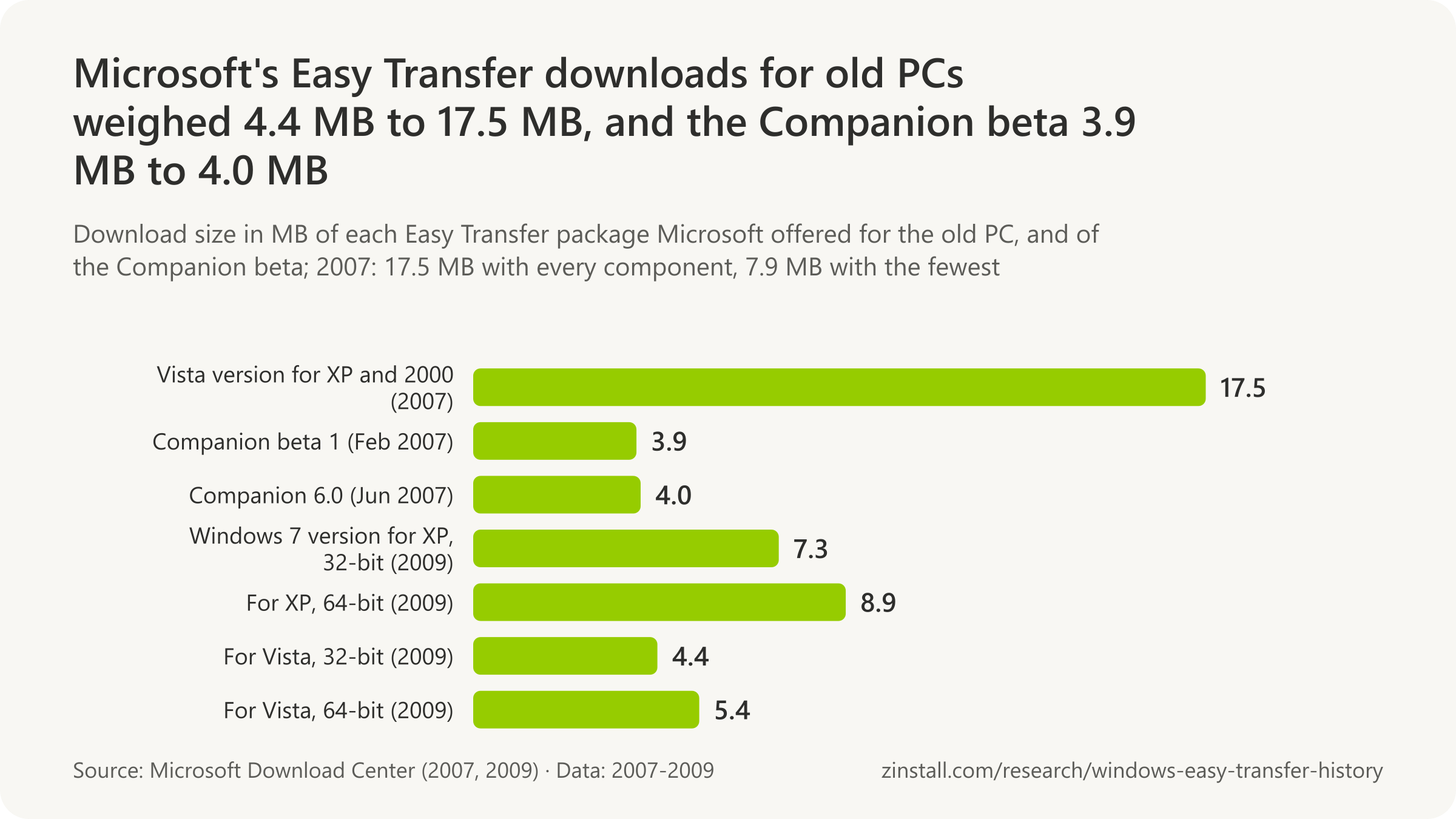
- Microsoft's January 2007 download of Windows Easy Transfer for Windows XP and Windows 2000 measured 7.9 MB to 17.5 MB depending on the components chosen (Microsoft, 2007).
- On 30 January 2007 Microsoft published a free download, Windows Easy Transfer for Windows XP and Windows 2000, so older PCs could send data to a new Vista PC; it was 7.9 MB to 17.5 MB, came in 16 languages and required Windows Genuine validation (Microsoft, 2007).
- In February 2007 Microsoft said Easy Transfer Cables moved data from PCs running Windows XP or Windows Vista to a PC running Windows Vista, and told buyers to look for a Certified for or Works with Windows Vista logo (Microsoft, 2007).
- Microsoft's Windows Vista feature page of February 2007 said Easy Transfer moved data to Vista from Windows Vista, XP or 2000 and did not support transfers to Windows Vista Starter (Microsoft, 2007).
- Windows Easy Transfer in Windows Vista offered four methods (a USB cable, a network, a USB flash drive or external hard disk, and CD or DVD), but Windows XP could not burn DVDs and Windows 2000 could burn neither CDs nor DVDs for it (Microsoft, 2007).
- Windows Easy Transfer in Windows Vista took both files and settings from Windows XP (SP2 or later) and Vista, but only files from Windows 2000, whose settings were not transferred (Microsoft, 2007).
- From Windows 2000, Windows Easy Transfer in Vista moved only data such as documents, music and pictures in My Documents and on the desktop, not e-mail messages or contacts, Microsoft's Nick White explained in April 2007 (Microsoft, 2007).
- When Microsoft updated the download to version 6.0 on 10 April 2007, it became Windows Easy Transfer for Windows XP: the Windows 2000 source disappeared, leaving XP SP2 to Vista and Vista to Vista (Microsoft, 2007).
- Windows Vista's Easy Transfer could copy its own program files to a CD, DVD, removable media or network drive (by default C:\migwiz) so they could be run as migwiz.exe on the old computer; for many source computers Microsoft pointed to the User State Migration Tool (Microsoft, 2007).
- Microsoft's Vista how-to of June 2007 named the computers Windows Easy Transfer could migrate from: Windows 2000 SP4, Windows XP SP2 and Windows Vista (Microsoft, 2007).
- Microsoft's Windows Vista help said floppy disks could not be used with Windows Easy Transfer and that DVDs could not be used when moving from Windows 2000 or XP to Vista (Microsoft, 2016).
- Windows Easy Transfer could not collect files and settings from a PC running Windows XP Starter Edition; Microsoft told those users to copy their files by hand (Microsoft, 2016).
Windows 7: Easy Transfer redesigned
- Windows Easy Transfer for Windows 7 accepted files from PCs running Windows XP and Windows Vista, and in the Windows 7 Release Candidate also from a Windows 7 Beta PC (Microsoft, 2009).
- Windows Easy Transfer in Windows 7 moved data in one of three ways (Easy Transfer Cable, network or external hard drive), let users choose which user profiles to move and allowed file-by-file selection, Microsoft's Brandon LeBlanc wrote in May 2009 (Microsoft, 2009).
- On 15 September 2009, five weeks before Windows 7's launch, Microsoft published four downloads of Windows Easy Transfer version 6.1 for old PCs (Windows XP 32-bit and 64-bit, Windows Vista 32-bit and 64-bit) to move data to Windows 7 (Microsoft, 2009).
- Windows Easy Transfer for Windows 7 required Windows XP SP2 or later or Windows Vista SP1 or later on the old PC, worked over the Easy Transfer Cable, a network or removable media, and did not migrate installed programs (Microsoft, 2009).
- The Windows 7 versions of Windows Easy Transfer for old PCs were small downloads: 7.3 MB for 32-bit Windows XP, 8.9 MB for 64-bit XP, 4.4 MB for 32-bit Vista and 5.4 MB for 64-bit Vista (Microsoft, 2009).
- Microsoft's 2009 Windows 7 FAQ said Windows Easy Transfer could move files and settings from an old PC to a new PC or from an old Windows installation to a new one on the same PC (Microsoft, 2009).
- Introducing Windows 7's Easy Transfer, Microsoft admitted that users had told it previous versions were hard to figure out or stalled before the job was done, and said the new version would finish and report anything that did not migrate (Microsoft, 2009).
- Windows 7, with a redesigned Windows Easy Transfer, was released to manufacturing on 22 July 2009 and became generally available worldwide on 22 October 2009 (Microsoft, 2009).
- Windows Easy Transfer in Windows 7 could be opened only from an administrator account (Microsoft, 2016).
- Windows Easy Transfer in Windows 7 could not move files from a 64-bit version of Windows to a 32-bit one; from 64-bit Windows XP, Microsoft said files had to be moved by hand (Microsoft, 2016).
- Microsoft's Windows 7 help said Easy Transfer moved files and settings from Windows XP, Windows Vista or Windows 7 to Windows 7; Windows 2000, a source for Vista's version, was no longer listed (Microsoft, 2016).
Windows 8 and Windows RT
- Moving to Windows 8 through setup, a Windows 7 PC could keep its applications, Windows settings, user accounts and files; a Vista PC its settings, accounts and files; and an XP PC only its user accounts and files (Microsoft, 2011).
- Microsoft documented in August 2012 how to use Windows Easy Transfer in Windows 8 to move a local user's files and settings to a domain account after joining a Windows Small Business Server domain, via a password-protected Easy Transfer file on an external drive (Microsoft, 2012).
- Windows 8, which kept Windows Easy Transfer, was released to manufacturers on 1 August 2012 and became generally available on 26 October 2012 (Microsoft, 2012).
- In Windows 8, Easy Transfer still could not move files from 64-bit to 32-bit Windows, and if the old and new PCs had different language settings it transferred only data, not program settings (Microsoft, 2012).
- Microsoft's Windows 8 help said Windows Easy Transfer moved user accounts, files and folders, music, pictures, videos, e-mail, contacts, Internet favorites and program settings, over an Easy Transfer cable (not a plain USB cable), a network, or a USB flash or external hard drive (Microsoft, 2012).
- For Windows RT, Microsoft's ARM edition of Windows 8, Easy Transfer could move files, e-mail and favorites only by USB flash drive or external hard drive, and could not move settings to or from an RT PC (Microsoft, 2012).
Windows 8.1: import only
- Windows 8.1, whose Windows Easy Transfer could only import data and no longer send it, became globally available on 17 October 2013, with Microsoft promoting settings sync and SkyDrive integration instead (Microsoft, 2013).
- A 2015 answer on Microsoft's community forum set out the Windows 8.1 rules: Easy Transfer accepted data only from Windows 8, Windows RT and Windows 7, only by USB flash drive or external hard drive, and could not back up an 8.1 PC, for which it pointed to SkyDrive (Microsoft Community, 2015).
Download sizes

Sources: Microsoft (2001-2016); Microsoft Community
Does Windows Easy Transfer transfer programs?
'Can I transfer programs? No.' Windows 7's help said Easy Transfer moved program settings, never the programs themselves (Microsoft, 2016).
- Windows XP's wizard moved application settings only, never the applications, which had to be reinstalled on the new PC.
- The Easy Transfer Companion beta of 2007 listed 104 programs it had transferred successfully, from Microsoft Office to Skype and Quicken.
- The Companion's download was still online in April 2008 and gone by December 2008, with no announcement.
- Windows 7 offered no in-place upgrade from XP, so XP users reinstalled every program after a clean install.
- Windows Backup restores the list of apps, but 'Apps will not be transferred or automatically installed'.
| Version or page | In Microsoft's words |
|---|---|
| Windows XP (2001): programs whose settings moved | 37 programs (settings only) |
| Windows Vista (2007) | It does not move programs |
| Windows Vista: fonts and drivers | No fonts, no drivers |
| Windows Vista: passwords | Not moved: new password at first logon |
| Windows 7 (2009): after the transfer | A list of programs to reinstall |
| Windows 7: music and video licences | DRM files moved, licences not |
| Windows 8 (2012) | No programs; a list to reinstall |
| Microsoft's transfer page, 2019 | reinstall your applications |
| Microsoft's transfer page, 2021 | new PC: reinstall your apps |
| A Microsoft executive on Windows Backup, October 2024 | "exactly as you had them" |
Sources: Microsoft (2001-2026)
Related guides: Programs and files to a new computer · Free ways to transfer programs
More statistics (59)
No version of Windows Easy Transfer, and no Microsoft tool before or since, moved installed programs. It carried a program's settings when the same program was already installed on the new PC, and from Windows 7 it produced a list of the programs to reinstall. The one exception was the Easy Transfer Companion, a beta built on technology Microsoft bought in the year before Vista, which it withdrew without a word. The only route that kept programs was an in-place upgrade of the same PC, and Windows 7 offered none from Windows XP.
What each version moved, and what it left behind
- Windows XP's Files and Settings Transfer Wizard moved application settings only, never the applications themselves, which had to be reinstalled on the new computer (Microsoft, 2001).
- Windows XP's Files and Settings Transfer Wizard moved settings in four groups (appearance, action, Internet and mail, for Outlook and Outlook Express) plus Office settings, fonts, network drives and printers, and the Desktop, My Documents, My Pictures, Favorites and Cookies folders (Microsoft, 2001).
- Microsoft's Windows XP Home site said on 24 August 2001 that the Files and Settings Transfer Wizard moves display properties, folder and taskbar options, browser and mail settings, and folders such as My Documents, My Pictures and Favorites (Microsoft, 2001).
- Microsoft listed 37 programs whose settings Windows XP's Files and Settings Transfer Wizard could carry across, from Adobe Acrobat Reader and AIM to Quicken 2001, Winamp and WinZip, provided each program was installed on the new PC first (Microsoft, 2001).
- Before Vista's launch, Microsoft listed what Windows Easy Transfer would move (user accounts, files and folders, program data files and settings, e-mail messages, settings and contacts, photos, music and videos, Windows settings and Internet settings) and said it was not meant for programs (Microsoft, 2006).
- "It does not move programs": the Windows Vista Team Blog (Nick White, 15 February 2007) said Easy Transfer moved user accounts, files and folders, e-mail, address books and Windows settings from Windows 2000, XP or Vista to a Vista PC (Microsoft, 2007).
- Windows Easy Transfer in Windows Vista could not move program files, only data and program settings, so each program had to be installed on the Vista PC before the transfer (Microsoft, 2007).
- Windows Easy Transfer in Windows Vista did not transfer system files such as fonts and drivers; Microsoft told users to reinstall custom fonts and updated drivers on the Vista PC (Microsoft, 2007).
- Microsoft's download page for Windows Easy Transfer for Windows XP stated in 2007 that it does not migrate installed applications (Microsoft, 2007).
- Windows Easy Transfer Reports, new in Windows 7, showed after a migration everything that was moved and where, plus a list of programs installed on the old PC with links for where to re-download them (Microsoft, 2009).
- Windows Easy Transfer in Windows 8 still moved program settings but not programs: after a transfer, its Program report listed the programs the user might want to install on the new PC (Microsoft, 2012).
- For a domain-joined new PC, Microsoft said the domain account had to be created before running Windows Easy Transfer, and accounts created during a transfer asked for a new password at first logon, so passwords did not carry over (Microsoft, 2016).
- Microsoft's Vista help listed what Windows Easy Transfer moved: files and folders, e-mail settings, contacts and messages, program settings, user accounts and settings (including fonts), Internet settings and favorites, music, pictures and video, but not the programs (Microsoft, 2016).
- Microsoft warned that Windows Easy Transfer could carry spyware, viruses and other malicious software from the old computer to the new one along with the files, and told users to scan both PCs (Microsoft, 2016).
- "Can I transfer programs? No.": Microsoft's Windows 7 help said Easy Transfer moved only program settings, and that some programs, such as security and antivirus software, might not work on the new Windows (Microsoft, 2016).
- Windows Easy Transfer in Windows 7 moved music and video files, including DRM-protected ones, but not their licences, which buyers had to restore through each store (Microsoft, 2016).
- Microsoft's Windows 7 help listed what Easy Transfer moved: everything in the Documents, Music, Pictures and Shared Documents folders (more by choice), e-mail settings, contacts and messages, program settings, user accounts and settings, Internet settings and favorites, pictures, video and music (Microsoft, 2016).
Microsoft's promise, and Apptimum
- Alohabob PC Relocator 3.0 sold for $49.99 boxed or $39.99 as a download on its maker's online store in December 2001, for Windows 9x, ME, 2000 or XP (Eisenworld, 2001).
- Demonstrating Longhorn's migration wizard at WinHEC on 4 May 2004, Microsoft's Jim Allchin said 'what gets migrated can be everything' and chose 'just take everything, apps included', a promise the Windows Easy Transfer that shipped in Windows Vista did not keep (Microsoft, 2004).
- Alohabob PC Relocator moved most programs as well as files and settings to a new PC, in its maker's words on the product page captured on 28 December 2004, the capability Microsoft bought with Apptimum in 2006 (Eisenworld, 2004).
- More than 150,000 licences of Alohabob PC Relocator had been sold, making it the top-selling PC migration utility at retail, Eisenworld claimed in its fact sheet captured on 28 December 2004 (Eisenworld, 2004).
- Eisenworld, the company behind Alohabob PC Relocator (renamed Apptimum in 2005), gave its founding date as April 1999 (Microsoft's 2006 announcement says 1998) and described itself as first to market with consumer PC-to-PC migration of applications, files and settings, in its press fact sheet captured on 28 December 2004 (Eisenworld, 2004).
- Microsoft announced on 7 March 2006 that it had acquired Apptimum Inc., whose products automatically transferred applications to new computers; terms of the acquisition were not announced (Microsoft, 2006).
- The first Microsoft product based on Apptimum's technology was planned as an optional download for Windows Vista customers, with no delivery timeline, Microsoft said when it announced the purchase on 7 March 2006 (Microsoft, 2006).
- Apptimum, formerly Eisenworld Inc., was founded in 1998 and was best known for its Alohabob PC Relocator products, according to Microsoft's announcement of the purchase on 7 March 2006 (Microsoft, 2006).
- "As a result of the Apptimum acquisition we will make it even easier for customers to transfer the applications that are most important to them," said Amitabh Srivastava, Microsoft's corporate vice president of Windows Core Operating System Development, on 7 March 2006 (Microsoft, 2006).
- Microsoft did not plan to keep selling Apptimum's existing Alohabob products, which were withdrawn from sale after the purchase, Apptimum told customers on its website in March 2006 (Apptimum, 2006).
- Microsoft's Windows Vista Team Blog announced on 15 February 2007 that Easy Transfer Companion was based on the Alohabob PC Relocator technology Microsoft had acquired with Apptimum in 2006, released as a beta in English for the US (Microsoft, 2007).
Easy Transfer Companion: the beta that moved programs
- Microsoft's release notes for the Easy Transfer Companion beta, dated 6 December 2006, two months before the public download, called it an independent complement to Easy Transfer rather than a superset, limited to x86-to-x86 transfers in US English (Microsoft, 2006).
- Microsoft's Easy Transfer Companion help article listed 104 programs it had transferred successfully, in seven groups from communications and education to office and productivity (33) and graphics and design (26), including Microsoft Office, Firefox, Skype, Quicken, Adobe InDesign and WinZip (Microsoft, 2007).
- The Easy Transfer Companion beta ran only from an x86 Windows XP SP2 PC to an x86 Windows Vista PC, both in US English, over an Easy Transfer Cable or network, with at least 200 MB free and an administrator account (Microsoft, 2007).
- Belkin told buyers in February 2007 that its Easy Transfer Cable could move applications only with Microsoft's free Easy Transfer Companion download; Windows Easy Transfer itself moved accounts, settings, files and email (Belkin, 2007).
- Microsoft said in February 2007 that the Easy Transfer Companion beta would move more than 100 of the most popular programs and warned that most security software could not be transferred (Microsoft, 2007).
- Microsoft posted Windows Easy Transfer Companion (Beta), a free tool to move installed programs from a Windows XP PC to a new Windows Vista PC, on its Download Center on 13 February 2007 as version 1, a 3.9 MB file (Microsoft, 2007).
- The Easy Transfer Companion beta, Microsoft's only built-in-era tool that moved programs, lasted about 16 months, from its 13 February 2007 release to its disappearance around mid-June 2008, and never left beta (derived from Microsoft, 2007, and ZDNet, 2008).
- Support for the Easy Transfer Companion beta was by phone only, consumer level, in English for North America (Microsoft, 2007).
- Asked about Windows 98, Microsoft's Nick White replied on 16 February 2007 that the Easy Transfer Companion only worked with Windows XP SP2 (Microsoft, 2007).
- The Easy Transfer Companion did not move programs without an installer, antivirus or system-monitoring programs, programs already on the new PC or Windows components; it also could not use a USB hub, dual-boot setups or the .NET Framework 1.1 (Microsoft, 2007).
- Microsoft updated the Easy Transfer Companion beta to version 6.0 on 28 June 2007 (a 4.0 MB download), still a beta for the US market only (Microsoft, 2007).
- Microsoft's Windows Experience Blog said on 29 June 2007 that the Easy Transfer Companion beta would work with over 100 programs and would warn when a program might not transfer with high confidence (Microsoft, 2007).
- Microsoft's TechNet Magazine described Easy Transfer Companion in January 2008 as still in beta, copying entire applications only from Windows XP SP2 to Windows Vista, with an Undo feature that expired within three days (Microsoft, 2008).
- ZDNet's Ed Bott reported on 18 July 2008 that Easy Transfer Companion had disappeared from Microsoft's website around mid-June 2008 with no announcement, and that Microsoft would say only that it was 'unclear' what shape the functionality would take (ZDNet, 2008).
- Microsoft withdrew Easy Transfer Companion without announcing it: its download page was still live in the Wayback Machine's capture of 24 April 2008 and its help article on 9 May 2008, but by December 2008 the download page read 'the page you requested cannot be found' (Microsoft, 2008).
The in-place upgrade: the only route that kept programs
- Microsoft's Engineering Windows 7 blog explained in April 2009 that it had decided at the start of the project that an in-place upgrade from Windows XP would not give the best results; it would offer to move files and settings instead, and applications would need reinstalling (Microsoft, 2009).
- Telemetry from the Windows 7 beta showed that most testers did clean installations onto new drive partitions rather than upgrades, Microsoft's Engineering Windows 7 blog said in April 2009, without giving a percentage (Microsoft, 2009).
- Microsoft told Windows XP users in September 2009 that moving to Windows 7 needed a custom installation, which keeps no files, settings or programs, because of the changes in PCs since XP's introduction in 2001 (Microsoft, 2009).
- Microsoft's Windows 7 tutorial for XP users said a custom installation preserves no programs, files or settings and can take a couple of hours, recommended the free Windows Easy Transfer with an external hard disk, and said programs must be reinstalled by hand (Microsoft, 2009).
- Windows 7 offered no in-place upgrade from Windows XP: Microsoft told XP users to run Windows Easy Transfer, do a custom (clean) installation of Windows 7, reload their files and settings and then reinstall their applications, while Vista SP1 PCs could upgrade and keep them (Microsoft, 2009).
- A study Microsoft commissioned in 2010 in three global markets, on people who chose not to upgrade to Windows 7, found that upgrading the PC was perceived as difficult, Microsoft said; it published no figures (Microsoft, 2011).
- Windows 8 setup added a 'Just personal files' option that gave a clean install while keeping the user's data without a separate tool such as Windows Easy Transfer (Microsoft, 2011).
- Microsoft offered Windows 10 as a free in-place upgrade for qualified Windows 7 and 8.1 PCs from 29 July 2015 until 29 July 2016 (Microsoft, 2015).
- For the in-place upgrade to Windows 10, Microsoft said in July 2015 that many applications, files and settings would migrate as part of the upgrade, though some applications or settings might not (Microsoft, 2015).
- Microsoft's Vista help noted that upgrading a PC in place from Windows XP to Windows Vista kept files, settings and programs automatically, so Windows Easy Transfer was not needed in that case (Microsoft, 2016).
What Microsoft says about programs now
- Microsoft's transfer page told people moving to a new Windows 10 PC to reinstall their programs: "we recommend doing a fresh installation of your applications" (Microsoft, 2019).
- Microsoft's 2020 guide for Windows 7 users, "Moving to a Windows 10 PC" (first published 16 September 2020), offered OneDrive, Backup and Restore or an external drive for files and made reinstalling programs a separate step (Microsoft, 2020).
- From September 2021 Microsoft's transfer page said that apps stay on a PC upgraded to Windows 11, but "if you purchase a new Windows 11 PC, you will need to reinstall your apps" (Microsoft, 2021).
- Microsoft's page "Transfer your data with Windows Backup" (first captured 29 September 2023, unchanged on this point in November 2026) says Windows Backup restores the list of apps, but "Apps will not be transferred or automatically installed" (Microsoft, 2026).
- Microsoft's Yusuf Mehdi wrote on 31 October 2024 that Windows Backup moves "personal files, settings and applications" from Windows 10 to Windows 11 "exactly as you had them saved", wording stronger than Microsoft's support pages (Microsoft, 2024).
Sources: Microsoft (2001-2026); Eisenworld Inc. (2001, 2004); Apptimum Inc.; Belkin International; ZDNet
How long does Windows Easy Transfer take?
Moving 1 GB over the Easy Transfer Cable took 3.9 minutes as one file and 11.4 as small files (The Register, 2007).

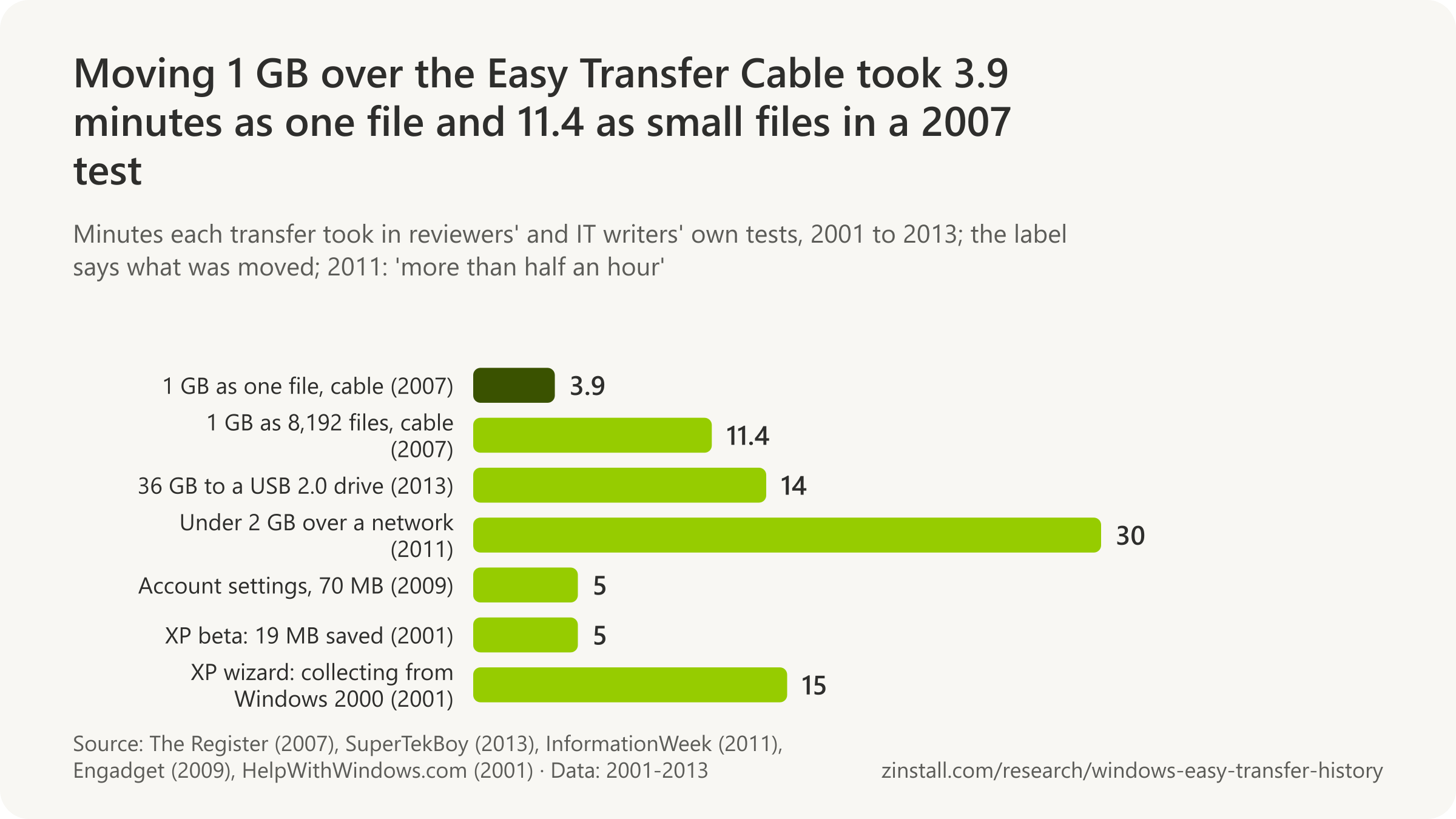
- Saving a 36 GB profile to a USB 2.0 drive took about 14 minutes, and as long again onto the new PC, in 2013.
- Moving just under 2 GB from Vista to Windows 7 over an Ethernet network took more than half an hour in 2011.
- Moving 5.6 GB from XP to Vista took almost a full day in one 2007 account, after Easy Transfer failed.
- In one blogger's 2007 comparison, a Mac moved more than 60 GB, applications included, in under an hour.
- Windows 7's help gave no speed, only that a transfer could take 'a half hour or several hours'.
| Transfer or claim | Time or speed |
|---|---|
| XP wizard, restoring a profile (2001) | 2 hours (restore alone) |
| Vista over a network, stuck preparing (2007) | 2 h 45 min, then aborted |
| 30 GB over the cable, a reviewer's estimate (2007) | 30 GB: an overnight job |
| Measured cable speed, one 1 GB file (2007) | about 4.4 MB/s |
| Measured cable speed, small files (2007) | about 1.5 MB/s |
| Microsoft's claim for the cable (2007) | about 20 GB per hour |
| A cable maker's claim (2007) | 30 GB an hour |
| Windows 7's recommended route, from upgrade check to restore | 60 screens |
| In-place upgrade, Vista to Windows 7 (2009) | about an hour |
Sources: The Register; SuperTekBoy; InformationWeek; ZDNet; Microsoft (2016, 2011, 2007); ActiveWin; TechRepublic; Belkin International; All Things Digital / The Wall Street Journal; Engadget; HelpWithWindows.com
Related guides: Everything to a new Windows 11 PC · Files from an old computer
More statistics (19)
Microsoft never published how long a transfer should take, beyond a claimed speed for the cable and 'a half hour or several hours' in its help. The timings that exist come from reviewers and IT writers who ran it themselves, most of them before Windows 8; the gap between small and large files matters more than the cable.
Measured at the time
- Saving Windows XP files and settings to a second hard drive with the Files and Settings Transfer Wizard took 5 minutes and 19 MB of disk space in HelpWithWindows.com's review of Windows XP Beta 2 in 2001 (HelpWithWindows.com, 2001).
- Collecting settings from Windows 2000 with the XP Files and Settings Transfer Wizard took about 15 minutes before any data was copied, and needed more than one 120 MB LS-120 disk, in HelpWithWindows.com's 2001 test (HelpWithWindows.com, 2001).
- ActiveWin's 2001 preview of Windows XP RC1 found that the Files and Settings Transfer Wizard, run with its defaults, "took several hours" to collect a profile, and that restoring it on a clean XP install took another 2 hours (ActiveWin, 2001).
- Windows Easy Transfer sat at "preparing to transfer data" for 2 hours 45 minutes over a network before Mitch Ratcliffe aborted it, in his February 2007 TechRepublic walk-through of an XP-to-Vista move; a Belkin cable bought for $54 then did not connect at all (TechRepublic, 2007).
- It took almost a full day to move 5.6 GB of user settings and documents from XP to Vista in ZDNet blogger Mitch Ratcliffe's February 2007 test, after Windows Easy Transfer failed and he switched to Lenovo's System Migration Assistant (ZDNet, 2007).
- The Mac, by contrast, migrated more than 60 GB of settings, documents and applications in less than an hour in the same February 2007 ZDNet comparison, against almost a full day for 5.6 GB on Vista (ZDNet, 2007).
- The Register warned in February 2007 that moving "the best part of 30GB" with Windows Easy Transfer over the cable was "likely to be an overnight job", because most users have many more small files than big ones (The Register, 2007).
- Copying 1 GB made of 8,192 small 128 KB files over Belkin's Easy Transfer Cable took 11 minutes 22 seconds, nearly three times as long as one 1 GB file, in The Register's February 2007 test (The Register, 2007).
- Copying a single 1 GB file between an XP SP2 laptop and a Vista laptop over Belkin's Easy Transfer Cable took 3 minutes 54 seconds in The Register's February 2007 test (The Register, 2007).
- Windows Easy Transfer bundled each user account's settings (about 70 MB, documents excluded) into a backup file in about five minutes, and restored them faster, in Engadget's August 2009 Windows 7 install guide (Engadget, 2009).
- Moving just under 2 GB from a Vista PC to a new Windows 7 PC over an Ethernet LAN with Windows Easy Transfer took more than half an hour in InformationWeek writer Lamont Wood's January 2011 account (InformationWeek, 2011).
- Copying a 36 GB profile with Windows Easy Transfer to a USB 2.0 hard drive took about 14 minutes, and another 14 to copy it onto the new PC, in IT consultant Gareth Gudger's account of December 2013 (SuperTekBoy, 2013).
Claimed against measured

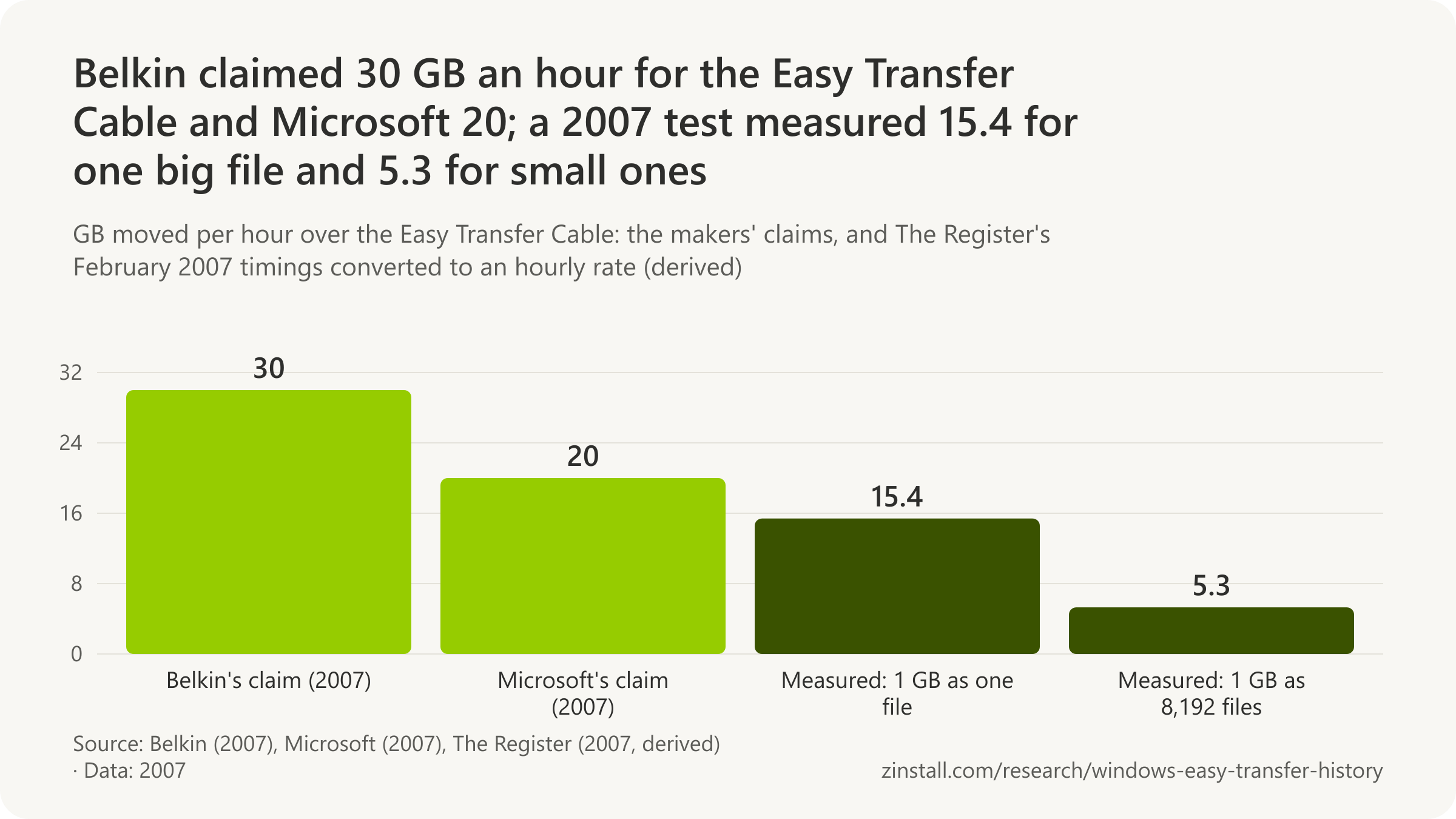
- Microsoft told Windows Vista buyers in 2007 that files would move over an Easy Transfer Cable at approximately 20 GB per hour (Microsoft, 2007).
- The Register's 2007 timing works out at about 1.5 MB per second (about 12 Mbit/s) for 1 GB of small 128 KB files over the Easy Transfer Cable (derived from The Register, 2007).
- The Register's 2007 timing works out at about 4.4 MB per second (about 35 Mbit/s) for one 1 GB file over the Easy Transfer Cable, a fraction of USB 2.0's 480 Mbit/s signalling rate (derived from The Register, 2007).
Microsoft's own estimates
- Microsoft said the recommended Windows 7 route (Upgrade Advisor, Windows Easy Transfer to save, a clean install, Easy Transfer again to restore) took four separate web and client experiences and walked the average customer through 60 screens (Microsoft, 2011).
- For Windows 8, Microsoft folded the Upgrade Advisor, setup and Windows Easy Transfer into one setup experience, cutting a Windows 7 upgrade of up to 60 screens to as few as 11 clicks, 82% fewer, it said (Microsoft, 2011).
- Microsoft's Windows 7 help gave no speed figure for Easy Transfer: it said a transfer could take a half hour or several hours, depending on how much was moved, the computers and the method (Microsoft, 2016).
The in-place upgrade, for comparison
- Walt Mossberg's in-place upgrade of a Vista laptop to a pre-release Windows 7 took about an hour and kept files, settings and programs, the path XP users did not have, he reported in July 2009 (All Things Digital, 2009).
Sources: HelpWithWindows.com; ActiveWin; TechRepublic; ZDNet; The Register; Engadget; InformationWeek; SuperTekBoy; Microsoft (2007, 2011, 2016); All Things Digital / The Wall Street Journal; Belkin International
What is an Easy Transfer Cable?
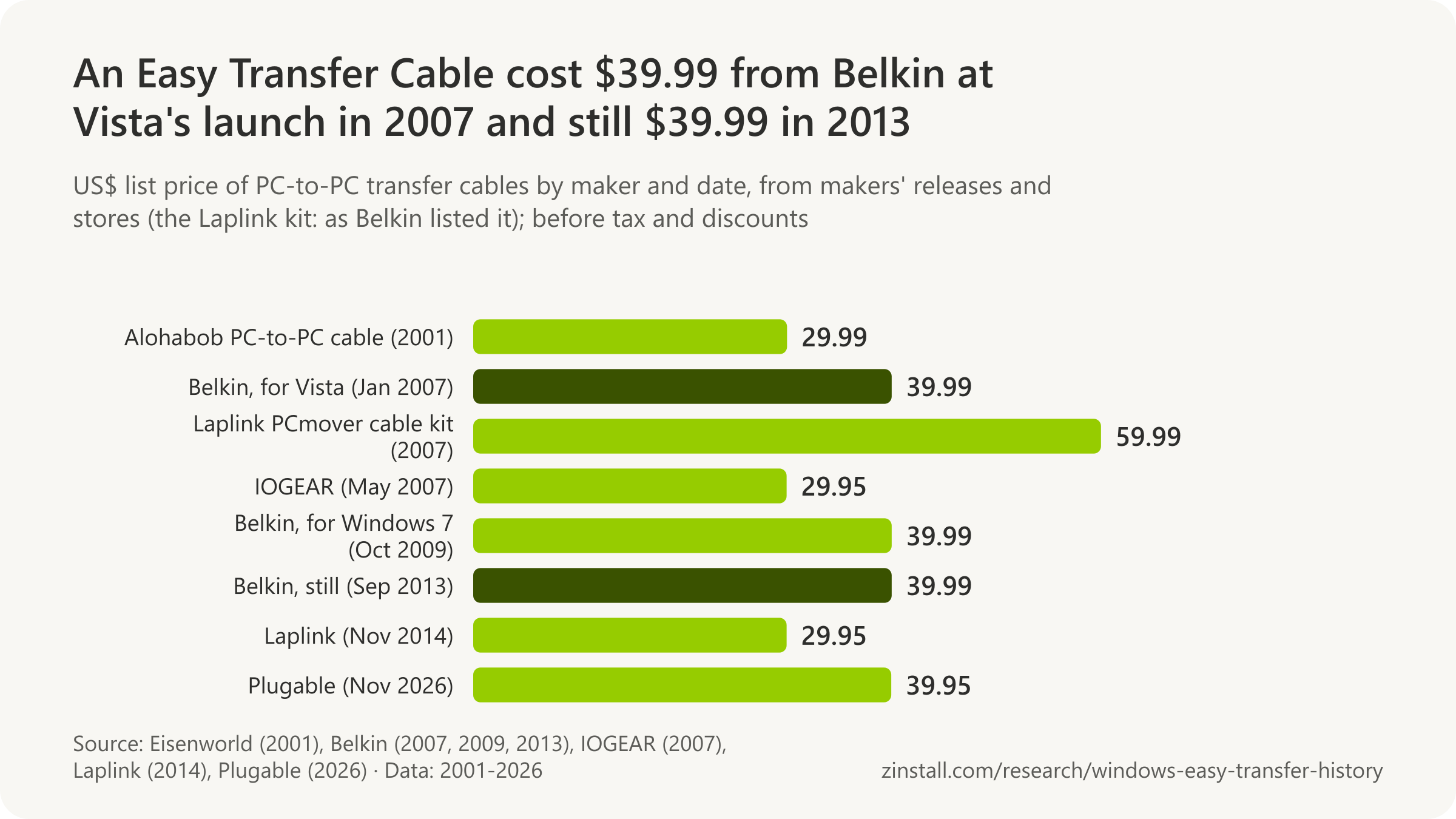
An Easy Transfer Cable for Windows Vista cost $39.99 in 2007; its maker still charged $39.99 for one in 2013 (Belkin, 2007).

- A standard USB cable cannot link two PCs; Easy Transfer Cables carried a special chip that made it possible.
- The usual chip, Prolific's PL-25A1, is a single-chip USB 2.0 bridge 'specially designed for Windows USB Easy Transfer cable'.
- A rival cable launched at $29.95 in May 2007, ten dollars below the best-known one.
- 'In Windows 8.1, Microsoft removed support for cables' from Easy Transfer, one cable maker's manual said in 2015.
- A transfer cable still sold for $39.95 in November 2026, bundled with Bravura Easy Computer Sync instead of Easy Transfer.
| Cable or source | What it says |
|---|---|
| Makers Microsoft named (2007) | Belkin, Vivanco, Bafo |
| Windows 7 help (2009) | Not a regular USB cable |
| Belkin's Windows 7 cable: programs | No programs |
| Belkin's Windows 7 cable: specification | 8 ft, USB 2.0, Windows 7 32/64-bit |
| Belkin's Vista cable at a retailer (Feb 2009) | $38.95 |
| Laplink's PCmover cable kit against Belkin's (2007) | $59.99 vs $39.99 |
| Flash drive prices Belkin cited against it (2007) | 2 GB $50, 4 GB $90, 8 GB $200 |
| The chip maker on Windows 8.1 (2014) | 8.1: no cable support |
| A cable on Windows 11 (2022) | Works on Windows 11 (with Bravura) |
| Belkin's support page (Nov 2026) | Still points to Windows Easy Transfer |
Sources: Belkin International (2007-2026); Microsoft (2009, 2007); Prolific Technology (2026, 2014); IOGEAR; StarTech.com; Plugable Technologies (2026, 2022); B&H Photo Video; Eisenworld Inc.; Laplink Software
Related guides: Easy Transfer cables for Windows 11 · Windows Easy Transfer on Windows 10
More statistics (39)
An Easy Transfer Cable was a USB cable with a bridge chip in the middle, which let two PCs talk to each other; a plain USB cable with the same plugs cannot. Belkin and others sold them for Windows Vista and Windows 7, mostly built on one Prolific chip. Windows 8.1 dropped cable transfers, and the makers that still sell cables today bundle other transfer software instead.
What it was, in Microsoft's words
- At WinHEC on 4 May 2004, Microsoft's Jim Allchin showed a 'smart USB cable' for Longhorn's migration wizard, saying it was not yet complete and that the software was meant to live in the cable itself (Microsoft, 2004).
- Each Easy Transfer Cable came with a CD carrying the Easy Transfer software to install on the Windows XP PC, after which the wizard opened on both PCs when the cable was plugged in, Microsoft said on 15 February 2007 (Microsoft, 2007).
- Easy Transfer Cables were made by several hardware partners, including Belkin International, Vivanco Group AG and Bafo Technologies, and were sold at retail, online and by PC makers, Microsoft said on 15 February 2007 (Microsoft, 2007).
- Easy Transfer Cables were USB 2.0 cables with a special chip that let them connect two PCs, something a standard USB cable cannot do even if the plugs fit, Microsoft's Windows Vista Team Blog explained on 15 February 2007 (Microsoft, 2007).
- The Easy Transfer Cable was not supported on Windows 2000, so Windows 2000 users had to move files over a network or removable storage, Microsoft's Nick White told readers of the Vista Team Blog on 20 March 2007 (Microsoft, 2007).
- "You cannot use a regular universal serial bus (USB) cable to transfer files and settings with Windows Easy Transfer," Microsoft's Windows 7 help page on getting an Easy Transfer cable said in its capture of 13 October 2009, adding that the cable could be bought online, from the PC maker or at an electronics store (Microsoft, 2009).
- Windows 8's help page on transferring files offered the Easy Transfer cable as one of three methods and noted "You can't use a USB cable", in its capture of 5 November 2012, ten days after Windows 8 shipped (Microsoft, 2012).
- Microsoft's Windows 7 transfer FAQ (article MSW700003) defined the Easy Transfer Cable as a specially designed USB cable that connects two computers and works with Windows Easy Transfer, and warned that a standard USB cable cannot be used, in its capture of 22 June 2016 (Microsoft, 2016).
The chip inside
- Belkin's own specifications for its Easy Transfer Cable for Windows Vista listed a Prolific chipset, an eight-foot cable with two type-A USB plugs and Microsoft's Premium Vista logo, in the capture of 7 February 2007 (Belkin, 2007).
- Plugable's USB 2.0 Easy Transfer Cable used Prolific's PL-25A1 chipset, needed no driver on Windows 7 and later, and came with a Bravura Easy Computer Sync licence ($19.95 value), according to its product page captured on 18 February 2012 (Plugable, 2012).
- Belkin's Easy Transfer Cables for Windows Vista (F5U258) and Windows 7 (F5U279) share one USB ID and are built on Prolific's PL-25A1 bridge chip, according to the Linux kernel's plusb driver source as of 17 November 2026 (Linux kernel, 2026).
- Prolific's PL-25A1 is a single-chip USB 2.0 host-to-host bridge controller "specially designed for Windows USB Easy Transfer cable", the chip maker's product page said on 17 November 2026 (Prolific, 2026).
Belkin's cables and prices
- Belkin claimed its Easy Transfer Cable for Windows Vista moved 30 GB of data in one hour (about 7,500 songs) at up to 480 Mbps, USB 2.0's signalling rate, in its launch release of 8 January 2007 (Belkin, 2007).
- Belkin announced its Easy Transfer Cable for Windows Vista (F5U258) on 8 January 2007 at CES, for sale in late January with Asia, Europe and Australia to follow, to move files and settings from a Windows XP PC to a Windows Vista PC (Belkin, 2007).
- Belkin's Easy Transfer Cable for Windows Vista shipped with Laplink's PCsync file-synchronisation software as well as Microsoft's Windows Easy Transfer, an early tie between the cable and Laplink, according to Belkin's launch release of 8 January 2007 (Belkin, 2007).
- Belkin's Easy Transfer Cable for Windows Vista (F5U258) was priced at $39.99 when Belkin announced it on 8 January 2007 (Belkin, 2007).
- Flash drives were too small and too dear for a PC move, with 2 GB at $50, 4 GB at $90 and 8 GB at $200, Belkin argued on its Easy Transfer Cable FAQ in February 2007 (Belkin, 2007).
- Belkin's comparison page set its $39.99 Easy Transfer Cable (480 Mbps, 8 feet) against Laplink's PCmover cable kit at $59.99 (12 Mbps, 6 feet), and credited only Laplink's kit with tested application transfer, in its capture of 5 March 2007 (Belkin, 2007).
- Belkin's own store sold the Easy Transfer Cable for Windows Vista (F5U258) for $39.99 in its capture of 5 March 2007, five weeks after Vista's consumer launch (Belkin, 2007).
- Belkin's Vista cable moved files only from Windows XP or Windows Vista to Windows Vista, and needed 40 MB of disk space and a CD-ROM drive on the XP PC, according to its 2007 product bulletin (Belkin, 2007).
- B&H Photo listed Belkin's Easy Transfer Cable for Windows Vista (F5U258) at $38.95, in stock, in its capture of 10 February 2009, and as no longer available by February 2012 (B&H Photo, 2009).
- Belkin announced its Easy Transfer Cable for Windows 7 (F5U279) on 7 October 2009, available from 23 October 2009 in North America and in the first quarter of 2010 in Europe and Asia (Belkin, 2009).
- Belkin's Easy Transfer Cable for Windows 7 moved files, user accounts, Windows and program settings, email and contacts but "does not support transfer of software programs", Belkin stated in its release of 7 October 2009 (Belkin, 2009).
- Belkin's Easy Transfer Cable for Windows 7 (F5U279) was priced at $39.99 at its announcement on 7 October 2009, the same price as the Vista cable in 2007 (Belkin, 2009).
- Belkin's Easy Transfer Cable for Windows 7 was a USB 2.0 cable, 8 feet long, certified for 32-bit and 64-bit Windows 7 and rated at up to 480 Mbps, according to Belkin's release of 7 October 2009 (Belkin, 2009).
- Belkin's US store still listed the Easy Transfer Cable for Windows 7 (F5U279) at $39.99 in its capture of 21 September 2013, four years after launch and a month before Windows 8.1 dropped cable transfers (Belkin, 2013).
- Belkin's support article on its Easy Transfer Cable still told users to launch the Windows Easy Transfer utility, with no word on Windows 8.1, 10 or 11, and warned that passwords of new accounts are not transferred, when checked on 17 November 2026 (Belkin, 2026).
Other makers
- A 6-foot PC-to-PC USB cable for Alohabob PC Relocator cost $29.99 on Eisenworld's store in December 2001, five years before the Easy Transfer Cables made for Windows Vista (Eisenworld, 2001).
- IOGEAR launched its Smartlink Transfer Cable for Windows Vista, designed to work with Windows Easy Transfer, on 29 May 2007 at $29.95 (MSRP), ten dollars below Belkin's cable (IOGEAR, 2007).
- Laplink sold its Easy Transfer Cable for Windows for $29.95 in November 2014, claiming it was the only cable able to move files, settings and user profiles to a Windows 8.1 PC and that it supported XP through 8.1 "and even Windows 10" (Laplink, 2014).
- Laplink announced on 18 December 2014 that its own Easy Transfer Cable for Windows was available worldwide, calling it the only cable able to migrate files, settings and user profiles to a Windows 8.1 PC, after Windows 8.1's Easy Transfer dropped cable transfers (Laplink, 2014).
After Windows 8.1
- Windows RT and ARM-based Windows 8 tablets, including Microsoft Surface, could not use Windows Easy Transfer, Bravura Easy Computer Sync or Plugable's USB Easy Transfer cable, Plugable warned on 25 October 2012, the day before Windows 8 and Surface RT went on sale (Plugable, 2012).
- "The Windows 8.1 Easy Transfer program does not include support for Easy Transfer Cable devices," chip maker Prolific wrote in its PL-27A1 (USB 3.0) cable manual of 13 June 2014, telling users to copy and run the older version from Windows 7 or 8 (Prolific, 2014).
- "In Windows 8.1, Microsoft removed support for cables from the Windows Easy Transfer software. As such, Windows 8.1 and later doesn't support the USB2Link cable," StarTech.com's manual for its USB Easy Transfer Cable said in its revision of 31 March 2015 (StarTech.com, 2015).
- Plugable added a notice to its Easy Transfer cable troubleshooting guide, first captured on 26 April 2015, that Microsoft had removed cable support from Windows Easy Transfer in Windows 8.1 and that owners should use the bundled Bravura Easy Computer Sync instead (Plugable, 2015).
- Prolific published instructions, dated by the PDF's creation on 3 June 2015, for copying the Windows Easy Transfer program from a Windows 7 or 8 PC to run it on Windows 8.1 or 10, because those versions had no Easy Transfer cable option (Prolific, 2015).
- Plugable's support team confirmed on 21 March 2022 that its USB-EASY-TRAN transfer cable was compatible with Windows 11 through the Bravura Easy Computer Sync software, though some boxes still carried Windows 10 packaging (Plugable, 2022).
- "Programs and installed applications cannot be transferred - they must be reinstalled from the original source or downloads," Plugable says of its Windows Transfer Cable (checked 17 November 2026), as Microsoft said of Windows Easy Transfer (Plugable, 2026).
- Plugable's USB Windows Transfer Cable sold for $39.95 on 17 November 2026, with a Prolific PL-27A1 USB 3.0 chipset, Bravura Easy Computer Sync software and support for Windows XP to Windows 11 (Plugable, 2026).
Sources: Microsoft (2004-2016); Belkin International (2007-2026); Plugable Technologies (2012-2026); Linux kernel; Prolific Technology (2014, 2015, 2026); B&H Photo Video; Eisenworld Inc.; IOGEAR; Laplink Software (2014); StarTech.com
When was Windows Easy Transfer discontinued, and why?
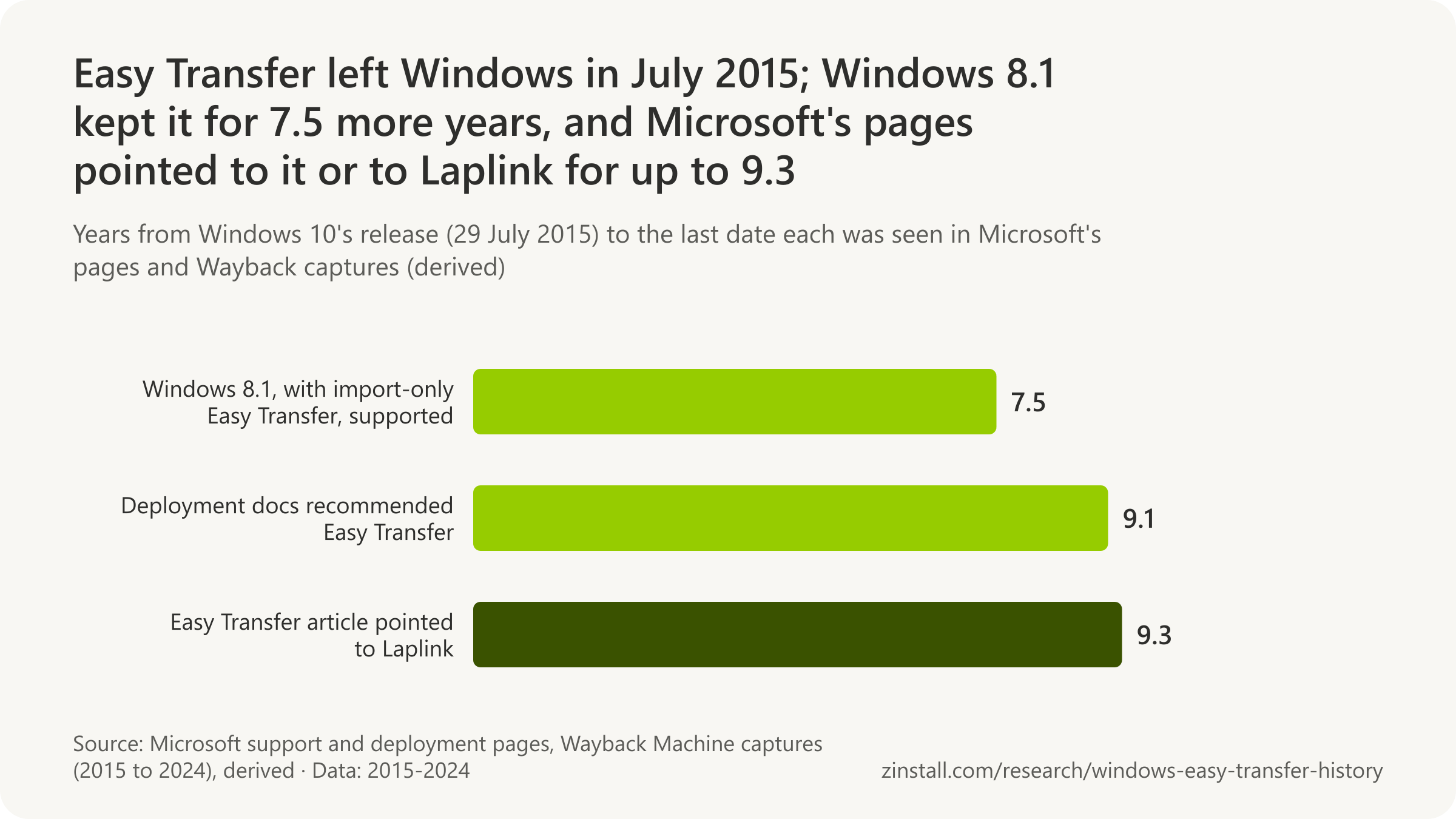
'WET is being deprecated', a Microsoft employee wrote on 24 July 2013, as Windows 8.1 cut Easy Transfer to importing only (Microsoft, 2013).

- Windows 10's launch list of removed features named Media Center and desktop gadgets, but not Easy Transfer.
- The help page 'Windows Easy Transfer is not available in Windows 10' pointed to Laplink's PCmover Express in 2015: 'It's free!'
- The deployment documentation kept recommending Easy Transfer for 9.1 years after Windows 10 shipped without it, until August 2024.
- By February 2026 the 'not available in Windows 10' article redirected to a page that names neither Easy Transfer nor Laplink.
| Page and date | What it said or did |
|---|---|
| Microsoft's advice to Windows 8.1 users (Jul 2013) | Copy files by hand, by USB drive or network |
| Windows 8's Easy Transfer help page (Nov 2013) | Redirected to SkyDrive |
| 'Not available in Windows 10' page (Mar 2017) | PCmover Express, no longer called free |
| Republished as KB 4026265 | 8 November 2017 |
| Page captured pointing to Laplink | at least 9 years |
| Its last capture (Nov 2024) | still Laplink in November 2024 |
| IT documentation, June 2019 | Recommended and 'not available' |
| IT documentation, August 2024 | Easy Transfer advised until 2024 |
| IT documentation drops Easy Transfer | 30 August 2024 |
Sources: Microsoft (2013-2026)
Related guides: Windows Easy Transfer for Windows 11 or 10 · Windows Easy Transfer on Windows 10
More statistics (14)
Windows Easy Transfer ended in two steps: Windows 8.1 cut it to an import-only tool, and Windows 10 shipped without it. Microsoft announced neither. The only reason on record is a Microsoft employee's reply on its own forum, and Microsoft's help, support and deployment pages went on pointing to Easy Transfer, or to Laplink in its place, for years after the tool had gone.
Windows 8.1: 'being deprecated'
- "WET is being deprecated": a Microsoft employee confirmed on 24 July 2013 that Windows Easy Transfer in Windows 8.1 could no longer collect data, only apply it, because many settings now roamed automatically and data could be shared with SkyDrive (Microsoft, 2013).
- Asked how to move large amounts of data between two Windows 8.1 PCs without Easy Transfer, the Microsoft employee who had called Easy Transfer 'being deprecated' a week earlier replied on 31 July 2013 that copying files manually by USB drive or network used the same methods Easy Transfer offered (Microsoft, 2013).
- After Windows 8.1 shipped, Microsoft retired its Windows 8 Easy Transfer help page: by 28 November 2013 the address redirected to its SkyDrive getting-started tutorial, from June 2014 to the OneDrive tutorial and from July 2016 to support.microsoft.com (Microsoft, 2013).
Windows 10: removed without a word
- Microsoft's Windows 10 specifications page at launch listed the features removed by the upgrade (Windows Media Center, desktop gadgets, the Windows 7 games, OneDrive placeholders) but did not mention Windows Easy Transfer (Microsoft, 2015).
- Microsoft's help page "Windows Easy Transfer is not available in Windows 10" pointed Windows 10 users to Laplink's PCmover Express and added "It's free!" in its earliest capture, of 8 November 2015 (Microsoft, 2015).
- Microsoft kept a page telling Windows 10 users that Easy Transfer was not available, and pointing them to Laplink, for at least nine years: from its first capture on 8 November 2015 to its last on 11 November 2024 (derived from Microsoft's captured pages, 2024).
- By its capture of 15 March 2017, Microsoft's article "Windows Easy Transfer is not available in Windows 10" had dropped "It's free!" and opened with "However", still pointing to Laplink's PCmover Express (Microsoft, 2017).
- Microsoft republished "Windows Easy Transfer is not available in Windows 10" as support article KB 4026265 (first published on its current platform on 8 November 2017), keeping the one-sentence pointer to Laplink's PCmover Express (Microsoft, 2017).
- Microsoft's article "Windows Easy Transfer is not available in Windows 10" still pointed to Laplink's PCmover Express in its last capture, of 11 November 2024, unchanged since 12 October 2020 and silent on the free offer having ended in 2016 (Microsoft, 2024).
- By 12 February 2026 Microsoft had retired the article "Windows Easy Transfer is not available in Windows 10": its address redirects to "Move your files to a new Windows PC", which names neither Easy Transfer nor Laplink (Microsoft, 2026).
Microsoft's IT pages
- Microsoft's deployment documentation kept recommending Windows Easy Transfer for about 9.1 years after Windows 10 shipped without it, from 29 July 2015 to the revision of 30 August 2024 (derived from Microsoft, 2024).
- In a revision dated 14 June 2019, Microsoft's Windows 10 deployment documentation added a note that Windows Easy Transfer is not available in Windows 10, while still recommending it for a few computers (Microsoft, 2019).
- Microsoft's Windows deployment documentation still told IT pros to use Windows Easy Transfer for a few computers in its revision dated 9 August 2023, still online in a capture of 24 August 2024, nine years after Windows 10 shipped without the tool (Microsoft, 2023).
- Microsoft removed Windows Easy Transfer from its Windows Upgrade and Migration Considerations page in a revision dated 30 August 2024, leaving USMT as the only migration tool it describes, 'also used in smaller migrations' (Microsoft, 2024).
Sources: Microsoft (2013-2026)
Is PCmover recommended by Microsoft?
'Recommended' is Laplink's word: its release said Microsoft had selected PCmover 'as its recommended migration solution' (Laplink, 2015).

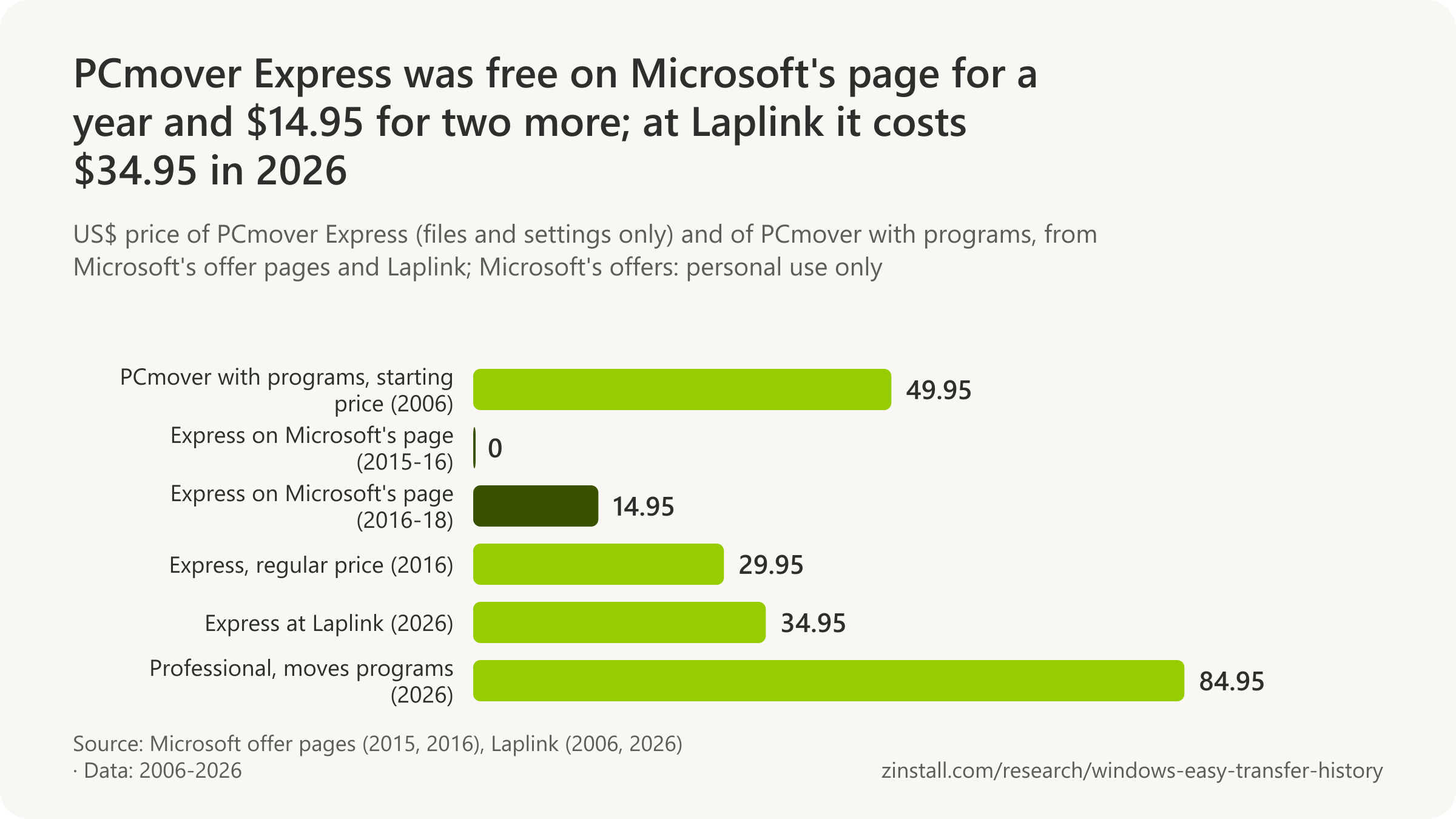
- PCmover Express costs $34.95 in 2026 and still moves no programs; Microsoft's site gave it away free for 366 days in 2015 and 2016.
- When the free year ended, Microsoft's offer page sold PCmover Express for $14.95, half its regular $29.95, until August 2018.
- The first PCmover Express offer on Microsoft's site came in March 2014, free for Windows XP users, five weeks before XP's end of support.
- Laplink was already calling PCmover 'the only Microsoft-recommended migration solution' by December 2014.
- Microsoft's transfer page dropped Laplink in September 2021, leaving OneDrive and a USB or external drive as the only options.
| Who and when | What it says |
|---|---|
| Microsoft invests in Laplink | 10 May 2005 |
| PCmover Express, 2010 edition | up to 3 applications |
| Microsoft's Windows XP offer (Mar 2014) | XP to 7, 8, 8.1; no apps |
| Microsoft's free offer (2015-16) | Free, 1 Sep 2015 to 31 Aug 2016 |
| Microsoft's words in Laplink's release (2015) | 'make it easier for customers to migrate' |
| Microsoft's transfer page after the offers (Sep 2018) | Laplink, no offer |
Sources: Laplink Software (2005-2026); Microsoft (2014-2021)
Related guides: Free ways to transfer programs · Programs and files to a new computer
More statistics (27)
Microsoft offered Laplink's PCmover Express to Windows XP users when XP's support ended, and to everyone moving to a Windows 8.1 or Windows 10 PC for a year after Windows 10's launch, then at half price. 'Recommended' is Laplink's word: Microsoft's pages said it had partnered with Laplink. Its transfer page dropped Laplink in the autumn Windows 11 was released, and its article on Easy Transfer pointed to Laplink for at least three more years; Microsoft has since retired that article. The free and discounted offers never moved programs.
Microsoft and Laplink before Windows 10
- Laplink announced on 10 May 2005 that Microsoft had made an investment in the company, a year before Microsoft bought Apptimum and a decade before it offered Laplink's PCmover Express to Windows users (Laplink via Help Net Security, 2005).
- In June 2006 Laplink said Toshiba was bundling PCmover with Satellite notebooks, Sony linked to it from Vaio PCs, Dell sold it in its online software store and Intel gave system builders a rebate on it, PC makers' first moves to offer program transfer (Laplink, 2006).
- Laplink's PCmover, which moved programs as well as files and settings to a PC running Windows XP, cost from $49.95 as a download in October 2006, and Laplink promised a Vista-certified version for Vista's 2007 launch (Laplink, 2006).
- In January 2010 Laplink's PCmover Express, then a version bundled with new PCs, moved up to three applications as well as files and settings; the 2014 and 2015 free editions offered through Microsoft moved no applications (Laplink, 2010).
- Microsoft announced on 3 March 2014, five weeks before Windows XP's end of support, a free Laplink tool, PCmover Express for Windows XP, to copy files, settings and user profiles from an XP PC to a new PC running Windows 7, 8 or 8.1 over a network (Microsoft, 2014).
- PCmover Express for Windows XP was to be released in English through WindowsXP.com in the week of 3 March 2014, in French, German, Italian, Japanese and Spanish later that March, and then in Korean, Chinese, Russian and Brazilian Portuguese, Microsoft said (Microsoft, 2014).
- For Windows XP users who wanted to move applications, Laplink offered its PCmover Professional at a special price, Microsoft said in its 3 March 2014 post; on 11 March Microsoft added that commercial customers should use the User State Migration Tool (Microsoft, 2014).
- Microsoft's "Free data transfer" page for XP users said the free PCmover Express would run only from Windows XP to Windows 7, 8 or 8.1, would not move apps, and needed both PCs online, in its capture of 7 March 2014 (Microsoft, 2014).
- Laplink said on 11 December 2014 that PCmover Express remained free on Microsoft's website for users leaving Windows XP, and already called PCmover "the only Microsoft-recommended migration solution on the market", nine months before Microsoft's Windows 10 offer (Laplink, 2014).
The free offer for Windows 10, and the price after
- Laplink announced on 28 July 2015, the day before Windows 10's release, a free PCmover Express optimized for Windows 10 that moved user profiles, data and settings but not applications, free only for personal use with a Windows 8.1 or 10 destination PC (Laplink, 2015).
- "With the removal of Windows Easy Transfer from Windows 10, users need a migration solution," Laplink's CEO Thomas Koll said on 28 July 2015, announcing the free PCmover Express (Laplink, 2015).
- Commercial users of PCmover Express had to buy a licence priced at about $20, Laplink said when it made the tool free for personal use on 28 July 2015 (Laplink, 2015).
- Microsoft's free PCmover Express offer for Windows XP users, software it had licensed from Laplink in 2014, ended on 1 August 2015, after which Laplink offered the XP tool free itself, updated for Windows 10, Laplink announced on 17 August 2015 (Laplink, 2015).
- Microsoft's free PCmover Express offer ran for 366 days, from 1 September 2015 to 31 August 2016 inclusive, the leap year making it a day longer than a calendar year (derived from Microsoft's offer terms, 2015).
- "We wanted to make it easier for customers to migrate their personal files and settings from their older Windows PC to a new Windows 8.1 or Windows 10 PC," said Shad Larsen, Microsoft's director of business planning, in Laplink's release of 1 September 2015 (Laplink, 2015).
- Microsoft's free PCmover Express offer was to run on Windows.com in 18 markets from 1 September 2015 to 31 August 2016, for personal use with a Windows 8.1 or 10 destination PC not joined to a domain, Laplink announced on 1 September 2015 (Laplink, 2015).
- Laplink announced on 1 September 2015 that PCmover "has been selected by Microsoft Corp. as its recommended migration solution for Windows users"; the wording is Laplink's, and Microsoft's quote in the same release speaks of collaboration (Laplink, 2015).
- Microsoft's "Free data transfer" page offered Laplink's PCmover Express free from 1 September 2015 to 31 August 2016, from Windows XP or later to Windows 8.1 or 10, for personal non-commercial use, without apps and not on domain-joined PCs, in its capture of 4 September 2015 (Microsoft, 2015).
- When the free year ended, Microsoft's page sold PCmover Express for $14.95, half its regular $29.95, under an offer running from 1 September 2016, in its capture of 2 September 2016 (Microsoft, 2016).
- The $14.95 PCmover Express offer on Microsoft's page ran for two years, 730 days from 1 September 2016 to 31 August 2018, after the free year (derived from Microsoft, 2017).
- PCmover Express's regular price was $29.95, according to Microsoft's offer page in its capture of 2 September 2016 (Microsoft, 2016).
- Microsoft extended its $14.95 PCmover Express offer by a year, to 31 August 2018: its page read "September 1, 2016 through August 31, 2018" in the capture of 4 October 2017, against "through August 31, 2017" a month earlier (Microsoft, 2017).
- After the half-price offer ended, Microsoft's transfer page still sent buyers to Laplink ("Get started with Laplink to transfer files from one computer to the next") but quoted no price or offer, in its capture of 3 September 2018 (Microsoft, 2018).
Laplink's own offers and price
- Laplink offered PCmover Express free for personal use (a $29.95 value) until 30 June 2021, extending a pandemic-era offer, in its release of 10 March 2021 (Laplink, 2021).
- PCmover Express cost $34.95 on Laplink's store on 17 November 2026 and "does not move Applications", which need PCmover Professional at $84.95 (Laplink, 2026).
How 'recommended by Microsoft' travelled
- A Super User answer of 16 June 2017 said Laplink's PCmover Professional 'is recommended by Microsoft', although Microsoft's offer had been for the free PCmover Express, which did not move applications, and had ended in August 2016 (Super User, 2017).
- A Microsoft Q&A answer of 21 September 2018 quoted Microsoft's support article of the time: Easy Transfer 'is not available in Windows 10', but 'Microsoft has partnered with Laplink' to offer PCmover Express, adding that the free download offer had ended (Microsoft Q&A, 2018).
Sources: Laplink Software (2005-2026); Microsoft (2014-2018); Super User, question 966044; Microsoft Q&A
Does Windows 11 have an Easy Transfer tool?
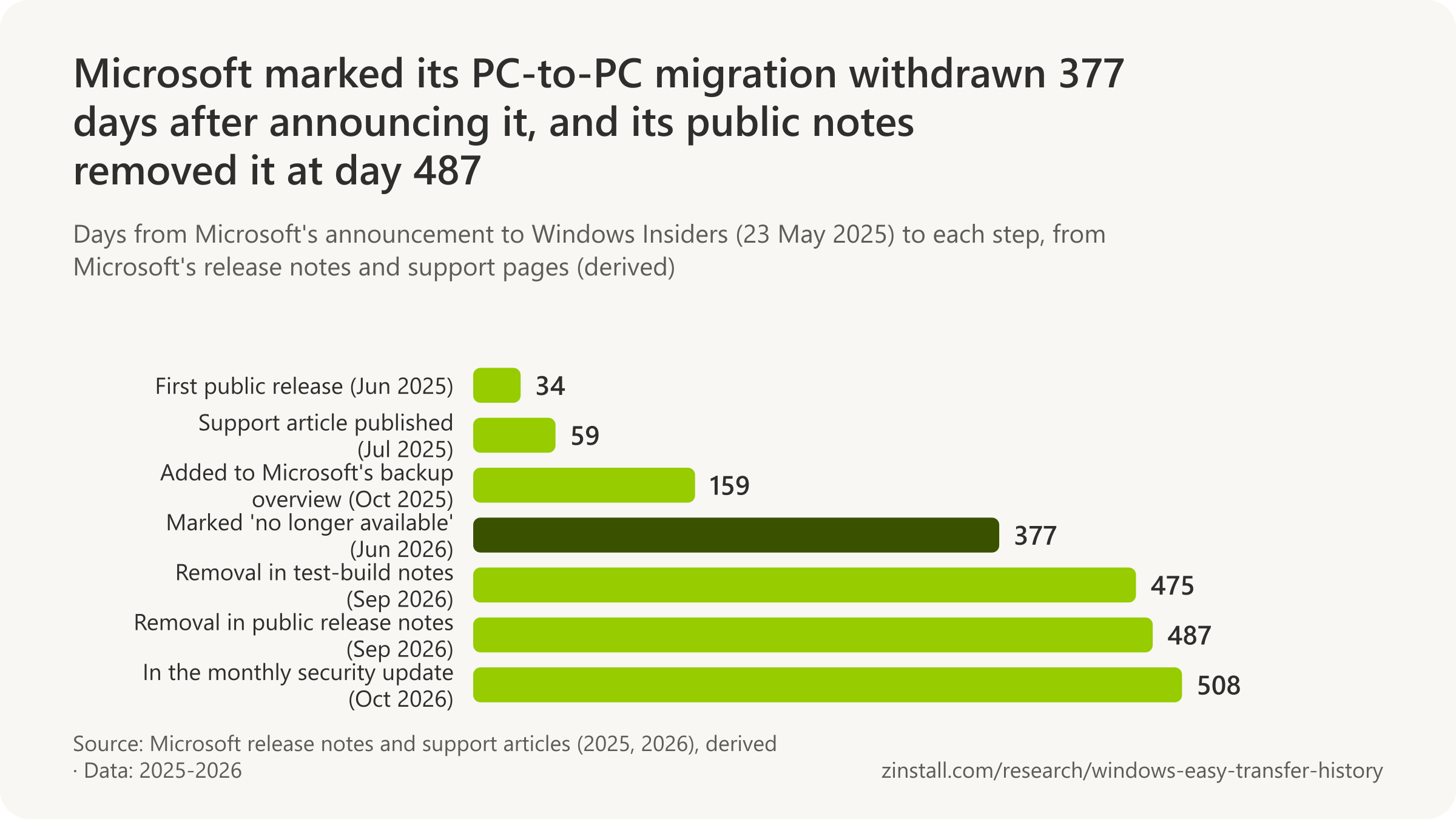
Microsoft's PC-to-PC migration, which copied files over the local network, lasted 487 days before its removal in September 2026 (derived from Microsoft, 2026).

- Windows Backup can save a Windows 10 PC, but restores only to Windows 11 version 22H2 or later.
- The PC-to-PC migration did not move installed apps, saved passwords, OneDrive files or BitLocker-encrypted drives.
- The PC-to-PC migration's support article was marked 'no longer available' on 4 June 2026, pointing readers to Windows Backup.
- The first press report found came on 11 September 2026, the day after the withdrawal appeared in test-build release notes.
- Windows 11 Home has needed a Microsoft account to finish setup since its unveiling in June 2021.
| Question or event | Answer or date |
|---|---|
| Store app restore announced | 24 May 2022 |
| Windows Backup app, first test build | 24 May 2023 |
| Windows Backup reaches Windows 11 | 26 September 2023 |
| Who can use Windows Backup | personal Microsoft account only |
| Apps after a restore | pins back, apps reinstalled |
| What 'Remember my apps' backs up | list of installed apps |
| PC-to-PC requirements | Windows 11 new PC, Microsoft account, same network |
| PC-to-PC documented as working | 318 days |
| Withdrawal in test-build notes | 10 September 2026 |
| Windows 10 end of support | 14 October 2025 |
Sources: Microsoft (2021-2026); Borncity
Related guides: Everything to a new Windows 11 PC · Windows 10 to Windows 11
More statistics (60)
Windows 11 has Windows Backup, which saves settings, the list of installed apps and, through OneDrive, the main folders, then restores them when a new PC is set up with the same Microsoft account. It does not reinstall desktop programs, and it restores only to recent versions of Windows 11. For a little over a year Microsoft also offered a PC-to-PC migration that copied files over the local network during setup; it withdrew it without giving a reason.
Windows Backup
- Microsoft announced on 24 May 2022 that it would test a feature to restore apps previously installed from the Microsoft Store onto a new Windows PC, the start of what became Windows Backup's app restore (Microsoft, 2022).
- Microsoft introduced the Windows Backup app on 24 May 2023 in Windows 11 Insider Preview build 23466, "to quickly get your current PC backed up and ready to move to a new PC", with restore during a new PC's setup (Microsoft, 2023).
- In its first Insider build, Windows Backup did not support all settings or app types, excluding desktop apps from the Store, Android apps and work or school accounts (Microsoft, 2023).
- Microsoft brought the Windows Backup app to Windows 10 on 10 August 2023, in Release Preview build 19045.3391 (Microsoft, 2023).
- Windows Backup reached the public first on Windows 10, on 22 August 2023, in optional update KB5029331 (build 19045.3393), a month before Windows 11 (Microsoft, 2023).
- Windows Backup came with Windows 10's monthly security update of 12 September 2023 (KB5030211); Microsoft says Windows 10 and 11 updates released on or after 22 August 2023 install it (Microsoft, 2024).
- Windows Latest reported on 23 September 2023 that Windows 10's September security update KB5030211 had added the Windows Backup app, which cannot be uninstalled, even to enterprise LTSC systems (Windows Latest, 2023).
- At launch Microsoft said Windows Backup could back up PCs running Windows 10 and later, but restore only to Windows 11 version 22H2 or later during setup with a network connection, everywhere except mainland China (Microsoft, 2023).
- Windows Backup began rolling out to Windows 11 version 22H2 on 26 September 2023, by controlled feature rollout, with broad availability expected by the November 2023 security update (Microsoft, 2023).
- Microsoft's launch post for Windows Backup said some apps reinstall when first opened on the new Windows 11 PC and others must be reinstalled manually from their maker (Microsoft, 2023).
- Microsoft's Windows Backup transfer page says backups can come from Windows 10 and later but restore needs Windows 11 version 22H2 or later, and transfers beyond 5 GB need a Microsoft subscription or trial (Microsoft, 2026).
- Microsoft says Windows Backup "is a system component and cannot be removed"; from updates of 25 January 2024 it is only hidden on Enterprise-managed, domain-joined and similar devices (Microsoft, 2024).
- Microsoft extended Windows Backup on Windows 10 on 13 June 2024 (build 19045.4593) to back up and restore Activity History and printer preferences, "to facilitate a seamless transition to a new PC" (Microsoft, 2024).
- Microsoft says Windows Backup is only for people who sign in with a personal Microsoft account, not Microsoft Entra ID or Active Directory users, who get "This feature is not supported by your organization" (Microsoft, 2024).
- Microsoft's Windows Backup Settings Catalog lists the "Remember my apps" item as backing up the "List of installed apps", and credentials as WPA Wi-Fi profiles and web credentials (Microsoft, 2026).
- Microsoft's Windows Backup article says the app syncs Desktop, Documents, Pictures, Videos and Music to OneDrive (5 GB free) and backs up installed apps, accessibility, accounts, Wi-Fi and passwords, personalization and language settings (Microsoft, 2026).
- Windows Backup needs a personal Microsoft account; Microsoft's article says work or school accounts will not work and that backed-up information is stored with the Microsoft account (Microsoft, 2026).
- When Windows Backup restores onto a new PC, Microsoft says app pins come back, Store apps install when their pin is selected, other apps send you to the web for their installer, and files return through OneDrive (Microsoft, 2026).
The PC-to-PC migration, 2025 to 2026
- Microsoft described the full PC-to-PC migration as transferring files and settings from the old PC to the new one during the new PC's setup, a step it said would come "in a future update" (Microsoft, 2025).
- Microsoft announced the PC-to-PC migration on 23 May 2025, starting its rollout to Windows Insiders in Beta Channel build 26120.4161 (KB5058515) with only the landing and pairing pages in the Windows Backup app (Microsoft, 2025).
- Microsoft's PC-to-PC migration lasted 487 days, about 16 months, from its announcement to Insiders on 23 May 2025 to the public release note of its removal on 22 September 2026 (derived from Microsoft, 2026).
- The PC-to-PC migration reached the Windows Insider Dev Channel in build 26200.5622 on 2 June 2025 (Microsoft, 2025).
- Microsoft announced the PC-to-PC migration for Windows 10 on 19 June 2025, in an addition to its Windows 10 Release Preview post for build 19045.6029; its support article later named Windows 10 as a possible old PC (Microsoft, 2025).
- The PC-to-PC migration's first public release note came on 26 June 2025, in the optional Windows 11 24H2 update KB5060829 (build 26100.4484), which began a phased rollout of the landing and pairing pages (Microsoft, 2025).
- Microsoft published its support article on the PC-to-PC migration, "Transfer your files and settings to a new Windows PC" (KB 5062263), on 21 July 2025, describing a transfer during a new PC's setup (Microsoft, 2025).
- Microsoft's PC-to-PC migration did not move installed applications, saved passwords and sign-in credentials, OneDrive files, system folders or BitLocker-encrypted drives (Microsoft, 2025).
- Microsoft's PC-to-PC migration copied all files across the old PC's folders and drives plus personalization settings such as wallpaper and themes (Microsoft, 2025).
- Microsoft's PC-to-PC migration needed an old PC on Windows 10 or 11, a new PC on "Windows 11, version 2024 or later", both on the same Wi-Fi or wired network, and a Microsoft account with no existing backup; it excluded Arm PCs and China (Microsoft, 2025).
- Microsoft's support article described the PC-to-PC migration as a working feature for 318 days, from its publication on 21 July 2025 to the "no longer available" notice of 4 June 2026 (derived from Microsoft, 2026).
- Pureinfotech reported on 21 July 2025 that Windows 11 setup in Dev and Beta Insider builds now offered to transfer files and settings from an old PC over the local network, without OneDrive (Pureinfotech, 2025).
- Microsoft revised the PC-to-PC article on 2 August 2025, replacing "ARM-based devices are currently not supported" with a processor requirement: most Intel and AMD PCs, other architectures planned (Microsoft, 2025).
- Microsoft added PC-to-PC transfer to its overview "Backup, restore, and recovery in Windows" (KB 5049299) in a revision of 29 October 2025, as a way to move files, settings and preferences with "no external drives or USBs needed" (Microsoft, 2025).
- Microsoft marked the PC-to-PC migration withdrawn on 4 June 2026, when its support article gained the notice "This feature is no longer available. Use Windows Backup and Restore instead" (Microsoft, 2026).
- Microsoft's release notes first said "PC-to-PC Migration is no longer available" on 10 September 2026, for Windows 11 Release Preview builds 26100.9539 and 26200.9539 (Microsoft, 2026).
- Borncity was the first outlet found to report the withdrawal, on 11 September 2026, the day after Microsoft's Release Preview notes (Borncity, 2026).
- Neowin, the first English-language outlet found to report the withdrawal (12 September 2026), noted that Microsoft did not explain why it removed the PC-to-PC migration (Neowin, 2026).
- Windows Latest headlined on 16 September 2026: "Microsoft built a local PC-to-PC transfer tool for Windows 11, now it's killing it to push OneDrive-based solution" (Windows Latest, 2026).
- Microsoft's public release notes confirmed the withdrawal on 22 September 2026: optional update KB5124010 for Windows 11 says "PC-to-PC Migration is no longer available" and points to Windows Backup (Microsoft, 2026).
- Microsoft's October 2026 security update KB5127648 (13 October 2026) says it includes the improvements of KB5124010, the update whose notes removed the PC-to-PC migration, carrying the removal into the monthly security update (Microsoft, 2026).
- How-To Geek's 2 November 2026 report "Windows 11 just lost an easy way to move files, and Microsoft wants you on OneDrive" said the removal reached regular users with the 13 October 2026 Patch Tuesday update (How-To Geek, 2026).
A Microsoft account at setup
- When Microsoft unveiled Windows 11 on 24 June 2021, its specifications page said Windows 11 Home requires internet connectivity and a Microsoft account to complete setup on first use (Microsoft, 2021).
- Microsoft extended the requirement to Windows 11 Pro in Insider build 22557 on 16 February 2022: internet during setup, and a Microsoft account when the PC is set up for personal use (Microsoft, 2022).
- Between its captures of 1 September and 1 October 2022, the month Windows 11 version 22H2 shipped, Microsoft's specifications page began saying that Windows 11 Pro for personal use and Windows 11 Home require a Microsoft account during setup (Microsoft, 2022).
- Microsoft's Windows Backup transfer page answers "Do I need a Microsoft account for Windows 11?" with "Yes", adding that Home and Pro need one to complete setup (Microsoft, 2026).
- Microsoft removed the bypassnro.cmd setup workaround in Insider build 26200.5516 on 28 March 2025 so that "all users exit setup with internet connectivity and a Microsoft Account" (Microsoft, 2025).
- Microsoft announced on 6 October 2025 (Insider build 26220.6772) that it was removing the known ways to create a local account during Windows setup; users must finish setup with internet and a Microsoft account (Microsoft, 2025).
Windows 10's end of support and the ESU route
- Windows 10 was released on 29 July 2015, the start date Microsoft's lifecycle listing gives for Windows 10 Home and Pro (Microsoft, 2015).
- Windows 11 Home and Pro has a lifecycle start date of 4 October 2021 (version 21H2); the public release was announced for 5 October 2021 (Microsoft, 2021).
- Microsoft first announced a consumer ESU option for Windows 10 on 31 October 2024, as a one-year option for $30 USD, the first time a Windows ESU was offered for personal use (Microsoft, 2024).
- Euroconsumers announced on 22 September 2025 that the free EEA ESU year does not require Microsoft Rewards, OneDrive or other tied services, after more than two years of advocacy under the Digital Markets Act (Euroconsumers, 2025).
- Windows 10 Home and Pro (version 22H2, the final version) reached end of support on 14 October 2025, after which no further security updates are issued without ESU (Microsoft, 2025).
- On the day after Windows 10's end of support, Microsoft's ESU page offered free enrolment for "syncing your PC Settings", 1,000 Rewards points or $30, all ending on 13 October 2026, a date it later moved to 12 October 2027 (Microsoft, 2025).
- Consumer ESU coverage for personal Windows 10 devices starts on 15 October 2025, the day after end of support; the enrolment wizard rolled out from July 2025 with broad availability by mid-August 2025 (Microsoft, 2025).
- Consumer ESU coverage for Windows 10 now runs through 12 October 2027, and already-enrolled devices continue automatically; enrolment stays open until the program ends on 12 October 2027 (Microsoft, 2026).
- Consumer ESU is available at no additional cost to users who sync their PC settings to a Microsoft account with Windows Backup (Microsoft, 2026).
- Consumer ESU requires Windows 10 version 22H2 (Home, Professional, Pro Education or Workstations), the latest update, the ESU Licensing Preparation Package KB5126256, and an administrator Microsoft account (Microsoft, 2026).
- Consumers can enrol a Windows 10 PC in ESU in one of three ways: at no additional cost by syncing PC settings, by redeeming 1,000 Microsoft Rewards points, or by a one-time purchase of $30 USD plus tax (Microsoft, 2026).
- Microsoft confirmed on 25 September 2025 that consumers in the European Economic Area get Windows 10 ESU free without syncing PC settings, saying it was updating the enrolment process to meet local expectations (Windows Central, 2025).
- Microsoft's editor's note of 25 June 2026 on its June 2025 blog post says the consumer ESU program for personal-use devices is being provided for an additional year, with coverage through 12 October 2027 (Microsoft, 2026).
Sources: Microsoft (2021-2026); Windows Latest (2023, 2025, 2026); Pureinfotech; Borncity; Neowin; How-To Geek; Euroconsumers; Windows Central
What replaced Windows Easy Transfer?
'Move your files to a new Windows PC' still recommends OneDrive, with 5 GB free, or an external drive, and not Windows Backup (Microsoft, 2026).
- Five months after the withdrawal notice, the PC-to-PC transfer was still offered in the official backup overview in November 2026.
- The Windows 10 end-of-support page answers the same question with Windows Backup, for 'files, photos, settings, apps'.
- The Surface setup page still linked to the PC-to-PC article that says 'This feature is no longer available'.
- The transfer page put OneDrive first, ahead of Laplink, in June 2019.
| Page | Advice or date |
|---|---|
| Windows 10 help (Sep 2015) | Backup and Restore (Windows 7) kept |
| Windows 7 end-of-support page (Jan 2020) | OneDrive, or an external drive |
| 'Move files using Backup and Restore' (Jul 2020) | Backup and Restore plus an external drive |
| 'Move your files to a new Windows PC' (Aug 2020) | OneDrive first, external drive second |
| Transfer page becomes Windows Backup's | 26 December 2023 |
| Backup overview adds PC-to-PC | 29 October 2025 |
| 'Move your files' while PC-to-PC existed | no mention of PC-to-PC |
Sources: Microsoft (2015-2026)
Related guides: Windows Easy Transfer on Windows 11 · Files from an old computer
More statistics (13)
Microsoft's answer to 'how do I move to a new PC?' changed with almost every year: Laplink's PCmover Express first, then OneDrive and an external drive, then Windows Backup, then briefly the PC-to-PC migration. On one day in November this year its pages gave three different answers, and one of them was a tool it had withdrawn months earlier.
Microsoft's advice over the years
- Windows 10 kept Windows 7's Backup and Restore so that backups made on earlier Windows versions stayed usable, Microsoft's help said in September 2015 (Microsoft, 2015).
- Between its captures of 23 and 30 June 2019, Microsoft's transfer page switched from Laplink first to OneDrive first, with Laplink's PCmover one of three options beside a USB or external drive (Microsoft, 2019).
- On the eve of Windows 7's end of support (capture of 13 January 2020), Microsoft's Windows 7 page answered "How do I transfer my personal files to a new computer?" with OneDrive, or an external drive or Backup and Restore, and named no transfer tool (Microsoft, 2020).
- Microsoft's support article "Move files using Backup and Restore" (first published 29 July 2020) told people moving off a Windows 7 or 8.1 PC to back up to an external drive and restore on the new device, in its last revision of 10 December 2024; by 12 April 2026 it redirected to "Move your files to a new Windows PC" (Microsoft, 2024).
- Microsoft's support article "Move your files to a new Windows PC" (first published 4 August 2020) recommends OneDrive first and an external hard drive or network drive second, and names no transfer tool (Microsoft, 2022).
- Microsoft removed Laplink from its transfer page between its captures of 8 and 15 September 2021, leaving OneDrive and a USB or external drive as the only options (Microsoft, 2021).
- Between 29 June and 26 December 2023 Microsoft's transfer page (microsoft.com/windows/transfer-your-data) began redirecting to its page "Transfer your data with Windows Backup" (Microsoft, 2023).
What Microsoft's pages say on 17 November 2026
- Microsoft's "Move your files to a new Windows PC" never mentioned the PC-to-PC migration while it existed: its captures of 24 July 2025, 28 November 2025 and 22 June 2026 still offered only OneDrive or an external drive (Microsoft, 2026).
- Microsoft's Windows 10 end-of-support page (revised 25 June 2026) answers how to move to a new computer with Windows Backup, which it says transfers "files, photos, settings, apps, and log in credentials" (Microsoft, 2026).
- On 17 November 2026, five months after the withdrawal notice, Microsoft's overview "Backup, restore, and recovery in Windows" (KB 5049299) still presented PC-to-PC transfer as a current option (Microsoft, 2026).
- On 17 November 2026 Microsoft's "Move your files to a new Windows PC" (dated 29 September 2026, for Windows 11 and 10) still recommended OneDrive, with 5 GB free, or an external drive, and did not mention Windows Backup (Microsoft, 2026).
- On 17 November 2026 the navigation of Microsoft's Windows backup support pages, headed "Backup & restore, PC-to-PC transfer, and recovery options in Windows", listed only the withdrawn PC-to-PC transfer and an external drive under "Transfer to a new PC" (Microsoft, 2026).
- Microsoft's "Set up your Surface" page still told buyers without a backup that they could move files, settings and preferences from their previous PC, linking to the PC-to-PC transfer article that itself says "This feature is no longer available", when checked on 17 November 2026 (Microsoft, 2026).
Sources: Microsoft (2015-2026)
How much free OneDrive storage do you get?
Free OneDrive storage fell to 5 GB in July 2016 and is still 5 GB in 2026, a fifth of the 2008 peak (BetaNews, 2016).

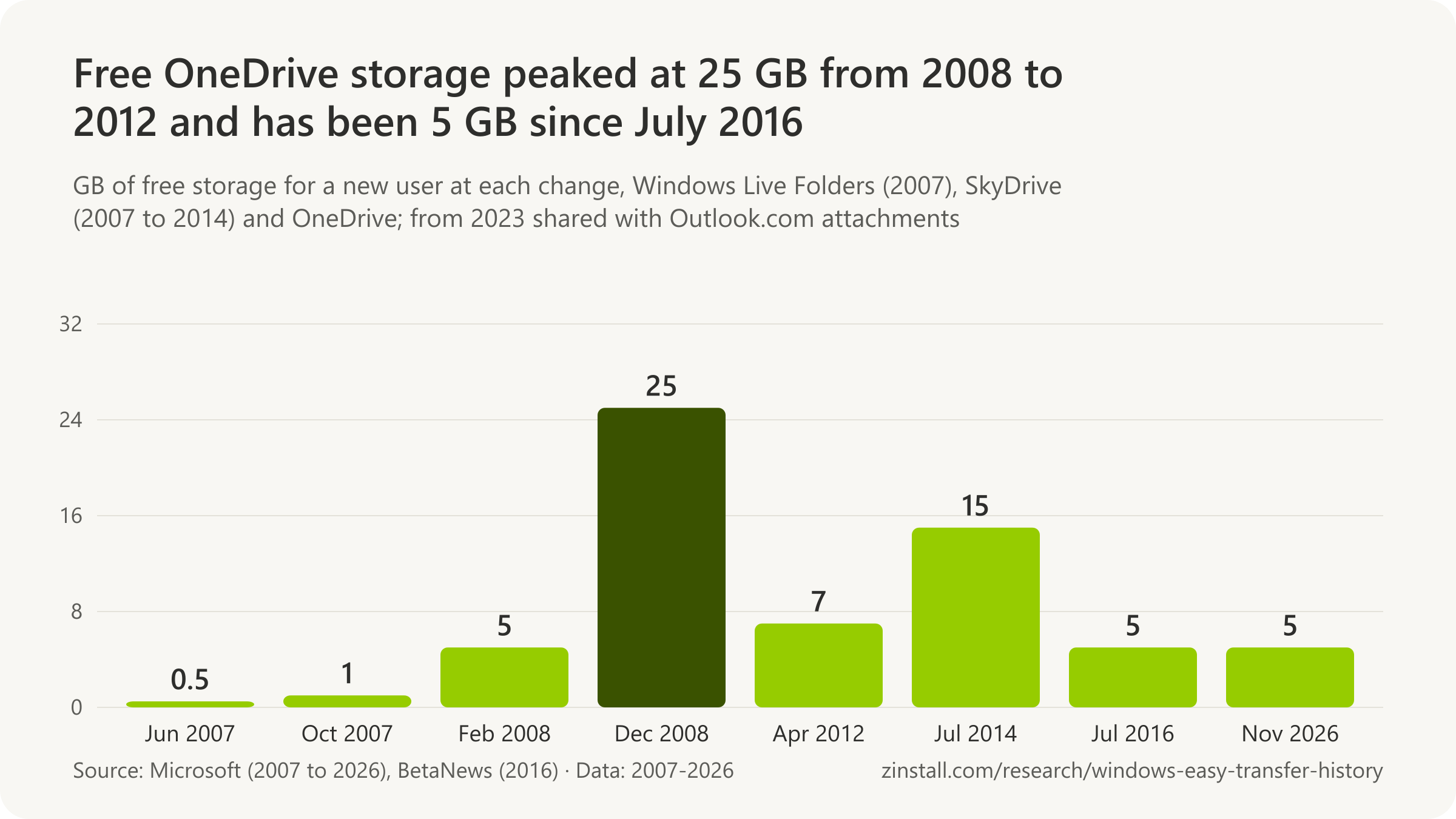
- SkyDrive began giving everyone 25 GB free in December 2008, the most the service ever offered.
- New users' free storage fell to 7 GB in April 2012, which the company said was enough for over 99% of people.
- Windows 8's settings sync could not carry desktop programs or their settings between PCs outside a company domain.
- In June 2024 Windows 11 setup was found turning on OneDrive folder backup without asking, with no announcement.
- Windows Backup will not save wallpaper, theme or Start layout without OneDrive sign-in and enough OneDrive storage.
| Event | Date or figure |
|---|---|
| Windows Live Folders beta opens | 26 June 2007 |
| Renamed Windows Live SkyDrive | 9 August 2007 |
| SkyDrive users (May 2012) | 130 million |
| Built into Windows | October 2013 (Windows 8.1) |
| OneDrive launches | 19 February 2014 |
| People with under 15 GB of files on their PC (2014) | 3 in 4 |
| People using OneDrive (Oct 2015) | Over 500 million |
| Free storage cut announced (Nov 2015) | 15 GB to 5 GB |
| Known Folder Move announced | 27 June 2018 |
| Outlook.com attachments count against it | 1 February 2023 |
Sources: BetaNews; Microsoft (2007-2026); Neowin
Related guides: Back up everything to OneDrive · Windows 10 to Windows 11
More statistics (79)
OneDrive began as Windows Live Folders, became SkyDrive and took its current name in the year after Windows 8.1. It is where Microsoft has sent people moving to a new PC since the late twenty-tens, and where Windows Backup keeps their folders, but its free allowance is a fifth of what SkyDrive gave new users in its most generous years. Settings sync, which Microsoft introduced with Windows 8 as the answer to losing everything on a new PC, has been cut back feature by feature.
Free storage
- Windows Live Folders opened its managed beta on 26 June 2007 with 500 MB of free online storage (Microsoft, 2007).
- Windows Live SkyDrive doubled its free storage from 500 MB to 1 GB for everyone on 11 October 2007, during the beta (Microsoft, 2007).
- Windows Live SkyDrive left beta on 21 February 2008 and raised free storage from 1 GB to 5 GB (Microsoft, 2008).
- Microsoft announced on 13 November 2008 that Windows Live SkyDrive would raise everyone's free storage from 5 GB to 25 GB (Microsoft, 2008).
- SkyDrive's 25 GB free allowance, the largest Microsoft ever gave, lasted about 3 years and 4 months for new users, from its roll-out on 2 December 2008 to the cut to 7 GB on 23 April 2012 (derived from Microsoft, 2008 and 2012).
- 25 GB of free Windows Live SkyDrive storage began rolling out on 2 December 2008 with the new Windows Live web services, the largest free allowance the service ever offered (Microsoft, 2008).
- 99.94% of SkyDrive customers used 7 GB or less in April 2012, the figure Microsoft gave for cutting the free allowance to 7 GB (Microsoft, 2012).
- Microsoft cut SkyDrive's free storage for new users from 25 GB to 7 GB on 23 April 2012, saying 7 GB was enough for over 99% of people (Microsoft, 2012).
- Existing SkyDrive users who had uploaded files by 22 April 2012 could opt in for a limited time to keep 25 GB free when the free allowance dropped to 7 GB (Microsoft, 2012).
- 77% of cloud-familiar consumers had content on a device that was not backed up elsewhere, and 69% would rather lose the device than its content, in a Harris Poll survey of 801 US adults commissioned by Microsoft for OneDrive's launch (Microsoft, 2014).
- OneDrive launched on 19 February 2014 with 7 GB of free storage, the same as SkyDrive's allowance for new users since 2012, plus paid add-ons of 50, 100 and 200 GB (Microsoft, 2014).
- 3 out of 4 people had less than 15 GB of files stored on their PC, Microsoft's data showed in June 2014, the reason it gave for raising OneDrive's free storage to 15 GB (Microsoft, 2014).
- Microsoft announced on 23 June 2014 that OneDrive's free storage would rise from 7 GB to 15 GB, with 1 TB for Office 365 subscribers, taking effect within the next month (Microsoft, 2014).
- Microsoft's OneDrive plans page showed 15 GB free in its capture of 19 July 2014, where the capture of 29 May 2014 had shown 7 GB (Microsoft, 2014).
- Microsoft announced unlimited OneDrive storage for Office 365 subscribers on 27 October 2014, an offer it withdrew for consumers on 2 November 2015 (Microsoft, 2014).
- Some Office 365 consumer subscribers stored more than 75 TB each on unlimited OneDrive, 14,000 times the average, the reason Microsoft gave in November 2015 for ending unlimited storage (Microsoft, 2015).
- Microsoft announced on 2 November 2015 that free OneDrive storage would fall from 15 GB to 5 GB for all users, current and new, and that the 15 GB camera roll bonus would end, from early 2016 (Microsoft, 2015).
- After the backlash, Microsoft let existing free OneDrive users keep 15 GB and the 15 GB camera roll bonus by opting in on a OneDrive page by 31 January 2016; the page was live by 11 December 2015 (Microsoft, 2015).
- The cut of free OneDrive storage to 5 GB rolled out in waves between 13 and 27 July 2016 for users who had not opted in, BetaNews reported on 14 July 2016 (BetaNews, 2016).
- Free OneDrive storage has stayed at 5 GB for more than ten years, from the July 2016 cut to November 2026, 80% less than SkyDrive's 25 GB of 2008 to 2012 (derived from BetaNews, 2016, and Microsoft, 2008 and 2026).
- Microsoft e-mailed free OneDrive users in April 2016 that the cut from 15 GB to 5 GB and the end of the camera roll bonus would take effect on 27 July 2016, Windows Central reported on 22 April 2016 (Windows Central, 2016).
- Microsoft's OneDrive help page of August 2020 called the feature 'PC folder backup', covered the Desktop, Documents and Pictures folders, and said it cost nothing extra up to 5 GB of files without a subscription (Microsoft, 2020).
- From 1 February 2023 Outlook.com attachments began counting toward the same cloud storage quota as OneDrive files, including backed-up Desktop, Documents and Pictures folders, Microsoft announced in late 2022 (Microsoft, 2022).
From Live Folders to OneDrive

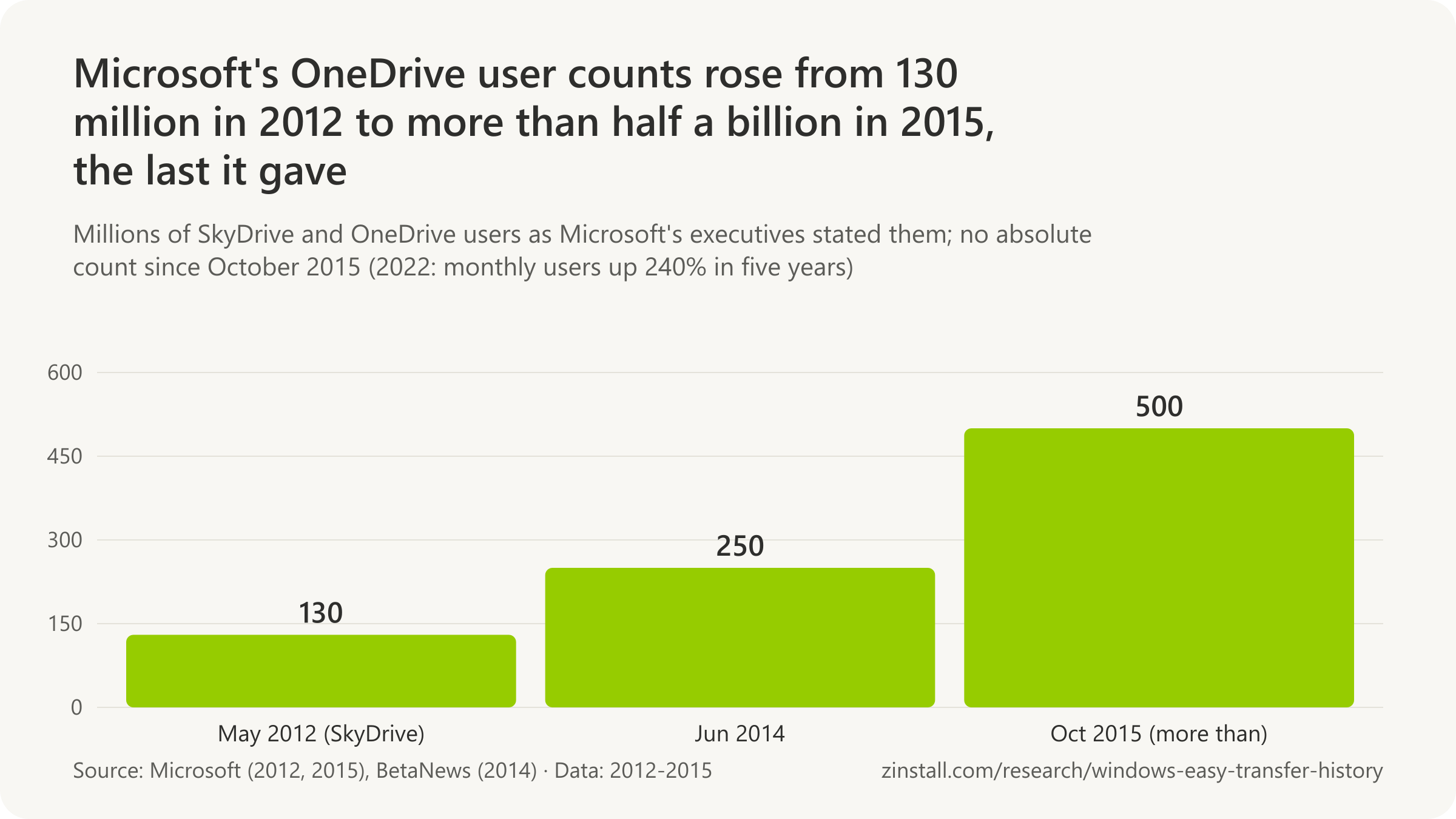
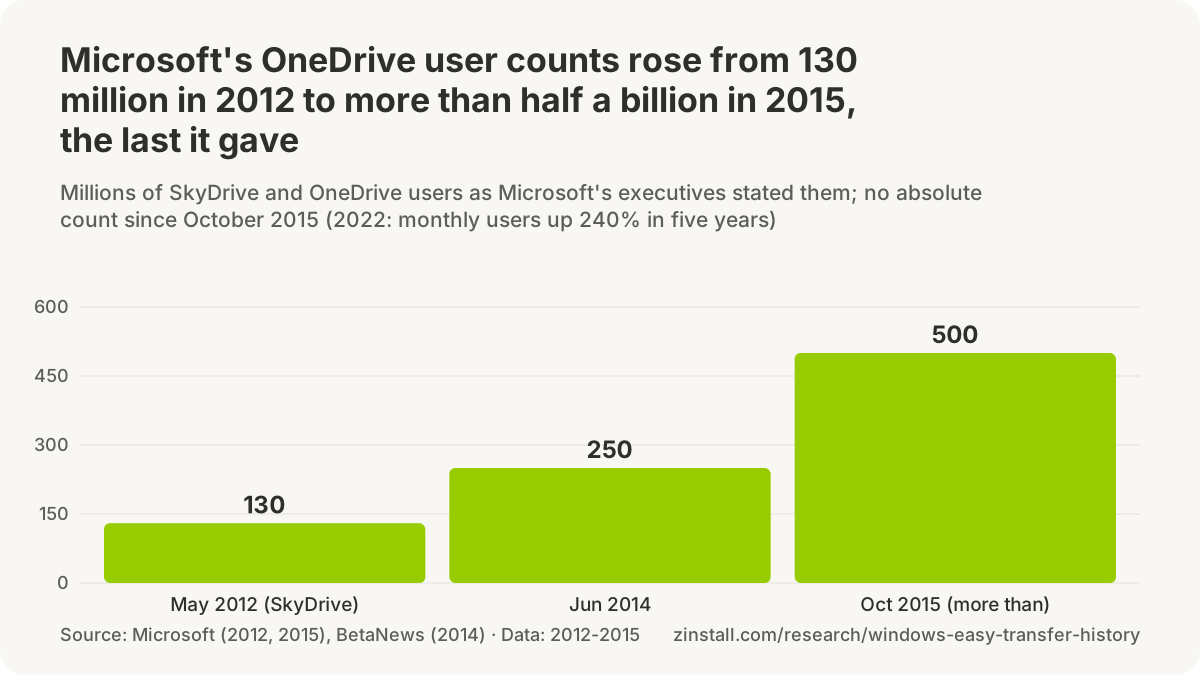
- Windows Live Folders, the service later renamed SkyDrive and then OneDrive, entered a limited managed beta in the United States on 26 June 2007 (Microsoft, 2007).
- Microsoft's own fifteenth-anniversary post dates OneDrive's start to August 2007, the SkyDrive name, although Windows Live Folders had opened its beta with 500 MB on 26 June 2007 (Microsoft, 2022).
- Microsoft renamed Windows Live Folders to Windows Live SkyDrive on 9 August 2007, still in beta and still with 500 MB of free space (Microsoft, 2007).
- Windows Live SkyDrive was available in 38 countries and regions when it left beta on 21 February 2008: the United States, the United Kingdom and India plus 35 new markets (derived from Microsoft, 2008).
- Microsoft released the preview of SkyDrive for the Windows desktop on 23 April 2012, putting SkyDrive files in Windows Explorer on Windows 8, Windows 7 and Windows Vista (Microsoft, 2012).
- SkyDrive had over 130 million users, 17 million of whom uploaded files each month, Microsoft said in May 2012 as it folded Windows Live into Windows 8 (Microsoft, 2012).
- On 2 May 2012 Microsoft folded its Windows Live services into Windows 8 under plain names, with SkyDrive (app, desktop app and SkyDrive.com) listed as the successor of FolderShare, Live Mesh and Windows Live Mesh and Windows Live ID becoming Microsoft account (Microsoft, 2012).
- Windows 8.1, released in October 2013, built SkyDrive into Windows itself, with 'smart files' that showed the whole SkyDrive in File Explorer without downloading every file (Microsoft, 2013).
- Microsoft announced on 27 January 2014 that SkyDrive would be renamed OneDrive, and SkyDrive Pro would become OneDrive for Business (Microsoft, 2014).
- OneDrive, formerly SkyDrive, launched worldwide on 19 February 2014, and existing SkyDrive sign-ins carried over (Microsoft, 2014).
- 250 million OneDrive users was the count Microsoft's Tony Prophet gave in a Computex keynote in June 2014 (BetaNews, 2014).
- OneDrive in Windows went almost three years without online-only placeholder files, from Windows 10 build 9879 in November 2014 to Files On-Demand in the Fall Creators Update of October 2017 (derived from Microsoft, 2014 and 2017).
- Windows 10 Technical Preview build 9879 of 12 November 2014 replaced Windows 8.1's OneDrive placeholders with selective sync, after users found 'online-only' files missing when offline (Microsoft, 2014).
- More than half a billion people managed their documents and photos in OneDrive, Microsoft CEO Satya Nadella said on the company's earnings call of 22 October 2015, the last absolute OneDrive user figure from Microsoft this research found (Microsoft, 2015).
- OneDrive Files On-Demand, announced at Build 2017 for the Windows 10 Fall Creators Update, reached Windows Insiders on build 16215 on 13 June 2017 (Microsoft, 2017).
- OneDrive Files On-Demand shipped with the Windows 10 Fall Creators Update, which began rolling out on 17 October 2017, showing OneDrive files in File Explorer without downloading them (Microsoft, 2017).
- 240% more monthly active users of OneDrive in five years is the growth Microsoft reported for OneDrive's fifteenth anniversary in August 2022, without an absolute count (Microsoft, 2022).
Settings sync, from Windows 8 to Windows Backup
- Windows 8 settings sync was designed to carry the lock screen picture, desktop background, user tile, browser favorites and history, spell check dictionaries, Explorer, mouse and accessibility settings to each PC (Microsoft, 2011).
- Windows 8 settings sync data did not count against the user's Windows Live storage quota and was stored separately from SkyDrive files, Microsoft said in September 2011 (Microsoft, 2011).
- Microsoft announced on 26 September 2011 that Windows 8 would sync a user's settings through the cloud to any Windows 8 PC signed in with the same Windows Live ID, citing the work lost when people buy a new PC (Microsoft, 2011).
- Microsoft said in September 2011 that Windows 8 settings sync could not roam desktop (non-Metro) programs and their settings without a domain, and discouraged tools that copy programs through the registry (Microsoft, 2011).
- Microsoft said in May 2012 that Windows 8 would roam settings through the cloud so a user could log in to a new PC and pick up where they left off, with SkyDrive holding documents, photos and PC settings (Microsoft, 2012).
- Microsoft's Windows 8 help page, captured on 25 October 2012, the eve of release, said signing in with a Microsoft account synced colors, themes, language preferences, browser history and favorites, and Windows Store app settings between PCs (Microsoft, 2012).
- With the Windows 8.1 Preview of 26 June 2013, Microsoft said the Start screen layout, installed apps and pins synced across a user's Windows 8.1 PCs, more than Windows 8 synced (Microsoft, 2013).
- Microsoft's Windows 8.1 help page said a Microsoft account stored personal settings in OneDrive and synced them, including the Start screen layout, to any Windows 8.1 PC the user signed in to (Microsoft, 2015).
- Enterprise State Roaming, settings sync for Windows 10 with work or school accounts, became generally available on 24 June 2016 as a feature of Azure Active Directory Premium, pitched as protection against device replacement (Microsoft, 2016).
- Microsoft deprecated Windows' System Image Backup (the Backup and Restore (Windows 7) control panel) in Windows 10 version 1709, pointing users to third-party full-disk backup or to OneDrive for data files (Microsoft, 2026).
- Windows 10's Sync settings synced the chosen settings, such as browser settings, passwords and color themes, across Windows 10 devices signed in with the same Microsoft account and also saved them in OneDrive, Microsoft's help page said in 2017 (Microsoft, 2017).
- Roaming of taskbar settings was removed in Windows 10 version 1909, after Microsoft announced in version 1903 that it was no longer being developed (Microsoft, 2026).
- Roaming of personalization settings, including wallpaper, slideshow, accent colors and lock screen images, was marked no longer in development in Windows 10 version 21H1 (Microsoft, 2026).
- Windows stopped uploading new Timeline activity for Microsoft accounts in July 2021 and stopped cross-device syncing of Microsoft Entra activity history from January 2024 (Microsoft, 2026).
- Package State Roaming, which let Windows Store (UWP) apps sync their data between a user's PCs, was deprecated in Windows 10 version 1909 and removed in Windows 11 (Microsoft, 2026).
- Microsoft's documentation says Enterprise State Roaming reduces the time needed to configure a new device and works like the consumer settings sync first introduced in Windows 8, and needs a Microsoft Entra ID P1 or P2 or EMS licence (Microsoft, 2024).
- Microsoft updated its deprecation notice for 'Sync your settings' on 30 July 2024: sync would move to a single cloud storage system shared with Enterprise State Roaming, needing Windows 11 or Windows 10 version 21H2 or later (Microsoft, 2024).
- Windows Backup will not back up personalization preferences such as wallpaper, theme and Start layout without OneDrive sign-in and enough OneDrive storage, Microsoft's 2026 help page says, unlike Windows 8's settings sync, which did not count against storage (Microsoft, 2026).
- Enterprise State Roaming management moved from the Microsoft Entra admin center to Windows settings backup and restore in July 2026; without new policies, ESR stops working after a one-year grace period (Microsoft, 2026).
Backup on by default
- Paul Thurrott reported on 21 January 2026 that, on every new or reset Windows 11 PC since September 2023, declining OneDrive folder backup during setup was followed days later by a prompt and then by Windows enabling it silently (Thurrott, 2026).
- Neowin reported on 24 June 2024 that Windows 11 setup, when completed online with a Microsoft account, turned on OneDrive folder backup without asking, a change Microsoft made without any announcement (Neowin, 2024).
- The Register reported on 26 June 2024 that Windows 11 setup had dropped the prompts to turn on OneDrive folder backup in favour of turning it on by default for new installations with a Microsoft account, not for existing ones (The Register, 2024).
- Paul Thurrott wrote on 4 July 2024 that Windows 11 setup turning on OneDrive folder backup was not new in June 2024: Home gave no choice and Pro did, and he had reported silent enabling since October 2023 (Thurrott, 2024).
Folder backup and Known Folder Move
- Known Folder Move worked on Windows 7, Windows 8 and Windows 10 and was to reach all OneDrive for Business users by the end of July 2018, Microsoft said when it announced the feature (Microsoft, 2018).
- Microsoft announced Known Folder Move for OneDrive on 27 June 2018, a single button to move the Desktop, Documents and Pictures folders into OneDrive, rolling out to business Targeted Release customers that week (Microsoft, 2018).
- OneDrive folder protection, the consumer version of Known Folder Move, began rolling out broadly to personal accounts in the week of 15 August 2018, a Microsoft spokesperson told The Verge (The Verge, 2018).
- Silent deployment of Known Folder Move, letting IT move users' known folders into OneDrive without user interaction, reached production builds of OneDrive on 17 October 2018 (Microsoft, 2018).
- Microsoft published a guide for moving files off a Windows 7 PC to a new PC with OneDrive by May 2019, eight months before Windows 7's end of support, using OneDrive's folder protection for Desktop, Documents and Pictures (Microsoft, 2019).
- Microsoft's 2019 guide for moving from a Windows 7 PC to a new PC with OneDrive said clicking Next through Windows 10 setup, including its 'Protect your files with OneDrive' screen, brought the Desktop, Documents and Pictures files across (Microsoft, 2019).
- When a user stopped OneDrive PC folder backup, files already backed up stayed in OneDrive and had to be moved back to the PC by hand, Microsoft's help page said in August 2020 (Microsoft, 2020).
- Microsoft's guide 'Move files off a Windows 8.1 PC with OneDrive', first captured on 24 June 2022, tells Windows 8.1 users, unsupported from 10 January 2023, to move their files to a new device through OneDrive (Microsoft, 2022).
- Microsoft recommends that enterprises and large organizations move users' known folders (Desktop, Documents, Pictures, Screenshots and Camera Roll) to OneDrive so files are backed up and reachable from any device, per its IT documentation of March 2025 (Microsoft, 2025).
- OneDrive folder backup on Windows covers the Desktop, Documents, Music, Pictures and Videos folders, Microsoft's help page said in March 2026, up from three folders in 2020 (Microsoft, 2026).
- On Windows, stopping OneDrive folder backup now asks whether to keep the files only in OneDrive, removing them from the PC, or only on the PC, removing them from OneDrive, per Microsoft's March 2026 help page (Microsoft, 2026).
- Microsoft's guide 'Move files to a new Windows PC using OneDrive', online since at least May 2022 and updated in October 2026, tells Windows 10 and 11 users to sync files to OneDrive on the old PC, sign in on the new PC and then turn on PC folder backup (Microsoft, 2026).
Sources: Microsoft (2007-2026); BetaNews (2014, 2016); Windows Central; Thurrott.com (2024, 2026); Neowin; The Register; Windows Latest; The Verge
What is the User State Migration Tool (USMT)?
USMT arrived with Windows XP in 2001 as the IT departments' counterpart to the Files and Settings Transfer Wizard (Microsoft, 2001).

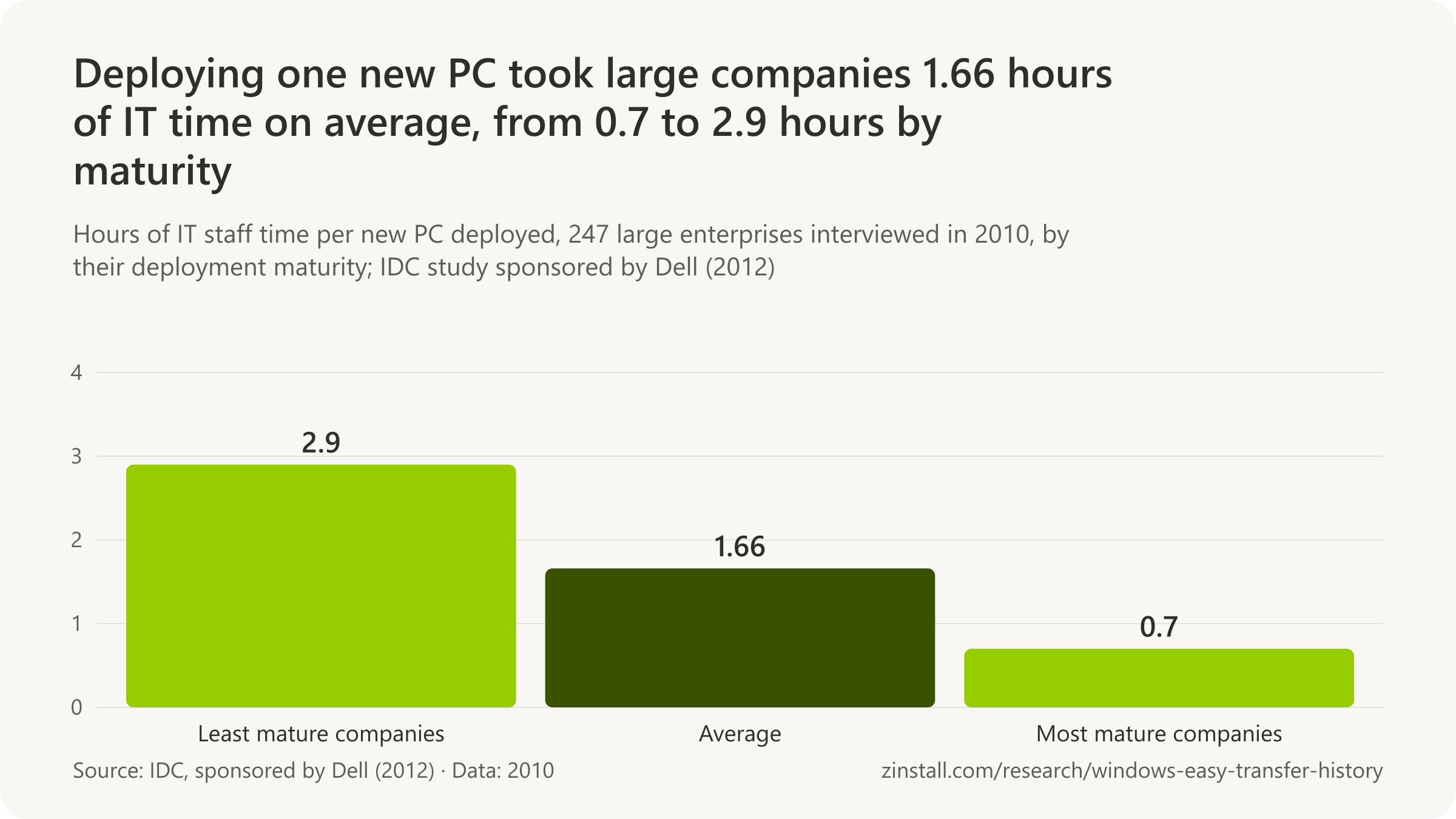
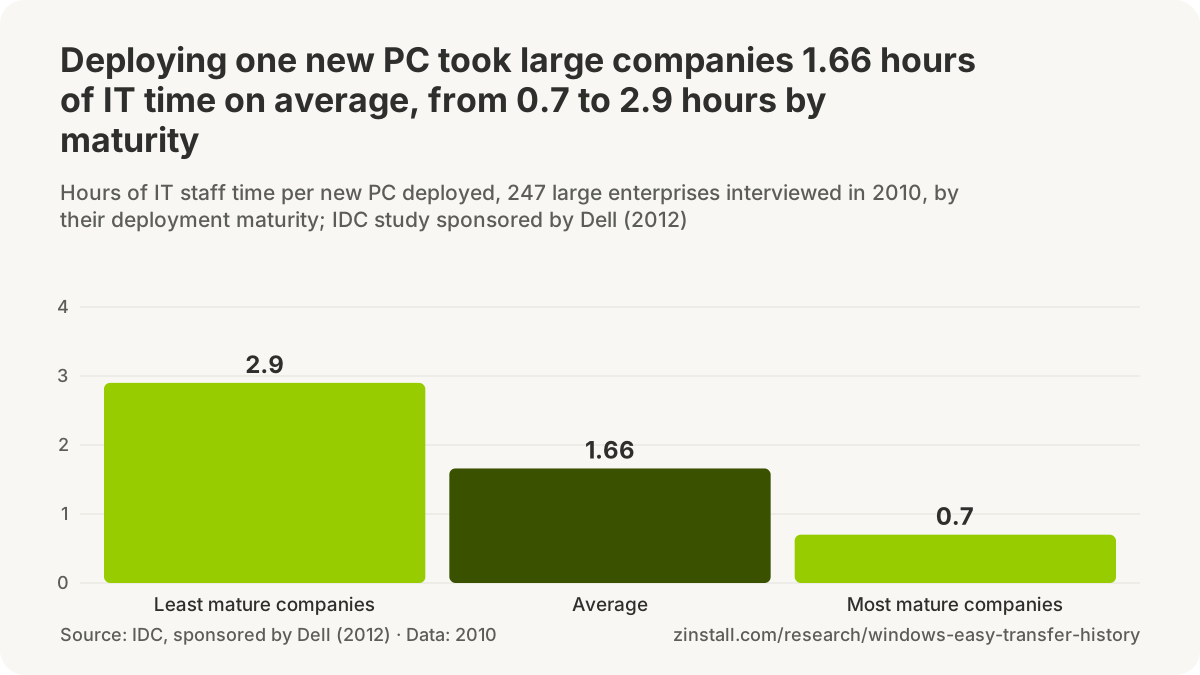
- USMT never moves programs: drivers, passwords, application files and DLLs stay behind, in 2025 as in 2008.
- The free Microsoft Deployment Toolkit was retired on 6 January 2026; its last build dated from January 2019.
- For refreshed business PCs, Autopilot guidance moves users' data through OneDrive rather than a state migration.
- 40% of 247 large enterprises still copied users' files to new PCs by hand, in a 2010 study sponsored by Dell.
| Release or question | Date or answer |
|---|---|
| USMT 2.6 | 13 October 2004 |
| USMT 3.0, for Windows Vista | 18 November 2006 |
| USMT 4.0, in the Windows 7 kit | 6 August 2009 |
| USMT 5.0, in the Windows 8 kit | 31 July 2012 |
| USMT for Windows 8.1 | 17 October 2013 |
| Latest Windows kits with USMT | September and October 2026 |
| USMT today: targets | Windows 10 or 11 as targets |
| Free space a hard-link store needs | 250 MB |
| MDT's last build | 25 January 2019 |
| On Microsoft's deprecated list (Nov 2026) | Not deprecated |
Sources: Microsoft (2001-2026); IDC, sponsored by Dell
Related guides: A guide to USMT · A new PC on a new domain
More statistics (91)
USMT is Microsoft's command-line tool for IT departments, the counterpart of the Files and Settings Transfer Wizard and Windows Easy Transfer, and the one Microsoft tool from that era still shipping. Like them it moves accounts, files and settings, never programs. Microsoft's free deployment toolkit that ran it has been retired, and for new PCs Microsoft now points businesses to Autopilot, OneDrive and a settings backup instead of a state migration.
USMT, version by version
- The User State Migration Tool (USMT) arrived with Windows XP in 2001 as the IT administrators' counterpart to the Files and Settings Transfer Wizard, in a Microsoft paper first published on 1 June 2001 (Microsoft, 2001).
- 50 MB of intermediate storage was often enough for a typical user's state, Microsoft said of the first User State Migration Tool for Windows XP (Microsoft, 2001).
- The first User State Migration Tool was for administrators only and required a client computer connected to a Windows Server domain controller (Microsoft, 2001).
- The first User State Migration Tool restored user state only onto a fresh, not upgraded, installation of Windows XP Professional, after the disk was reformatted and applications reinstalled (Microsoft, 2001).
- Microsoft described the first User State Migration Tool as giving administrators all the functionality of Windows XP's Files and Settings Transfer Wizard plus full customisation, such as registry changes (Microsoft, 2001).
- The first User State Migration Tool, for Windows XP, collected user state from Windows 95, 98, NT Workstation 4.0 or 2000 Professional and restored it only to Windows XP Professional (Microsoft, 2001).
- USMT 2.6 was published on Microsoft's Download Center on 13 October 2004 as a 1.6 MB installer for deployments of Windows 2000 or Windows XP (Microsoft, 2004).
- USMT 2.6 accepted Windows 95, 98, 98 SE, ME, NT, 2000 SP4 and XP as sources and restored to Windows 2000 or Windows XP Professional, adding unattended migration, multi-user profiles and compression (Microsoft, 2004).
- USMT 2.6.1 was published on Microsoft's Download Center on 11 November 2005, still for deployments of Windows 2000 or Windows XP (Microsoft, 2005).
- USMT 2.6.2 was published on 22 July 2006, differing from 2.6.1 only by a fix for a Microsoft Excel error after migration (Microsoft, 2006).
- USMT 3.0, the version for Windows Vista, was published on Microsoft's Download Center on 18 November 2006, for deployments of Windows XP and Windows Vista (Microsoft, 2006).
- USMT 3.0 stopped collecting from Windows 95, 98, Millennium Edition and NT Workstation 4.0 and stopped restoring to Windows 2000, dropping support its predecessor had offered (Microsoft, 2008).
- USMT 3.0 could move a 32-bit Windows installation to 64-bit but never the reverse, and supported no Windows server systems and no Starter editions of Windows XP or Vista (Microsoft, 2008).
- USMT 3.0 collected from Windows 2000, XP or Vista and restored to Windows XP or Vista, and its 32-bit version could move a 32-bit system to 64-bit but not the reverse (Microsoft, 2006).
- USMT 3.0 replaced the .inf rule files of USMT 2.6 with .xml rules, so one set of files could serve migrations to both Windows XP and Windows Vista (Microsoft, 2008).
- USMT 3.0.1 was published on 20 April 2007, adding installation on non-English Windows Vista and fixing local-account settings that USMT 3.0 failed to migrate (Microsoft, 2007).
- USMT 3.0.1 kept Windows 2000, XP and Vista as sources and Windows XP and Vista as destinations, and supported no version of Windows Server at either end (Microsoft, 2007).
- The Windows Automated Installation Kit (AIK) for Windows 7, which carried USMT 4.0, was published on 6 August 2009 as a 1,706.6 MB ISO image (Microsoft, 2009).
- USMT 4.0 introduced the hard-link migration store for refreshing Windows on the same PC, moving accounts, files and settings in less time using megabytes of disk space instead of gigabytes (Microsoft, 2010).
- USMT 4.0 no longer needed access to a domain controller to migrate domain user accounts, a requirement of the first USMT for Windows XP (Microsoft, 2010).
- USMT 4.0 added offline migration: ScanState could gather user state from a Windows installation that was not running, from Windows PE or from a Windows.old folder left by Setup (Microsoft, 2010).
- USMT 4.0 collected from Windows XP Professional (SP2 or SP3), Vista and 7 but restored only to Vista or 7, ending Windows XP as a destination and Windows 2000 as a source (Microsoft, 2011).
- With the Windows 8 Consumer Preview in 2012, Microsoft replaced the Windows AIK with the Windows Assessment and Deployment Kit (Windows ADK), which carried USMT 5.0, binary version 6.2.8250 (Microsoft, 2012).
- The Windows Assessment and Deployment Kit (ADK) for Windows 8, which includes USMT 5.0 and succeeded the Windows AIK and OEM Preinstallation Kit, was published on 31 July 2012 (Microsoft, 2012).
- USMT 5.0 collected from Windows XP only with Service Pack 3, restored to Vista, 7 or 8, and did not support Windows RT at all, for which Microsoft pointed to Windows Easy Transfer (Microsoft, 2013).
- The Windows ADK for Windows 8.1, carrying the updated User State Migration Tool, was published in its updated form on 17 October 2013 (Microsoft, 2013).
- USMT version 6.3, in the Windows ADK for Windows 8.1, did not support Windows XP, so moving XP users straight to Windows 8.1 meant capturing with the Windows 8 ADK's USMT and restoring with 6.3 (Microsoft, 2014).
- USMT in the Windows ADK for Windows 10 migrated settings for Office 2003, 2007, 2010 and 2013 from version 1511 (10.1.10586.0), and version 1607 (10.1.14393.0) added Office 2016 (Microsoft, 2016).
- Microsoft's Windows 10 deployment documentation called the tool User State Migration Tool (USMT) 10.0, an application for administrators performing large-scale automated deployments (Microsoft, 2017).
- USMT today collects user state from Windows 7, 8, 10 or 11 but restores it only to Windows 10 or 11, and still cannot move a 64-bit installation to a 32-bit one (Microsoft, 2025).
- USMT remains part of the Windows Assessment and Deployment Kit (Windows ADK) and still supports offline migrations from Windows PE or Windows.old folders, Microsoft's 2025 overview says (Microsoft, 2025).
- Microsoft's current Windows ADK releases are version 10.1.26100.9457 of September 2026, for Windows 11 versions up to 26H2, and 10.1.28000.3481 of October 2026, for Windows 11 version 26H1 (Microsoft, 2026).
What USMT never moves, and what Microsoft claims for it
- USMT 3.0 did not migrate mapped network drives, local printers, hardware settings, drivers, passwords, application binary files, .dll files or other executables, so programs had to be installed separately (Microsoft, 2008).
- Microsoft said a USMT 4.0 hard-link migration typically took a few minutes, duplicated no files and could save several hours when upgrading a PC to Windows 7 (Microsoft, 2012).
- USMT migrates an application's settings only when the same version is installed on both computers, with Microsoft Office the one exception, and it skips settings left at their defaults (Microsoft, 2025).
- USMT may still capture user state from versions of Windows that are out of support, such as Windows 7 and 8, but restoring to an out-of-support version is not supported (Microsoft, 2025).
- A USMT hard-link migration store needs only 250 MB of free disk space on NTFS volumes for almost every migration, whatever its size, because files stay in place (Microsoft, 2025).
- Microsoft tells USMT users to install all applications on the destination computer before restoring user state, because USMT brings only their settings (Microsoft, 2025).
- USMT does not migrate local printers, hardware settings, drivers, passwords, application binary files, synchronization files, DLLs or other executables, so programs never move with it (Microsoft, 2025).
- USMT does not support Microsoft Entra joined devices at either end, does not migrate settings for Microsoft Store apps and does not support any Windows Server version, Microsoft's 2025 requirements say (Microsoft, 2025).
- Microsoft claims USMT lowers the cost of deploying Windows by preserving user state, reduces end-user downtime and reduces help-desk calls, but publishes no figure for any of these benefits (Microsoft, 2025).
- Microsoft says USMT is intended for administrators running large-scale automated deployments and is not recommended for migrations that need end-user interaction or machine-by-machine customisation (Microsoft, 2025).
- Microsoft's Windows deployment documentation says USMT only supports devices joined to a local Active Directory domain and does not support Microsoft Entra joined devices (Microsoft, 2025).
- Microsoft's Windows deployment documentation says USMT transfers only program settings, not the programs themselves (Microsoft, 2025).
- USMT does not appear on Microsoft's list of deprecated features in the Windows client as revised on 11 November 2026, unlike the Microsoft Deployment Toolkit, which Microsoft retired in January 2026 (Microsoft, 2026).
Easy Transfer or USMT: what Microsoft told IT
- Microsoft's USMT 3.0 guide sent anyone migrating only a few computers to the Files and Settings Transfer Wizard on Windows XP or Windows Easy Transfer on Windows Vista, reserving USMT for automated deployments (Microsoft, 2008).
- Microsoft's USMT 3.0 guide said the tool was for side-by-side and wipe-and-load migrations and was not needed when only upgrading the operating system in place (Microsoft, 2008).
- Microsoft's Windows Vista migration guide drew the line between its two tools: Windows Easy Transfer for all the users of a single computer, USMT for many users on multiple computers (Microsoft, 2008).
- Microsoft's Windows 7 deployment guide positioned USMT 4.0 for large automated deployments and Windows Easy Transfer for a small number of computers, saying both moved program settings but not programs (Microsoft, 2013).
- Microsoft's USMT 5.0 overview, covering Windows 7, 8 and 8.1, still told anyone migrating only a few computers to use Windows Easy Transfer instead (Microsoft, 2013).
- Microsoft tells organisations that Windows 11 is built on the same foundation as Windows 10, so the same deployment capabilities, scenarios and tools apply (Microsoft, 2025).
- Microsoft's deployment documentation says an in-place upgrade to a newer Windows keeps applications, files and settings, while a custom installation keeps neither applications nor settings and moves personal files to Windows.old (Microsoft, 2025).
Deployment kits: BDD and MDT
- Microsoft announced the final Business Desktop Deployment (BDD) 2007 on 20 February 2007, a free kit for deploying Windows Vista and Office 2007 that bundled user-state migration tools (Microsoft, 2007).
- Microsoft's free deployment toolkit lasted 18.9 years from the final Business Desktop Deployment 2007, announced on 20 February 2007, to the Microsoft Deployment Toolkit's retirement on 6 January 2026 (derived from Microsoft, 2026).
- Microsoft Deployment, later the Microsoft Deployment Toolkit (MDT) 2008, was released in November 2007 as 'the next version of Business Desktop Deployment (BDD) 2007', integrating USMT 3.0.1 (Microsoft, 2007).
- Microsoft Deployment Toolkit 2008 Update 1, version 4.2, described by Microsoft as 'the fourth generation deployment accelerator', was published on 4 September 2008 (Microsoft, 2008).
- Microsoft presented USMT 4.0 as working with System Center Configuration Manager and the Microsoft Deployment Toolkit to cut end-user and deployment time (Microsoft, 2010).
- Microsoft Deployment Toolkit 2010, version 5.0, for deploying Windows 7 and Windows Server 2008 R2, was published on 8 September 2009 (Microsoft, 2009).
- MDT 2012 Update 1, version 6.1.1, added support for Windows 8 and Windows Server 2012 and was published on 19 September 2012 (Microsoft, 2012).
- MDT 2013, version 6.2, supporting the Windows ADK for Windows 8.1 and deployment of Windows 8.1, 8 and 7, was published on 16 October 2013 (Microsoft, 2013).
- MDT 2013 Update 1, released on 17 August 2015, added deployment and upgrade of Windows 10 and required the Windows ADK for Windows 10 (Microsoft, 2015).
- MDT build 8443, published on 9 November 2016 for Windows 10 version 1607 and Windows Server 2016, was the first release named only by build number (Microsoft, 2016).
- MDT build 8456, released on 25 January 2019 for Windows 10 version 1809, was the last version of the Microsoft Deployment Toolkit (Microsoft, 2019).
- The Microsoft Deployment Toolkit's last build was 6.9 years old when Microsoft retired it, released on 25 January 2019 and retired on 6 January 2026 (derived from Microsoft, 2026).
- Microsoft's MDT release notes say build 8456 supports no Windows versions released after Windows 10 version 1809, so MDT never officially supported Windows 11 (Microsoft, 2026).
- Microsoft first announced the deprecation of MDT's integration with Configuration Manager, and of standalone MDT, in December 2024, with support removed from the first Configuration Manager release after 10 October 2025 (Microsoft, 2026).
- Microsoft announced the immediate retirement of the Microsoft Deployment Toolkit in a notice dated 6 January 2026: no more updates, fixes or support, though existing installations keep working (Microsoft, 2026).
- Microsoft's MDT retirement notice recommends Windows Autopilot instead, with Configuration Manager operating system deployment still supported for on-premises customers, and offers no in-place upgrade path from MDT (Microsoft, 2026).
- Microsoft's Download Center entry for MDT build 8456 was live on 17 December 2025 but returned 'this download is no longer available' by 7 January 2026, the day after the retirement notice, and still did on 17 November 2026 (Microsoft, 2026).
Configuration Manager, Autopilot and settings backup
- System Center Configuration Manager 2007 had a state migration point, a server role that stored a user's state securely while a new operating system was deployed and then restored it to the new computer (Microsoft, 2011).
- Microsoft announced Windows AutoPilot Deployment on 29 June 2017, a cloud service letting IT customise Windows 10's out-of-box setup so employees could set up new PCs themselves, with no images to build (Microsoft, 2017).
- Microsoft pitched Windows AutoPilot in 2017 as taking a new device out of the box and configuring it in a few clicks, with no more images to create and maintain and no infrastructure to manage (Microsoft, 2017).
- To move a user to new hardware, Configuration Manager pairs the old and new computers in a 'computer association' so the state migration point knows where to restore the captured state (Microsoft, 2021).
- Configuration Manager's task sequences capture and restore user state by running USMT 10.0, storing it on a state migration point, in a local folder or as hard-links on the same disk (Microsoft, 2021).
- Microsoft's Windows 11 preparation guide names Windows Autopilot as the way to deploy new Windows 11 devices in a business-ready state with the organisation's applications, settings and policies (Microsoft, 2024).
- Microsoft recommends deploying new devices as cloud-native Microsoft Entra joined PCs and advises against hybrid join, even through Windows Autopilot, its Autopilot FAQ says (Microsoft, 2025).
- Windows Backup for Organizations backs up users' settings and preferences automatically every eight days to the organisation's tenant (Microsoft, 2025).
- Windows Backup for Organizations, which saves Windows settings and the list of Microsoft Store apps for restore on a new Microsoft Entra joined PC, became generally available on 26 August 2025, after its announcement at Ignite in November 2024 (Microsoft, 2025).
- Microsoft's business settings backup restores only Windows settings and the list of Microsoft Store apps, not user files, desktop applications or app settings, and Microsoft recommends OneDrive for users' data (Microsoft, 2025).
- Microsoft announced on 14 January 2026 a private preview of restore at first sign-in for Windows Backup for Organizations, so users who missed the restore during setup could still get their settings and Store app list back (Microsoft, 2026).
- Windows Autopilot sets up a new PC from the manufacturer's preinstalled Windows, applying settings, policies and apps instead of re-imaging, and its overview describes no step for moving a user's old data (Microsoft, 2026).
- By 29 October 2026 Microsoft had renamed Windows Backup for Organizations "Windows settings backup and restore", describing it as preserving user settings and the Microsoft Store app list (Microsoft, 2026).
- From Windows 11 version 26H2, Microsoft turns Windows settings backup on by default for eligible business devices, while restore still needs an administrator's policy (Microsoft, 2026).
- For refreshing existing PCs with Windows Autopilot, Microsoft tells IT to back up users' data with OneDrive for work or school Known Folder Move rather than a state migration, so data syncs back after setup (Microsoft, 2026).
Time and cost
- Upgrading from Windows XP to Windows 7 would cost $1,035 to $1,930 per user in a hypothetical 2,500-user organisation, counting hardware, administration, application testing and replacement, Gartner's Michael Silver estimated in October 2009 (Gartner via InfoWorld, 2009).
- Deploying a new PC took 1.66 hours of IT time on average, from 2.9 hours at the least mature companies to 0.7 hours at the most mature, in IDC's Dell-sponsored study of 247 large enterprises published in February 2012 (IDC for Dell, 2012).
- 40% of 247 large enterprises were at the most basic level of user state migration, copying users' files manually to the new PC, in IDC's Dell-sponsored study, from interviews in 2010, published in February 2012 (IDC for Dell, 2012).
- Deploying a PC cost $615 on average in large enterprises, with costs above $700 not uncommon, in IDC's Dell-sponsored study published in February 2012 (IDC for Dell, 2012).
- Microsoft's own IT upgraded 190,000 employee devices to Windows 11 in five weeks, with 99 percent of upgrades successful, it reported in May 2022 (Microsoft, 2022).
- Forrester's model for Microsoft assumed 2 hours of IT time to upgrade each new piece of hardware for Windows 11 and 30 minutes of each end user's time, with new hardware at $1,200 on average (Forrester for Microsoft, 2024).
- 30 to 45 minutes of end-user downtime per device was one interviewee's estimate for upgrading to Windows 11, and others said 30 minutes or 10 to 15 minutes, in a Forrester study commissioned by Microsoft (Forrester for Microsoft, 2024).
Sources: Microsoft (2001-2026); InfoWorld; IDC, sponsored by Dell; Forrester Consulting
Which transfer tools move apps? Mac, phones and PC makers
A new Mac's Migration Assistant transfers documents, apps, user accounts and settings from the old Mac (Apple, 2026).

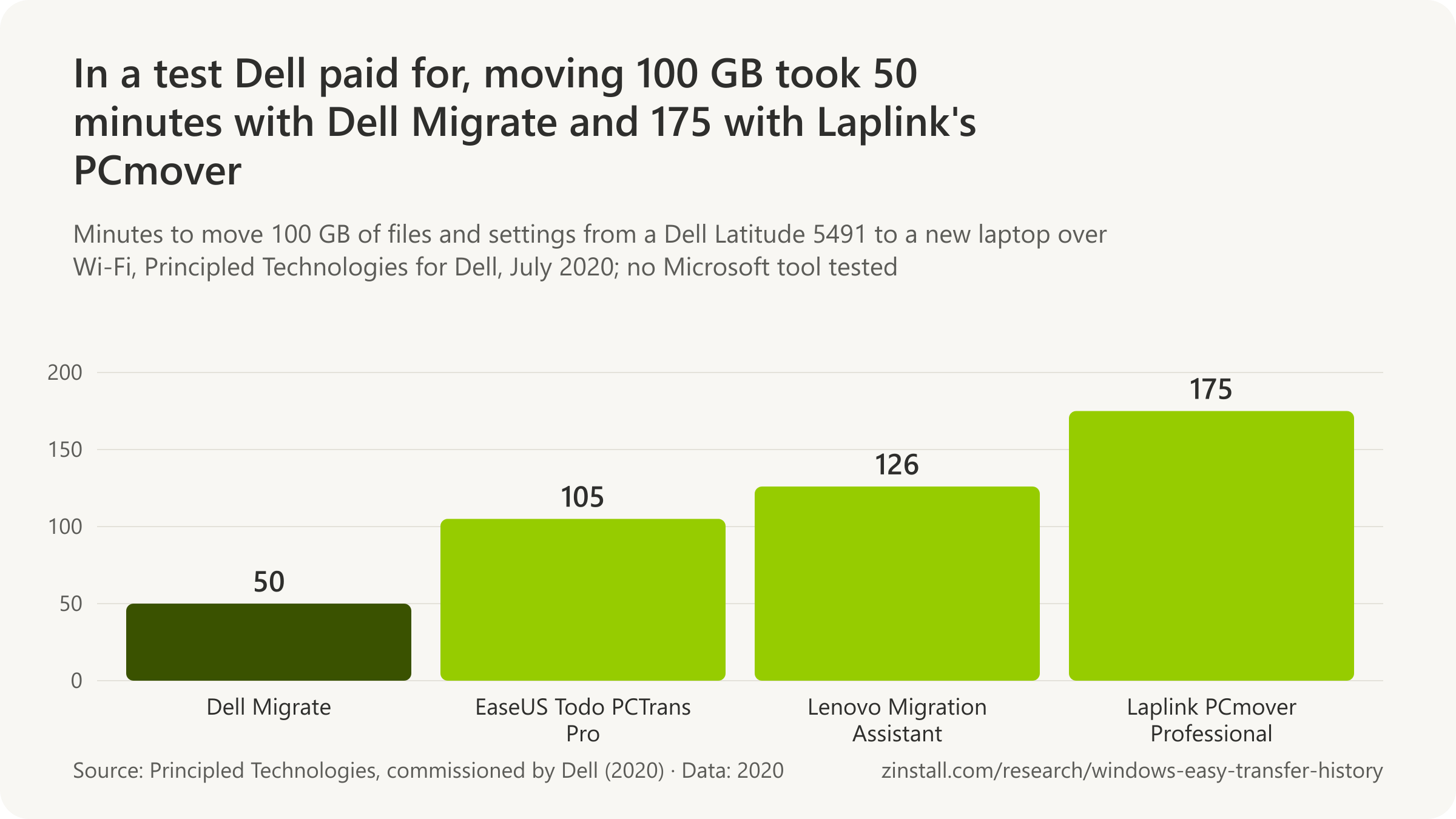
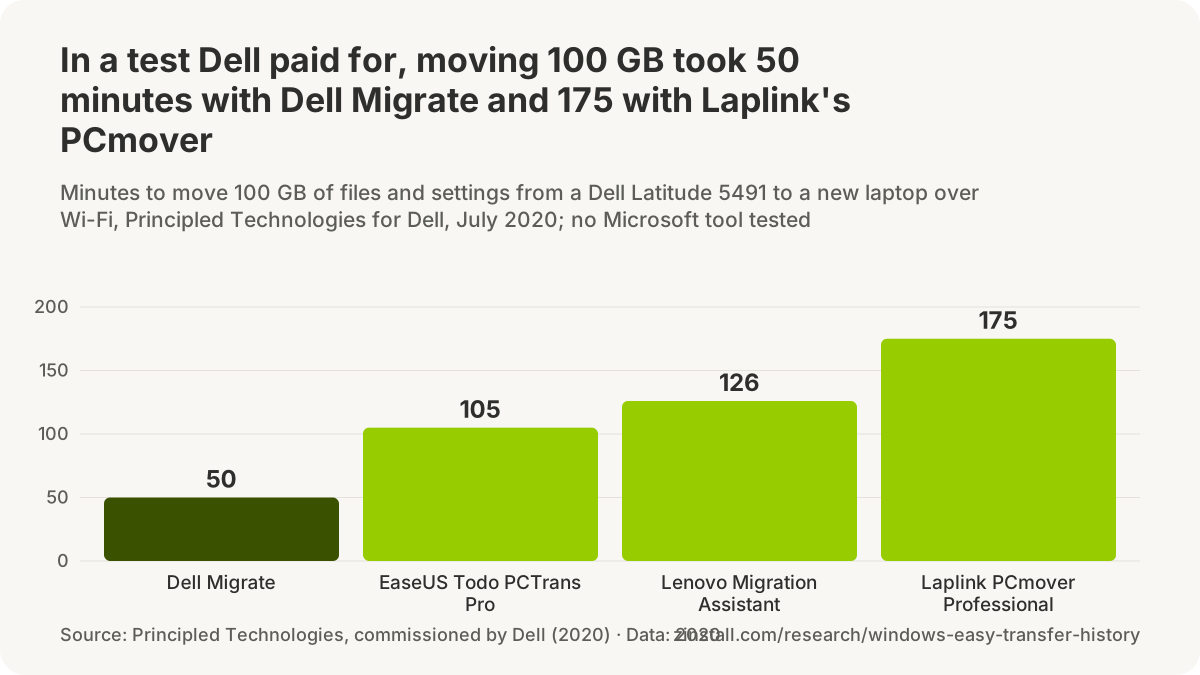
- A new Mac could take the old one's applications over a plain FireWire cable in 2005, two years before Windows Easy Transfer shipped.
- Apple's tool for moving from a PC to a Mac lists no applications among what it moves.
- Android's setup copies apps only from the Google Play Store, by cable or wirelessly.
- Dell's transfer service says 'installed applications, programs, and software licenses are not transferred'.
- 'HP does not offer tools for transferring installed applications,' its migration guide says.
| Tool | What it moves, or when |
|---|---|
| Mac OS X Tiger on sale | 29 April 2005 |
| Apple's Windows Migration Assistant 1.0 | 20 July 2011 |
| What it moved from a PC (2011) | Mail, contacts, calendars, files, settings |
| iPhone Quick Start: apps | Apps restored at setup |
| Direct iPhone-to-iPhone migration | 22 July 2019 |
| Dell Migrate at launch (2020) | $39 |
| Lenovo Migration Assistant | Files only; same Lenovo ID |
| Lenovo's older System Migration Assistant | SMA end of life; LMA current |
| Samsung Galaxy Book Smart Switch | Store apps only |
| 100 GB, three laptops and four tools (test for Dell, 2020) | 0:45 to 3:26 |
Sources: Apple (2005-2026); Google; Dell Technologies (2026, 2020); HP Inc.; Lenovo (2025a, 2025b); Samsung Electronics; Principled Technologies (2020a, 2020b)
Related guides: A new Dell laptop · Lenovo Migration Assistant and alternatives · HP's migration tool and alternatives
More statistics (19)
A new Mac has been able to take the old Mac's applications since two years before Windows Vista shipped, and phones reinstall their apps from the store at setup. Apple's tool for moving from a PC to a Mac lists no applications, and the PC makers' own tools for Windows say outright that installed programs do not move.
Apple: Mac to Mac
- Mac OS X Tiger's Setup Assistant moved user accounts, network settings, files and the Applications folder from an old Mac to a new one over a standard FireWire cable, Apple's Tiger features page said in its capture of 14 April 2005, two years before Windows Easy Transfer shipped without program transfer (Apple, 2005).
- Apple announced on 12 April 2005 that Mac OS X 10.4 Tiger, whose Setup Assistant moved applications to a new Mac, would go on sale on 29 April 2005 (Apple, 2005).
- "Migration Assistant transfers documents, apps, user accounts, and settings from one Mac to another," Apple's support article published 10 February 2026 says, a capability no tool built into Windows has had (Apple, 2026).
Apple: PC to Mac
- Apple released Windows Migration Assistant 1.0 for OS X Lion on 20 July 2011, a 2.78 MB download that moved data from a PC running Windows XP (SP3), Vista or 7 to a Mac (Apple, 2011).
- Windows Migration in OS X Lion moved email accounts, contacts, Outlook calendars, the iTunes library, home folders, browser bookmarks and user settings from a Windows XP SP3 or later PC into a new user account on the Mac, Apple's article of 9 August 2011 said; Windows programs were not on the list (Apple, 2011).
- Apple's current Windows Migration Assistant is version 3.2.1.0, for Windows 10 or later to macOS Sonoma 14 and later, and its list of what moves (email, contacts, calendars, Outlook tasks, media, bookmarks, documents, photos, some settings and known Wi-Fi networks) names no applications, in Apple's article published 9 November 2026 (Apple, 2026).
Phones
- iOS 12.4, released on 22 July 2019, introduced iPhone migration, transferring data wirelessly and directly from an old iPhone to a new one during setup, according to Apple's release notes (Apple, 2019).
- Apple's Quick Start sets up a new iPhone or iPad from another device running iOS 11, iPadOS 13 or later, and when the data comes from iCloud "your apps and data download in the background", Apple's article published 14 September 2026 says (Apple, 2026).
- Android's setup copies apps and certain app data, photos, messages, contacts, call history and most settings from an old Android phone, by cable (recommended) or wirelessly, but not apps from outside the Google Play Store or data from apps that don't use Android backup, Google's help page said on 17 November 2026 (Google, 2026).
PC makers' tools
- Dell launched Dell Migrate on 13 May 2020, a do-it-yourself service to move files and settings from any Windows 8 or newer PC to a new Dell, priced from $39 for unlimited use for six months, in the US for XPS, Inspiron, Alienware and G Series systems (Dell, 2020).
- Samsung's Galaxy Book Smart Switch moves files and settings from an old Windows PC to a new Galaxy Book and can reinstall Microsoft Store apps, but "apps other than Microsoft Store apps cannot be transmitted", Samsung's support page updated on 1 December 2022 said (Samsung, 2022).
- Lenovo Migration Assistant, offered through Lenovo Vantage on Lenovo PCs, moves files PC to PC over the local network when both PCs are signed in with the same Lenovo ID, or through Dropbox, according to Lenovo's support article as updated on 27 January 2025 (Lenovo, 2025).
- Lenovo's list of preloaded software marked its older ThinkVantage System Migration Assistant "End of Life" while leaving Lenovo Migration Assistant unmarked, in the version updated on 25 June 2025; no end-of-life notice for Lenovo Migration Assistant itself was found (Lenovo, 2025).
- "HP does not offer tools for transferring installed applications," HP said in its guide to HP Migration Tools of 23 December 2025; the tools move user profiles, application settings, documents and personal data to a new HP PC (HP, 2025).
- Dell Migrate, now run through the Dell Data Assistant app from any PC on Windows 7 or later, moves files, photos, documents and certain settings, while "installed applications, programs, and software licenses are not transferred", Dell's page said on 17 November 2026 (Dell, 2026).
A timing test paid for by Dell
- 50 minutes was the time for Dell Migrate to move 100 GB of files and settings from a Dell Latitude 5491 to a Dell XPS 13 9300 over Wi-Fi, in Principled Technologies' 2020 test commissioned by Dell (Principled Technologies, 2020).
- 1 hour 45 minutes (EaseUS Todo PCTrans Pro) and 2 hours 6 minutes (Lenovo Migration Assistant to a ThinkPad L14) were the other two timings for moving 100 GB from a Dell Latitude 5491 in Principled Technologies' 2020 test for Dell (Principled Technologies, 2020).
- 2 hours 55 minutes was the time for Laplink PCmover Professional to move the same 100 GB from a Dell Latitude 5491 to a Dell XPS 13 9300, the slowest of four tools in Principled Technologies' 2020 test for Dell (Principled Technologies, 2020).
- 45 minutes to 3 hours 26 minutes was the full range of times to move 100 GB across three source laptops and four tools (HP ZBook 15u G6 with Dell Migrate the fastest, Dell Inspiron 5570 with Laplink PCmover the slowest) in Principled Technologies' 2020 test for Dell (Principled Technologies, 2020).
Sources: Apple (2005-2026); Google; Dell Technologies (2020, 2026); Samsung Electronics; Lenovo (2025); HP Inc.; Principled Technologies (2020)
Windows Easy Transfer reviews: what people said
Decades after Windows shipped, there is 'still no mechanism' to move everything to a new PC the way phones do (PCWorld, 2025).
- Easy Transfer 'won't transfer your programs, only your personal data', a leading reviewer warned XP users in 2009.
- Windows 7's Easy Transfer did 'a generally excellent job', one reviewer wrote in 2009, 'far better than any previous edition'.
- 'The new Windows operating system fell flat on its face,' a blogger wrote after Easy Transfer failed him in 2007.
- Windows 8.1's Easy Transfer was 'an appalling user experience', a magazine reviewer wrote in 2014.
- 'None of the sources we reviewed defend the change,' a review of the press coverage of the PC-to-PC removal concluded in 2026.
| Outlet and year | In a phrase |
|---|---|
| HelpWithWindows.com, 2001 (XP wizard) | A real relief |
| The Register, 2007 (Vista, with the cable) | Doesn't get much simpler |
| Trusted Reviews, 2007 | A winning combination |
| Engadget, 2009 (Windows 7) | Far and away the easiest |
| An IT consultant, 2013 | A godsend |
| InfoWorld, 2014 (the Laplink offer) | Not ours |
| Tom's Guide, 2023 (Windows Backup) | Sound idea, bloatware at best |
| BetaNews, May 2025 (PC-to-PC) | Could be a game-changer |
| BetaNews, July 2025 | Not as impressive as Microsoft made out |
| Windows Latest, September 2026 (the withdrawal) | Far better than OneDrive backups |
Sources: PCWorld; All Things Digital / The Wall Street Journal; ZDNet (2009, 2007); PC Pro; Help Desk Geek; HelpWithWindows.com; The Register; Trusted Reviews; Engadget; SuperTekBoy; InfoWorld; Tom's Guide; BetaNews (2025a, 2025b); Windows Latest
Related guides: Windows Easy Transfer on Windows 11
More statistics (80)
Reviewers liked Windows Easy Transfer more with each version and never stopped pointing out that it left programs behind. The loudest reactions came when Microsoft took something away: the Companion, the network and cable options in Windows 8.1, and the PC-to-PC migration, whose removal no outlet was found defending.
Windows XP's wizard
- "Anyway, it seems a real relief when you want to transfer files & settings to a (new) computer," HelpWithWindows.com concluded about Windows XP's Files and Settings Transfer Wizard in its 2001 beta review (HelpWithWindows.com, 2001).
- Tom's Hardware's Windows XP preview of 3 August 2001 described the Files and Settings Transfer Wizard in one line of its feature list: "The intended use of this wizard is when you buy a new computer and want to transfer your current system onto that" (Tom's Hardware, 2001).
- Windows IT Pro's John Savill advised in December 2002 to run Windows Update before using XP's Files and Settings Transfer Wizard, because of a fix for problems including a wizard that "quits before the transfer process has been completed" (Windows IT Pro, 2002).
Windows Vista and the Companion, 2006 to 2008
- "Our customers and partners have been asking for a much easier way to transfer their data and applications from old computers to new ones," Microsoft corporate vice president Amitabh Srivastava said when Microsoft bought Apptimum on 7 March 2006 (Microsoft, 2006).
- Laplink answered Microsoft's promise of a free application-transfer add-on for Vista by announcing a Vista version of PCmover, which, InformationWeek reported on 1 November 2006, "migrates some but not all Windows applications" (Laplink via InformationWeek, 2006).
- "Microsoft doesn't really want you to move your applications," ZDNet blogger Mitch Ratcliffe argued in February 2007, calling the lack of program transfer in Vista's Windows Easy Transfer a "really bad user experience" (ZDNet, 2007).
- "The new Windows operating system fell flat on its face," ZDNet blogger Mitch Ratcliffe wrote on 6 February 2007, after repeated failures of Windows Easy Transfer over a network and an Easy Transfer Cable while moving from XP to Vista (ZDNet, 2007).
- "It doesn't actually transfer programs, though, so you'll need to install them on the new PC first before moving over your old settings," The Register's review of the Easy Transfer Cable for Windows Vista said in February 2007 (The Register, 2007).
- The Register's verdict on Windows Easy Transfer with Belkin's cable in February 2007: "anything that makes the process a little easier is to be welcomed - and it doesn't get much simpler than this" (The Register, 2007).
- "Although the standard Easy Transfer wizard does not move installed programs, this is a very important capability that's been requested by our customers," Microsoft's Nick White wrote on the Windows Vista Team Blog on 15 February 2007, announcing the Easy Transfer Companion beta (Microsoft, 2007).
- "The Microsoft bureaucracy chose to be right rather than popular," InformationWeek's David DeJean wrote on 18 February 2007, angry that Easy Transfer Companion moved programs only from XP and not from Windows 2000 (InformationWeek, 2007).
- InformationWeek's David DeJean acknowledged in February 2007 that with Easy Transfer Companion Microsoft could, for the first time, move installed programs between Windows PCs: "it's never been able to migrate an installed app from one Windows PC to another before" (InformationWeek, 2007).
- Trusted Reviews called Windows Easy Transfer with Belkin's sub-£20 Easy Transfer Cable "a winning combination" for moving from XP to Vista in March 2007, while warning that the software "isn't omniscient" about programs' settings (Trusted Reviews, 2007).
- Microsoft's Windows Experience Blog tried the Easy Transfer Companion beta in June 2007: the moved Windows Live Photo Gallery failed to open until a prerequisite was installed by hand, "Overall though, this tool worked great" (Microsoft, 2007).
- Microsoft's TechNet Magazine promoted Easy Transfer Companion to IT staff in January 2008: "Now, a free tool from Microsoft can spare you those countless reinstalls" (Microsoft TechNet Magazine, 2008).
- Easy Transfer Companion's "extended public beta" ended suddenly in June 2008 "with no announcement and no plans for a replacement", ZDNet's Ed Bott reported on 18 July 2008 (ZDNet, 2008).
- Microsoft told ZDNet in July 2008 that it was "unclear" what shape Easy Transfer Companion's program-moving functionality would take and when it might next be released (Microsoft via ZDNet, 2008).
Windows 7, 2009 to 2011
- Windows Easy Transfer in Windows 7 was "still missing a killer feature Microsoft promised three years ago", moving programs, ZDNet's Ed Bott wrote in April 2009, judging the Apptimum technology "officially abandoned" (ZDNet, 2009).
- Windows Easy Transfer in Windows 7 "does a generally excellent job of moving files, user settings, and some program preferences between computers, far better than any previous edition", ZDNet's Ed Bott wrote in April 2009 (ZDNet, 2009).
- Ed Bott wrote in April 2009 that he had been "lukewarm at best" on the XP wizard and Vista's Easy Transfer, but that with Windows 7 "Microsoft appears to have gotten this stuff mostly right", programs aside (Ed Bott, 2009).
- Microsoft's Brandon LeBlanc said in May 2009 that the Windows 7 version of Windows Easy Transfer "comes with improvements based on feedback received from Windows Vista customers" (Microsoft, 2009).
- BetaNews could not get Windows Easy Transfer to finish scanning a well-used XP installation for a move to Windows 7 in May 2009, even with anti-malware off, and kept advising readers to upgrade through Vista instead (BetaNews, 2009).
- Walt Mossberg warned XP users in July 2009 that Microsoft's free Easy Transfer program for the move to Windows 7 "won't transfer your programs, only your personal data", calling the XP path "frustrating, tedious and labor-intensive" (All Things Digital, 2009).
- "Clean installs have gotten a lot less painful with the Windows Easy Transfer (WET) tool," InformationWeek's Dave Methvin answered Walt Mossberg in July 2009, preferring a clean Windows 7 install plus Easy Transfer to an in-place upgrade (InformationWeek, 2009).
- Of the ways Engadget tried to carry data and settings to Windows 7 in August 2009, "far and away the easiest was Microsoft's Easy Transfer application" (Engadget, 2009).
- "What Windows Easy Transfer doesn't do, of course, is transfer your installed applications," Paul Thurrott wrote in his Windows 7 review in August 2009, calling the XP-to-Windows 7 migration a "somewhat complicated procedure" (Paul Thurrott's SuperSite for Windows, 2009).
- Paul Thurrott called Windows Easy Transfer "a relatively painless way to move important documents and settings between old and new Windows installs" in October 2009, and its report of installed applications "pretty decent" (Paul Thurrott's SuperSite for Windows, 2009).
- "There is some bad news, though: Windows Easy Transfer won't copy your programs," PCWorld's Jeff Bertolucci wrote in November 2009, while praising the Windows 7 version's file picker and its report of what it could not move (PCWorld, 2009).
- PCWorld's November 2009 review found that the Windows 7 version of Windows Easy Transfer "won't hang" on a file or setting it cannot move, but finishes and then reports what it could not copy (PCWorld, 2009).
- "Having had to wrestle with such things manually in the past, it was an enormous relief," InformationWeek's Lamont Wood wrote of Windows 7's Easy Transfer in January 2011, after it carried over icons, Office recent files, Outlook mail and browser bookmarks, though no programs (InformationWeek, 2011).
Windows 8.1 and the end of Windows XP, 2013 to 2014
- Pureinfotech, first to report Windows 8.1's cut-down Easy Transfer in July 2013, framed it as Microsoft "pulling the plug on different features and adding new ones that are suited for the 21st century", with SkyDrive and File History taking over (Pureinfotech, 2013).
- "Windows Easy Transfer was a godsend," IT consultant Gareth Gudger wrote in December 2013, recalling desktop moves before it, in a post calling its reduction to import-only in Windows 8.1 a mistake (SuperTekBoy, 2013).
- "Skydrive is not a viable alternative to the home user or small business," Gareth Gudger argued in December 2013, against Windows 8.1's answer to the loss of Easy Transfer's network transfer: slow links, a Microsoft account and 7 GB of free space (SuperTekBoy, 2013).
- Computerworld reported in February 2014 that readers mocked Microsoft's appeal to move XP users to Windows 8.1, since there was no way to do it "without hours spent reinstalling applications and restoring files from a back-up" (Computerworld, 2014).
- "They should have spent some money building their own," crisis-PR executive Gene Grabowski of Levick told Computerworld in March 2014 about Microsoft handing XP users a Laplink tool: "strategically, they had no plan" (Computerworld, 2014).
- Computerworld read Microsoft's 3 March 2014 offer of Laplink's free PCmover Express for XP users as a reaction to "criticism from customers that upgrading from Windows XP was 'impossible'" (Computerworld, 2014).
- "Microsoft: Use Laplink's Windows XP migration tools, not ours," InfoWorld headlined on 3 March 2014, arguing the partnership let Microsoft "offload the job" of moving XP users' data (InfoWorld, 2014).
- "The migration problem should have been fixed in the 1990s," analyst Rob Enderle wrote in June 2014, blaming an industry that treated migration as "someone else's responsibility" for XP users' reluctance to move (IT Business Edge, 2014).
- Analyst Rob Enderle judged in June 2014 that migrating from Windows 8.1 to a new machine was "almost magical", while moving from XP still meant moving everything by hand (IT Business Edge, 2014).
- PC Pro's Barry Collins called Windows 8.1's Easy Transfer, which still offered network and cable options that no longer worked, "an appalling user experience" in July 2014 (PC Pro, 2014).
What Laplink said, 2011 to 2015
- 39% of 1,200 PC users felt that migrating from an old PC to a new one was reason enough to delay buying a new PC, in an Intel-sponsored survey cited by Laplink in 2011 (Laplink press release, 2011).
- 1 in 5 PC buyers was so concerned about setting up a new PC that they would put off buying one, according to Laplink's own research on PC buyer habits cited in October 2012 (Laplink press release, 2012).
- "One reason we know some users hesitate to move off of Windows XP despite serious security risks is their fear of losing years' worth of data," Laplink CEO Thomas Koll said in December 2014 (Laplink, 2014).
- Getting data to a new PC "may even result in delaying the purchase of a new PC," Laplink CEO Thomas Koll told IT Business Edge in July 2015, noting that Windows 10 came with no tool for the transfer (IT Business Edge, 2015).
- "Manually transferring everything to a new PC is a pain. It's time-consuming, difficult, and almost every user will leave something behind in the process," Laplink CEO Thomas Koll said in July 2015 (Laplink, 2015).
- More than 30 million Windows XP computers were still in use in the United States alone, Laplink estimated in August 2015 when it took over the free XP migration tool Microsoft had stopped distributing (Laplink's estimate, 2015).
Windows Backup and OneDrive, 2019 to 2025
- Windows Easy Transfer "was a great free option to bring your settings and local user profiles from an old computer to a new computer", How-To Geek's Josh Hendrickson wrote in May 2019, four years after Windows 10 shipped without it (How-To Geek, 2019).
- "Shunting data from PC to PC remains a thing, even though the likes of Microsoft insist that everyone should be in the cloud by now," The Register wrote in November 2019, ahead of Windows 7's end of support (The Register, 2019).
- "Moving from one PC to the next will be even easier than ever," PCWorld's Mark Hachman wrote when Microsoft showed app and layout restore for new Windows 11 PCs at Build on 23 May 2023, provided users sign in with a Microsoft account (PCWorld, 2023).
- "Good news! Microsoft is finally adding the ability to back up and restore settings and apps via the Microsoft Store," Windows Central's Zac Bowden wrote on 23 May 2023, saying it would make setting up a new PC "much more straightforward" (Windows Central, 2023).
- "Some have described the Backup app as bloatware or Microsoft's latest effort to push OneDrive cloud storage," Windows Latest reported in September 2023, after Microsoft said the Windows Backup app could not be removed because it is a system component (Windows Latest, 2023).
- "At best, the app could be seen as bloatware meant to force people to use Microsoft's OneDrive cloud storage," Tom's Guide wrote of the Windows Backup app in October 2023, while calling the idea behind it "sound" (Tom's Guide, 2023).
- "Microsoft has made OneDrive slightly more annoying for Windows 11 users," Neowin's Taras Buria wrote on 24 June 2024, first to report that Windows 11 setup now turned on OneDrive folder backup without asking (Neowin, 2024).
- "While Apple and Google offer online backups on their devices, these are opt-in, and you can always decline them," Tom's Hardware noted in June 2024, contrasting them with Windows 11 setup turning OneDrive backup on by default (Tom's Hardware, 2024).
- "User data is being slurped into Microsoft's cloud via OneDrive folder backup without user permission," The Register wrote in June 2024, calling the new Windows 11 default "a bit pushy" given OneDrive's 5 GB free tier and upgrade prompts (The Register, 2024).
- "The only app Windows offers is Windows Backup, which I actively dislike," PCWorld's Mark Hachman wrote in February 2025, because it restores library files and Store apps but not programs such as Photoshop or Steam games (PCWorld, 2025).
- "Decades after Microsoft shipped Windows, there's still no mechanism for moving everything from one PC to another, in much the same way Android or iOS sets up a new device," PCWorld's Mark Hachman wrote in February 2025 (PCWorld, 2025).
- A Windows 11 migration app found in test builds "may ease the biggest headache of buying a new laptop", Laptop Mag wrote in February 2025, hoping it would move more than Windows Backup, which "mostly focuses on key files" (Laptop Mag, 2025).
The PC-to-PC migration, 2025 to 2026
- "It seems like Windows Easy Transfer might be making a comeback, at least in spirit," PCWorld wrote in May 2025 when a PC-to-PC transfer option appeared in Windows Backup test builds (PCWorld, 2025).
- "The new PC-to-PC migration experience in Windows 11 could be a game-changer," BetaNews headlined on 27 May 2025, four days after Microsoft began rolling it out to Insiders (BetaNews, 2025).
- "Microsoft really wants PC owners with unsupported hardware to dump Windows 10 and buy a Windows 11 PC, but will you?" Windows Latest asked in June 2025, on finding the PC-to-PC transfer hidden in a Windows 10 build (Windows Latest, 2025).
- Microsoft's consumer marketing chief Yusuf Mehdi recommended Windows Backup in June 2025 as "an easy way to help you safely and securely transfer your data, personal files, and most settings and applications" to a Windows 11 PC (Microsoft, 2025).
- "The Windows 11 transfer tool is not as impressive as Microsoft made out," BetaNews headlined on 22 July 2025, once Microsoft's support page listed what the PC-to-PC migration would leave behind: apps, passwords, OneDrive files, BitLocker drives and system folders (BetaNews, 2025).
- PCWorld's July 2025 explainer of the PC-to-PC migration said Windows Easy Transfer "was eventually discontinued in favor of transferring via OneDrive, which many still regret today" (PCWorld, 2025).
- Microsoft's new PC-to-PC migration "could be ideal for people who hate OneDrive", TechRadar wrote in July 2025, though it still needed a Microsoft account and moved no apps (TechRadar, 2025).
- Windows Backup's route to a new Windows 11 PC is "Microsoft not-so-subtly pushing a OneDrive subscription", TechRadar argued in July 2025, since the free OneDrive tier holds 5 GB (TechRadar, 2025).
- "It's easier than ever to transfer your data from an old PC to a new one," Computerworld's Preston Gralla wrote in December 2025, calling Windows Backup, with its PC-to-PC transfer, the simplest and fastest way to do it (Computerworld, 2025).
- German site Borncity read the PC-to-PC migration's removal in September 2026 as "a move away from purely local, network-based transfer without account binding" (Borncity, 2026; translated from German).
- Microsoft gave no reason for pulling the PC-to-PC migration from Release Preview builds, Neowin's Ivan Jenic noted on 12 September 2026, while arguing Windows Backup could be "a more reliable way" because it needs no uninterrupted link between two PCs (Neowin, 2026).
- "Even with those restrictions, the PC-to-PC migration tool was far better than OneDrive-based backups for moving to a new PC," Windows Latest's Mayank Parmar wrote on 16 September 2026, as Microsoft withdrew it (Windows Latest, 2026).
- "Microsoft tried bringing back Windows 7-style Easy Transfer with Windows 11's PC-to-PC transfer, and is now killing it in favor of OneDrive," Windows Latest wrote in September 2026 (Windows Latest, 2026).
- heise called the PC-to-PC migration's removal in the September 2026 Windows 11 update preview "a major cutback", since its replacement "transfers everything through Microsoft's cloud storage" (heise online, 2026).
- "Windows 11 just lost an easy way to move files, and Microsoft wants you on OneDrive," How-To Geek headlined on 2 November 2026, noting that Microsoft had not said what prompted the removal (How-To Geek, 2026).
- "Microsoft somehow made the worst part of buying a new PC even worse," MakeUseOf headlined on 2 November 2026: moving everything from the old system, now without a guided local route (MakeUseOf, 2026).
- "One feature is a backup service, and the other was a moving truck. But Microsoft just told you to rent storage!" Windows Latest's Abhijith M B wrote in November 2026 of Windows Backup replacing the PC-to-PC migration (Windows Latest, 2026).
- Microsoft's own screenshots of the withdrawn PC-to-PC migration showed it preparing to move 118 GB of folders in one go, against OneDrive's 5 GB free tier for the Windows Backup route that replaced it, Windows Latest pointed out in November 2026 (Windows Latest, 2026).
- "It was never a full system migration tool," gHacks wrote of the withdrawn PC-to-PC migration on 3 November 2026, but it moved files "without any cloud account or storage quota involved" (gHacks, 2026).
- "None of the sources we reviewed defend the change on its merits," Help Desk Geek concluded on 3 November 2026 after reviewing the press coverage of the PC-to-PC migration's removal (Help Desk Geek, 2026).
- "Microsoft has done away with the most convenient way for users to transfer files and settings between two Windows computers," PCWorld wrote on 6 November 2026, pointing to the 5 GB free OneDrive tier behind Windows Backup (PCWorld, 2026).
Sources: HelpWithWindows.com; Tom's Hardware (2001, 2024); Windows IT Pro, now ITPro Today; Microsoft (2006-2025); InformationWeek (2006-2011); ZDNet (2007, 2008, 2009); The Register (2007, 2019, 2024); Trusted Reviews; Ed Bott; BetaNews (2009, 2025); All Things Digital / The Wall Street Journal; Engadget; Paul Thurrott's SuperSite (2009); PCWorld (2009-2026); Pureinfotech; SuperTekBoy; Computerworld (2014, 2025); InfoWorld; IT Business Edge (2014, 2015); PC Pro; Laplink (2011, 2012); Laplink Software (2014, 2015); How-To Geek (2019, 2026); Windows Central; Windows Latest (2023, 2025, 2026); Tom's Guide; Neowin (2024, 2026); Laptop Mag; TechRadar (2025); Borncity; heise online; MakeUseOf; gHacks Tech News; Help Desk Geek
Windows Easy Transfer myths: what Wikipedia, download sites and AI answers get wrong
The '500 MB' limit an encyclopedia gives Microsoft's free PCmover offer of 2015-16 belongs to a Laplink product of 2020 (Wikipedia, 2025).
- Google's AI answer still described the withdrawn PC-to-PC pairing as current in November 2026.
- An answer on Microsoft's own forum said in 2025 that Easy Transfer was 'introduced in Windows 7'; it shipped with Vista.
- Download sites offer 'Windows Easy Transfer for Windows 10 11.0', a version Microsoft never released.
- A vendor page updated in November 2026 says Microsoft 'rolled out Windows Easy Transfer for Windows 10/11'.
- A history site dates Easy Transfer '2007-2014', though Windows 8.1, which still carried it, was supported until 2023.
| Claim and where | What the record shows |
|---|---|
| Apptimum's technology went into Easy Transfer (Wikipedia) | Untraced: Microsoft promised a separate download |
| Easy Transfer was 'reintroduced' in 2023 (Wikipedia) | Misleading: a cloud restore, not a PC-to-PC tool |
| USMT was made for Windows 2000 (Wikipedia) | USMT 'for Windows 2000' (wrong) |
| XP's wizard moved programs (BetaWiki) | XP wizard moved programs (implied, wrong) |
| Windows 8.1 lost its options after a legal challenge (PC Pro) | 'Legal challenge' (rumour) |
| PC-to-PC was the first local transfer since Vista (PCWorld) | "first since Vista" (wrong) |
| PC-to-PC was inherited from Windows 7 (Ubergizmo) | 'Inherited from Windows 7' (wrong) |
| Windows Backup came to Windows 11 first (Computerworld) | Wrong: Windows 10 got it first, in August 2023 |
| Dropped because Microsoft partnered with Laplink (EaseUS) | Untraced: the free offer began after Windows 10 shipped |
| Microsoft stopped updating it in 2014 (Enterprise Times) | Wrong: no Microsoft document dates a change to 2014 |
Sources: Wikipedia, article 'Windows Easy Transfer'; Google Search, AI Overview; Microsoft Q&A; MajorGeeks; EaseUS (2026a, 2026b); Version Museum; BetaWiki, article 'Windows Easy Transfer'; PC Pro; PCWorld; Ubergizmo; Computerworld; Enterprise Times
Related guides: Windows Easy Transfer for Windows 11 or 10
More statistics (63)
Most of what ranks for Windows Easy Transfer today is old, copied or wrong: an encyclopedia article with claims no source supports, download sites offering a 'Windows Easy Transfer for Windows 10' that Microsoft never made, vendor pages describing a withdrawn Microsoft tool as current, and search engines' AI answers built on all of them. Each record below gives a claim as published and the record that settles it.
Wikipedia's Windows Easy Transfer article
- TechRepublic's 4 February 2003 article on Windows XP's Files and Settings Transfer Wizard says Microsoft presented the User State Migration Tool 'with the introduction of Windows 2000', the claim Wikipedia's Windows Easy Transfer article has repeated since 2015 (TechRepublic, 2003).
- Microsoft's KB 930086 (last reviewed 15 March 2007) says Windows Vista's incoming-connection feature no longer accepts direct serial-cable or infrared links, a networking change the article never ties to Windows Easy Transfer (Microsoft, 2007).
- Laplink's free PCmover Windows Store Edition, in the Microsoft Store since 9 March 2020, 'will transfer up to 500MB at a time' and moves only music, videos, pictures and documents between Windows 10 PCs, Laplink's listing says (Laplink, 2020).
- Wikipedia's Windows Easy Transfer article (revision of 15 December 2025) says Microsoft 'incorporated a key technology into the Windows Easy Transfer tool' from its 2006 Apptimum purchase, while the press release it cites promised only a separate optional download for Windows Vista customers (Wikipedia, 2025).
- Wikipedia's Windows Easy Transfer article (revision of 15 December 2025) says Apptimum's technology complemented the transfer experience in Windows Vista, Windows 7, 8.1 and 10, although the 2006 press release it cites names only Windows Vista, and Windows 10 shipped without Easy Transfer (Wikipedia, 2025).
- Wikipedia's Windows Easy Transfer article (revision of 15 December 2025) lists CDs and DVDs among Easy Transfer's transfer methods without saying that only the Windows Vista version offered them (Wikipedia, 2025).
- Wikipedia's Windows Easy Transfer article (revision of 15 December 2025) says the Windows Easy Transfer Companion, meant to move supported applications from Windows XP to Vista, stayed in perpetual beta and never reached a final release (Wikipedia, 2025).
- Wikipedia's Windows Easy Transfer article (revision of 15 December 2025) says Easy Transfer 'was discontinued with Windows 10', citing a 2018 Tom's Hardware forum FAQ rather than Microsoft's own support article (Wikipedia, 2025).
- Wikipedia's Windows Easy Transfer article (revision of 15 December 2025) says Microsoft 'reintroduced a feature similar to Windows Easy Transfer' in September 2023 as part of Windows Backup, an uncited sentence that treats a Microsoft-account cloud restore as a PC-to-PC transfer and omits the 2025 local migration and its 2026 withdrawal (Wikipedia, 2025).
- Wikipedia's Windows Easy Transfer article (revision of 15 December 2025) says Windows XP's Files and Settings Transfer Wizard was built to move data from Windows 98 and Windows Me, a narrower list than Microsoft's own, which also named Windows 95, NT 4.0 and 2000 (Wikipedia, 2025).
- Wikipedia's Windows Easy Transfer article (revision of 15 December 2025) says the free PCmover Express that Microsoft offered with Laplink from 1 September 2015 to 31 August 2016 'allowed 500 MB of data and settings to be transferred', a cap Microsoft's offer page never stated (Wikipedia, 2025).
- Wikipedia's Windows Easy Transfer article (revision of 15 December 2025) says Microsoft 'has since recommended OneDrive' as a substitute, an uncited sentence that Microsoft's current 'Move your files to a new Windows PC' page bears out (Wikipedia, 2025).
- Wikipedia's Windows Easy Transfer article (revision of 15 December 2025) says that in every Windows version Easy Transfer moved only files and settings, never applications, which Microsoft's own documentation confirms (Wikipedia, 2025).
- Wikipedia's Windows Easy Transfer article (revision of 15 December 2025) lists Windows Vista's lack of IrDA, serial and parallel incoming connections as an Easy Transfer restriction, citing a Microsoft article about the incoming-connection networking feature that never mentions Easy Transfer (Wikipedia, 2025).
- Wikipedia's Windows Easy Transfer article (revision of 15 December 2025) says Microsoft developed the User State Migration Tool 'for Windows 2000', a claim traced to a 2003 TechRepublic article rather than to any Microsoft document (Wikipedia, 2025).
- Wikipedia's Windows Easy Transfer article (revision of 15 December 2025) says Microsoft backported Windows 7's Easy Transfer to Windows XP and Vista as an optional download, an uncited sentence that matches Microsoft's own download offer (Wikipedia, 2025).
- Wikipedia's Windows Easy Transfer article (revision of 15 December 2025) says Easy Transfer in Windows 8.1 could only import, and only from Windows 7, 8 and RT, not from Vista or another 8.1 PC, citing Pureinfotech's July 2013 report (Wikipedia, 2025).
- Wikipedia's Windows Easy Transfer article (revision of 15 December 2025) says a USB flash drive was the only transfer method in Windows 8.1, narrower than Microsoft's description of 8.1's import from a USB flash drive or an external hard disk (Wikipedia, 2025).
- Wikipedia's Windows Easy Transfer article (revision of 15 December 2025) says Jim Allchin demonstrated a preliminary Windows Easy Transfer at WinHEC 2004 with an optional specialized USB cable, citing a Thurrott show report dated 2010 instead of Microsoft's own 2004 transcript (Wikipedia, 2025).
Other wikis
- Polish Wikipedia's Windows Easy Transfer article (revision of 26 April 2025) says transfers from Windows 2000 covered only user accounts, registry entries and system settings, the reverse of Microsoft's rule that Windows 2000 sources gave files only (Wikipedia, 2025).
- BetaWiki says the Windows Easy Transfer Companion would have transferred the settings of specific applications, while Microsoft described the Companion as moving the programs themselves from Windows XP to Vista (BetaWiki, 2025).
- BetaWiki implies that Windows XP's Files and Settings Transfer Wizard could move installed programs and that Easy Transfer lost the ability, although Microsoft said the XP wizard never transferred programs either (BetaWiki, 2025).
- BetaWiki says Windows Easy Transfer first appeared as 'Windows Transfer' in Windows Vista build 5270 and was renamed in build 5308, pre-release build details that no Microsoft document records and that Google's AI answer repeated in November 2026 (BetaWiki, 2025).
- BetaWiki says Windows Easy Transfer was last included in Windows 10 build 9888 and removed in build 9900, both pre-release builds of late 2014, so the tool was gone months before Windows 10 shipped on 29 July 2015 (BetaWiki, 2025).
- Wikipedia's User State Migration Tool article, in its revision of 7 January 2026, still gives 5.0 as USMT's latest release version, although Microsoft has shipped USMT with every Windows ADK since, called USMT 10.0 in its Windows 10 documentation (Wikipedia, 2026).
- Wikipedia's 'Windows Backup (2023)' article (revision of 9 March 2026) calls Windows Backup 'a replacement for Windows Easy Transfer' that can restore 'by using a direct network connection to the old computer', citing a 2023 Microsoft page for a local transfer that existed only from 2025 to 2026 (Wikipedia, 2026).
Google's AI answers and their sources
- Sony's support article 'How to use the Windows Easy Transfer feature', last modified 1 November 2024 and one of the sources of Google's AI answer, describes Easy Transfer as a Windows 7 feature with a report of programs to reinstall, without saying Windows 10 and 11 lack it (Sony, 2024).
- Google's AI answer for 'when was windows easy transfer discontinued' on 3 November 2026 said Easy Transfer ended with Windows 10 in 2015 and that Microsoft introduced Windows Backup in September 2023, citing only Wikipedia articles and Pureinfotech, and said nothing of the 2025 to 2026 PC-to-PC tool (Google, 2026).
- Google's AI answer for 'windows easy transfer history' on 3 November 2026 repeated BetaWiki's 'Windows Transfer' in Vista build 5270 and Wikipedia's claim that Easy Transfer 'incorporated migration tech' from the Apptimum purchase, which the 2006 press release does not support (Google, 2026).
- Google's AI answer for 'files and settings transfer wizard' on 3 November 2026 presented the PC-to-PC transfer in Windows Backup as built into Windows 10 and 11 with one-time-code pairing, a feature Microsoft had already withdrawn (Google, 2026).
- Google's AI answer for 'windows easy transfer windows 11' on 3 November 2026 still told users to pair their old and new PCs 'via a code over the same network' in Windows Backup, months after Microsoft's support article marked that PC-to-PC transfer 'no longer available' (Google, 2026).
- Google's AI answer for 'windows easy transfer' on 17 November 2026 described Easy Transfer as a discontinued Microsoft utility for Windows Vista through 8.1, retired with Windows 10, that never moved installed programs, all consistent with Microsoft's record (Google, 2026).
Download sites
- Softpedia's 'Windows Easy Transfer' download page, ranking for 'windows easy transfer windows 11' in November 2026, offered version 6.1 by Microsoft, updated 21 April 2011, recommended to Windows Vista or XP users moving to a new computer (Softpedia, 2011).
- Softonic's 'Windows 7 Easy Transfer' page, second for 'windows easy transfer' in November 2026, lists Microsoft as developer and version 6.1.7600, Microsoft's downloadable Easy Transfer for moving from Windows XP or Vista to Windows 7 (Softonic, 2022).
- Software Informer listed 'Windows Easy Transfer 6.3' by Microsoft, latest version 6.3.0015, a version Microsoft never offered as a download, since Windows 8.1's built-in Easy Transfer could only import (Software Informer, 2022).
- Uptodown's 'Windows 7 Easy Transfer' page (Microsoft, version 6.1, captured May 2023) says the tool could store data on a CD or DVD, a method Windows 7's Easy Transfer had dropped, and still opens 'Currently the most-used operating system is Windows XP' (Uptodown, 2023).
- MajorGeeks lists 'Windows Easy Transfer for Windows 10 11.0' (author TechyGeeksHome, dated 3 February 2025, 19 MB), a version number Microsoft never used, presented as filling the gap Microsoft left by removing the tool in Windows 10 (MajorGeeks, 2025).
- Softonic lists 'Windows Easy Transfer for Windows 10' as a free 'lightweight utility', version 11.0, developer TechyGeeksHome, updated 7 January 2026, with a generic description that never says the files are Microsoft's Windows 7 tool (Softonic, 2026).
- TechyGeeksHome's download page (republished 25 July 2026) offers 'Windows Easy Transfer for Windows 10' as 'the last officially released version', a repackaged copy of the Windows 7 tool that Microsoft never released for Windows 10 (TechyGeeksHome, 2026).
Running Windows 7's Easy Transfer on Windows 10
- On 8 June 2015 a Ten Forums user wrote that Microsoft 'removed Easy Transfer from Win 8.1' and suggested copying Windows 7's migwiz folder to run it elsewhere, the earliest forum post of the migwiz-copy workaround found (Ten Forums, 2015).
- Two days before Windows 10's release, a Ten Forums user published on 27 July 2015 the workaround of copying Windows 7's or Windows 8's 'migration' and 'migwiz' folders to run Easy Transfer on Windows 10, reporting it tested from Windows 7 to 10 (Ten Forums, 2015).
- Chuck's Tech Blog (13 March 2016), still ranking for 'windows easy transfer' in November 2026, says Windows 7's Easy Transfer 'will still work on newer versions of Windows' if its migwiz folder is copied from a live Windows 7 machine, and offers 32-bit and 64-bit copies (Chuck's Tech Blog, 2016).
- A Super User answer of 7 August 2016 told Windows 10 users to copy the migration and migwiz folders from a Windows 7 PC and start migwiz.exe, repeating the Ten Forums workaround of July 2015 (Super User, 2016).
- Help Desk Geek's guide (dated 6 March 2018) says Microsoft removed Easy Transfer from Windows 10, then tells readers to copy Windows 7's 64-bit Easy Transfer folder or download the site's own zipped copy (Help Desk Geek, 2018).
- An answer on Microsoft's own Q&A forum on 21 September 2018 told a user to copy the migwiz folder from a Windows 7 PC and run migwiz.exe on Windows 10, reproducing Help Desk Geek's published steps word for word without credit (Microsoft Q&A, 2018).
- UltFone's 2019 page, first for 'windows easy transfer' on 17 November 2026, says Easy Transfer 'has gone from Windows 10 for good' and offers fixes for errors in a tool Microsoft stopped shipping in 2015, alongside its own product (UltFone, 2019).
Dates and reasons that drifted
- Pureinfotech's 22 July 2013 article, headlined 'Microsoft removing Windows Easy Transfer in Windows 8.1', gave SkyDrive as the 'clear reason' two days before the Microsoft Answers reply that said the same, and still ranks for 'when was windows easy transfer discontinued' (Pureinfotech, 2013).
- PC Pro's Barry Collins wrote on 11 July 2014 that he was told, but could not confirm, that Microsoft removed Windows 8.1's network and cable transfer options 'after a legal challenge', a rumour no Microsoft document or later report supports (PC Pro, 2014).
- Laplink's 28 July 2015 release said that in 2014 Windows Easy Transfer was 'no longer supporting XP users', a compression of the facts: Windows 8.1's import-only Easy Transfer (October 2013) took no XP data, while Windows 7's Easy Transfer and its XP download still did (Laplink, 2015).
- Enterprise Times wrote on 29 July 2015 that Microsoft 'ceased upgrading' Windows Easy Transfer in 2014, 'removing support for XP users', a drift from Laplink's release of the day before; no Microsoft document dates any Easy Transfer change to 2014 (Enterprise Times, 2015).
- Version Museum's list of discontinued Microsoft utilities, ranking for 'when was windows easy transfer discontinued' in November 2026, dates Windows Easy Transfer '2007-2014', although Windows 8.1 carried it until Windows 10 replaced it in July 2015 and 8.1 was supported until January 2023 (Version Museum, 2019).
- A Microsoft Q&A answer of 18 February 2025, the one that also says Easy Transfer moved programs, says Easy Transfer 'was introduced in Windows 7' and replaced in Windows 8 and later, when it shipped in Windows Vista in 2007 and remained in Windows 8 and, import-only, in 8.1 (Microsoft Q&A, 2025).
- A Microsoft Q&A answer of 18 February 2025, signed by a 'Microsoft Community Support Specialist', says Easy Transfer moved 'programs' to a new computer, contradicting Microsoft's own documentation that it never did (Microsoft Q&A, 2025).
- Windows Latest's 21 July 2025 report on Microsoft's new PC-to-PC migration said Easy Transfer 'was introduced with Windows Vista / Windows 7' and that Microsoft 'pulled Windows Easy Transfer and relied on OneDrive instead', a motive Microsoft stated only in a 2013 forum reply (Windows Latest, 2025).
- PCWorld's 22 July 2025 article (from PC-WELT) called the PC-to-PC migration "the first time since Windows Vista" that Microsoft offered a local transfer, although Windows Easy Transfer moved data locally in Windows 7, 8 and 8.1 (PCWorld, 2025).
- Polish tech site Antyweb headlined its 23 July 2025 report on Microsoft's PC-to-PC migration 'Windows 11 finally gets a useful tool. They borrowed it from Windows 7', framing a new Windows Backup feature as Easy Transfer's return (Antyweb, 2025).
- Computerworld's migration guide (updated 25 December 2025), a source of Google's AI answers in November 2026, says Windows Backup was introduced to Windows 11 in 2023 'and later to Windows 10', and presents the PC-to-PC transfer as a recent addition still available (Computerworld, 2025).
- Ubergizmo's 17 September 2026 report on the withdrawal called Windows 11's PC-to-PC migration 'a feature inherited from Windows 7', when it was a new Windows Backup feature announced in May 2025 that only resembled Easy Transfer (Ubergizmo, 2026).
- EaseUS's page of seven 'Best Windows Easy Transfer Alternatives', updated 29 October 2026, answers 'Does Windows 10 have a migration tool?' with third-party software only, although Microsoft's Windows Backup app has backed up and restored Windows 10 files and settings since 2023 (EaseUS, 2026).
- An EaseUS page updated on 3 November 2026 says Microsoft discontinued Easy Transfer with Windows 10 'as they partnered with Laplink', a cause Microsoft never stated; the free PCmover Express offer began on 1 September 2015, after Windows 10 shipped (EaseUS, 2026).
- An EaseUS page updated on 3 November 2026 carries a '2026 Update' saying Microsoft 'rolled out Windows Easy Transfer for Windows 10/11', when Microsoft never released a tool by that name and had withdrawn its 2025 PC-to-PC transfer by then (EaseUS, 2026).
- EaseUS's 'Windows 11/10 New Migration Tool [2026]' page, updated on 3 November 2026, still says 'a new Windows 11 migration tool is available' and that it is 'being tested', after Microsoft had withdrawn it (EaseUS, 2026).
Sources: TechRepublic; Microsoft; Laplink Software Inc. (2015, 2020); Wikipedia, article 'Windows Easy Transfer' (2025); BetaWiki, article 'Windows Easy Transfer'; Wikipedia; Wikipedia, article 'Windows Backup'; Sony Electronics; Google Search, AI Overview (2026); Softpedia; Softonic (2022, 2026); Software Informer; Uptodown; MajorGeeks; TechyGeeksHome; Ten Forums, thread 5027 (2015); Chuck's Tech Blog; Super User, question 966044; Help Desk Geek; Microsoft Q&A (2018, 2025); UltFone; Pureinfotech; PC Pro; Enterprise Times; Version Museum; Windows Latest; PCWorld; Antyweb; Computerworld; Ubergizmo; EaseUS (2026)
Data. All 614 statistics on this page, each with its source, verbatim quote and locator: CSV · JSON. Charts and figures on this page may be reused with a link to https://www.zinstall.com/research/windows-easy-transfer-history as the source. Original publishers retain attribution.
Data behind each chart (CSV, 13 files)
- Windows had a built-in transfer tool for 13.8 years, then none for 9.8; the PC-to-PC migration of 2025 lasted 1.3
- Each Windows from XP to 8.1 had its own transfer tool; XP's wizard was the newest for 5.3 years, 8.1's import-only one for 1.8
- Moving 1 GB over the Easy Transfer Cable took 3.9 minutes as one file and 11.4 as small files in a 2007 test
- An Easy Transfer Cable cost $39.99 from Belkin at Vista's launch in 2007 and still $39.99 in 2013
- Easy Transfer left Windows in July 2015; Windows 8.1 kept it for 7.5 more years, and Microsoft's pages pointed to it or to Laplink for up to 9.3
- PCmover Express was free on Microsoft's page for a year and $14.95 for two more; at Laplink it costs $34.95 in 2026
- Microsoft marked its PC-to-PC migration withdrawn 377 days after announcing it, and its public notes removed it at day 487
- Free OneDrive storage peaked at 25 GB from 2008 to 2012 and has been 5 GB since July 2016
- Deploying one new PC took large companies 1.66 hours of IT time on average, from 0.7 to 2.9 hours by maturity
- In a test Dell paid for, moving 100 GB took 50 minutes with Dell Migrate and 175 with Laplink's PCmover
- Microsoft's Easy Transfer downloads for old PCs weighed 4.4 MB to 17.5 MB, and the Companion beta 3.9 MB to 4.0 MB
- Belkin claimed 30 GB an hour for the Easy Transfer Cable and Microsoft 20; a 2007 test measured 15.4 for one big file and 5.3 for small ones
- Microsoft's OneDrive user counts rose from 130 million in 2012 to more than half a billion in 2015, the last it gave
Methodology
What we included. Microsoft's own documentation for each tool (help pages, Knowledge Base articles, Download Center entries, release notes, engineering and team blogs, support articles and IT documentation), read live or, where Microsoft has removed or changed a page, in the Wayback Machine's dated captures; partners' and cable makers' releases, manuals and stores; Apple's, Google's and the PC makers' documentation for their own tools; reviews and news reports at each milestone; and the pages that rank for the subject today, recorded as restatements with the record that confirms or corrects them. Official statistics, the trackers' own publications, company filings and transcripts, and peer-reviewed or analyst reports are preferred; vendor surveys and news reports are included only where no better source exists and are labelled as such in the dataset.
How each figure was verified. Every record carries the exact sentence or table cell from the source (the quote) and where it sits (the locator). A researcher confirmed each one against the source document; a script then re-fetched every source on November 17, 2026 and checked for the quote. Records the script could not confirm are kept only if the researcher's check was complete, and are marked for human review in the dataset. Restatements (a later outlet quoting an earlier figure) are recorded as restatements, with the primary figure alongside.
What we excluded. Download counters, forum view counts and testimonials; vendors' estimates presented as facts (they appear only as labelled claims); third-party estimates of OneDrive's users; Microsoft's screenshots and marketing figures presented as measurements; any figure whose only source is a roundup or a content farm. Where a source gives a figure only in a form we could not confirm (for example, a chart with no data table), the record is marked unverified and is not exported.
Rounding and derivation. Numbers are reproduced as published. Where a tracker publishes two decimals, statements and table cells give one decimal, rounded half up, and the dataset keeps the published value. In the short sentences at the top of the page and of each section, large counts and money amounts may be rounded to two or three significant figures; the exact figure follows in the section's full statements and in the dataset. Derived figures (a change between two months, a share computed from two counts) say so and name their inputs. The bold figure in each statement is a reading aid, not an edit.
Updates. Sources are re-checked and new figures added quarterly, with the monthly tracker series topped up as they are published; the next scheduled refresh is February 2027, then after each Windows feature update that changes Windows Backup or the transfer pages, and whenever Microsoft revises its 'Move your files to a new Windows PC' article. Corrections are welcome through the contact page.
Dates. A date is the one Microsoft or the publisher gave; where a page changed without notice, the date is the first archived capture that shows the change, and the record says so. Durations (years and days between two dates) are derived from those dates and labelled as derived. Words. Microsoft's wording is quoted as published, because the difference between 'recommended' and 'partnered', or 'settings' and 'programs', is the story. Commissioned studies. Studies paid for by a vendor (IDC for Dell, Forrester for Microsoft, Principled Technologies for Dell) are labelled as such wherever they appear.
Cite this page
Zinstall. "Windows Easy Transfer: History, Versions and What Replaced It." https://www.zinstall.com/research/windows-easy-transfer-history. Updated 2026-11-17.
Frequently asked questions
Does Windows Easy Transfer still work on Windows 10 and 11?
No. Windows 10 shipped on 29 July 2015 without Windows Easy Transfer, and Microsoft's support article said it was 'not available in Windows 10'; Windows 11 has never had it. The 'Windows Easy Transfer for Windows 10' on download sites is Windows 7's tool repackaged, at a version number Microsoft never used.
When was Windows Easy Transfer discontinued?
In two steps. Windows 8.1, generally available on 17 October 2013, could only import data, and a Microsoft employee wrote on 24 July 2013 that Easy Transfer was 'being deprecated'; Windows 10 dropped it on 29 July 2015, and Microsoft's removed-features list did not mention it.
Could Windows Easy Transfer move programs?
No. Microsoft's Windows 7 help answered 'Can I transfer programs? No.', and five Windows versions with a built-in transfer tool, XP to 8.1, moved none. The exception was the Easy Transfer Companion beta of 2007, which listed 104 programs it had transferred successfully and disappeared around mid-June 2008.
Does Windows 11 have an Easy Transfer tool?
Not under that name. Windows Backup, released in 2023, restores settings, the list of apps and OneDrive folders to a new PC on Windows 11 version 22H2 or later, but 'Apps will not be transferred'. Microsoft's PC-to-PC migration copied files over the local network for 487 days, from 23 May 2025 to its removal on 22 September 2026.
Is PCmover recommended by Microsoft?
'Recommended' is Laplink's word, used in its release of 1 September 2015. Microsoft offered PCmover Express free from 1 September 2015 to 31 August 2016 and for $14.95 until 31 August 2018, removed Laplink from its transfer page between 8 and 15 September 2021, and by February 2026 had retired its article that pointed Windows 10 users to Laplink.
What was the Easy Transfer Cable?
A USB 2.0 cable with a bridge chip, usually Prolific's PL-25A1, that let two PCs connect; Microsoft said a standard USB cable 'cannot do this'. Belkin's cost $39.99 at Vista's launch in January 2007 and still $39.99 in September 2013, a month before Windows 8.1 dropped cable transfers.
How much free OneDrive storage do you get?
5 GB, shared with Outlook.com attachments, the allowance since July 2016. SkyDrive gave new users 25 GB from December 2008 to April 2012, the most it ever offered.
Which sources should I cite for Windows Easy Transfer history?
For each version, Microsoft's own help and Knowledge Base pages, many now in the Wayback Machine (KB 928635 for Vista, the Windows 7 help, Microsoft's 24 July 2013 forum reply for 8.1); for the end, Microsoft's article 'Windows Easy Transfer is not available in Windows 10'; for Windows 11, support article KB 5062263 and release notes KB5124010; for 'recommended', Laplink's 2015 release. Cite the original page and its date, not a copy.
Sources: Microsoft (2007-2026); MajorGeeks; ZDNet; Laplink Software; Prolific Technology; Belkin International (2007, 2013); BetaNews
Ready to transfer your programs and files?
Sources
Every source document behind the figures on this page, listed by publisher. The sources line under each section links each publisher to its document, and the dataset carries the verbatim quote and locator for every statistic.
Show all 380 sources
Loading the list of sources. It is also published as a file: JSON.
guaranteeAny PC, any Windows Buy now